Home / Security
User Manual for Honeywell Platinum Series 3 Outlet Surge Protector
Quick guide for the Honeywell Platinum Series 3 Outlet Surge Protector with 1xType C and 2xUSB. Includes setup instructions, safety precautions, technical specifications, and troubleshooting steps.
Quick answers from the manual
Quick answer
- The Honeywell Platinum Series 3 Outlet Surge Protector provides surge protection for up to 471 Joules. It features 3 AC outlets, 1 USB-C port, and 2 USB-A ports. It includes a 'Safe Shutdown' feature indicated by a blue LED; if the LED is off, the protection is exhausted and the unit should be replaced. p. 2
Key actions
- Plug the surge protector into a properly grounded AC wall socket. p. 4
- Check the blue LED indicator to ensure surge protection is active. p. 2
First start
- Plug the unit into a grounded wall outlet and turn on the power switch. p. 4
Problems and fixes
Protected LED is off
The surge protector has served its purpose and needs to be replaced.
p. 5Maintenance and reset
- The unit features an automatic reset switch with a circuit breaker. p. 2
Technical specifications
| Parameter | Value | Meaning | Pages |
|---|---|---|---|
| AC Outlets | 3 | Universal/EU/Thai/UK | p. 2 |
| Electrical Rating | 2440W | Max power rating | p. 2 |
| Surge Energy | 471 Joules | Total energy rating | p. 2 |
Where to find it in the PDF
- Product Overview and Specs p. 2
- Product Diagrams p. 3, 4
- Troubleshooting p. 5
Table of contents
Manual images
Click an image to enlargeQuick Guide
The Honeywell Platinum Series 3 Outlet Surge Protector is designed to protect your electronic devices from power surges and voltage spikes. It features three AC outlets, one USB-C port, and two USB-A ports. To use, simply plug the device into a properly grounded AC wall socket and connect your equipment.
Product Overview
This surge protector offers advanced safety features and high-performance protection:
- Surge Protection: Up to 471 Joules / 13,500 Amps.
- USB Charging: USB-C (20W Max) and USB-A (15W Max).
- Safety: Automatic reset switch, child safety shutters, and fire-resistant material.
- Safe Shutdown: The unit features a blue LED indicator. If the light turns off, the surge protection has been exhausted, and the unit should be replaced.
Product Appearance
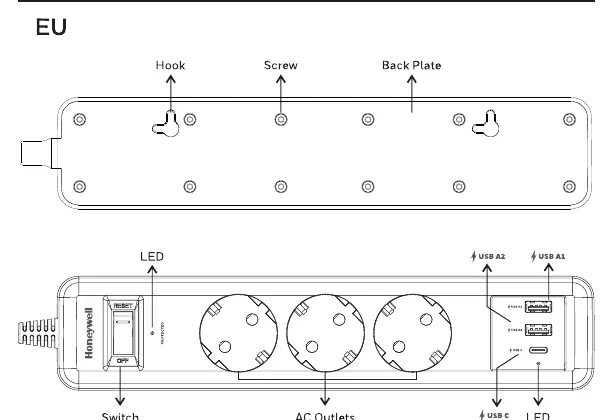
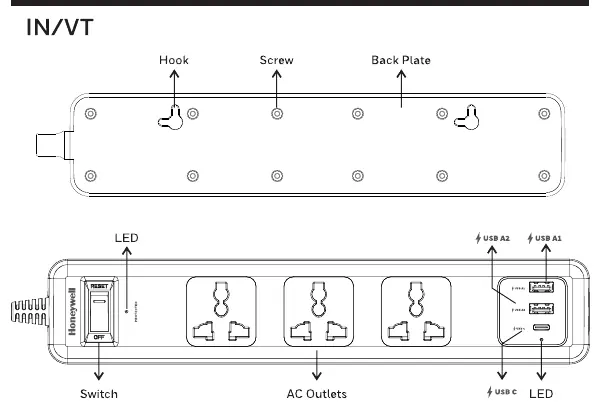
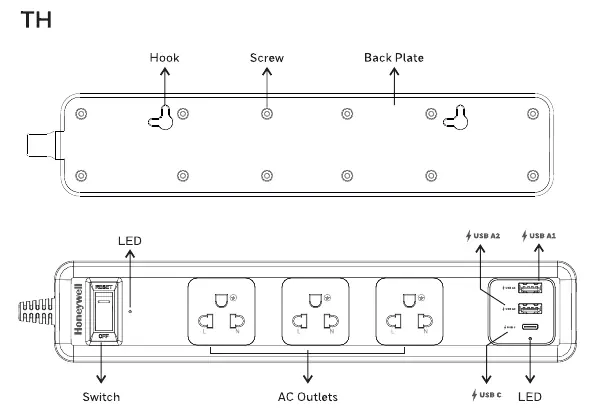
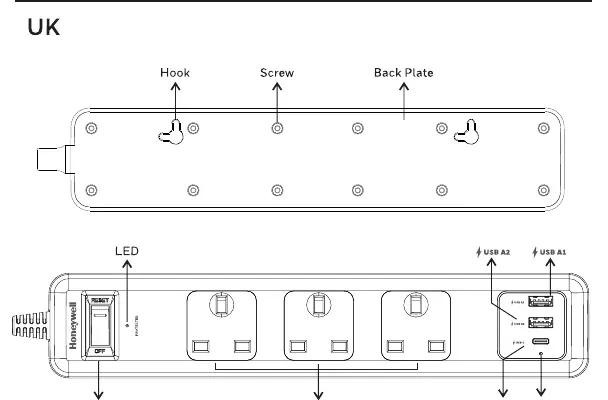
The device includes a power switch with reset functionality, AC outlets, and USB ports. Mounting options include hooks and screw holes on the back plate for wall installation.
How to Use
- Ensure the wall outlet is properly grounded.
- Plug the surge protector into the wall outlet.
- Connect your devices to the AC outlets or USB ports.
- Turn on the power switch.
Precautions
- Use only in properly grounded AC wall sockets.
- Do not exceed the rated voltage (up to 250V).
- Do not use with products that do not conform to the rated specifications.
- Keep away from heat sources, fire, and liquids.
- Do not connect the surge protector to other power strips or extension cords.
Troubleshooting
If you encounter issues, check the following:
- No AC Power: Ensure the plug is fully inserted into a working outlet and connected equipment is turned on.
- USB/C Not Charging: Unplug the cable and try another port. Ensure you are using the original charging adapter if required by the device manufacturer.
- Protected LED Off: If the blue indicator light is off, the surge protection is no longer active. The unit needs to be replaced.
Technical Specifications
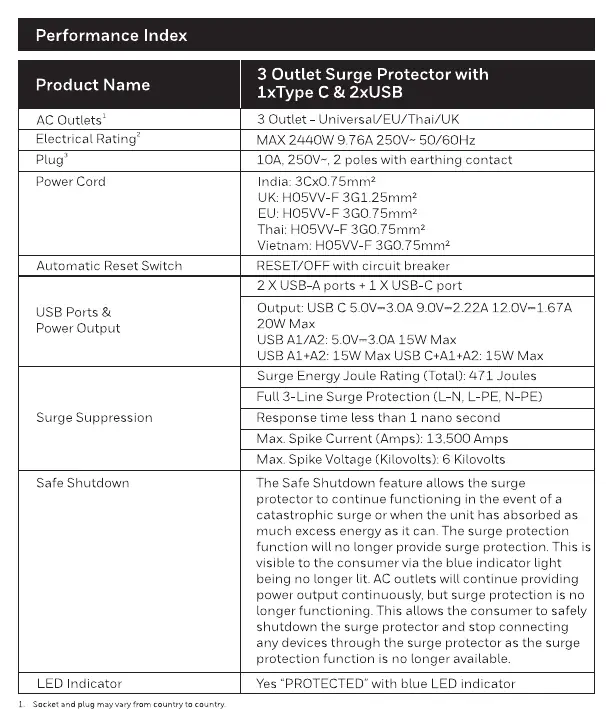
- AC Outlets: 3 Universal/EU/Thai/UK outlets.
- Electrical Rating: Max 2440W, 9.76A, 250V~, 50/60Hz.
- Surge Suppression: Full 3-Line protection (L-N, L-PE, N-PE).
- Response Time: Less than 1 nano second.
- USB Output: USB C (20W Max), USB A1/A2 (15W Max).
Manufacturer information
Honeywell International Inc.
Practical help
Common problems
No AC power to connected equipment
Check that the plug is fully inserted into a working wall outlet, verify all connections, and ensure the connected equipment is switched on.
USB/C device not charging
Unplug the USB cable and try a different port. If the issue persists, ensure you are using the original charging adapter provided by the device manufacturer.
Protected LED indicator is off
The blue 'Protected' light indicates surge protection is active. If it is off, the unit has exhausted its protection capacity and must be replaced.
Before use
- Verify the wall outlet is properly grounded.
- Ensure the total load does not exceed 2440W.
- Check that the voltage rating is compatible (up to 250V).
- Inspect the power cord for any damage.
- Ensure the device is placed away from heat sources and liquids.
Specs in practice
- Surge Energy Joule Rating
- 471 Joules - the total amount of energy the device can absorb during a surge.
- Safe Shutdown
- A feature where the blue LED turns off when surge protection is exhausted, signaling the unit needs replacement.
- USB-C Output
- Supports up to 20W Max for fast charging compatible devices.
Images and diagrams
- Switch: Controls power and includes a reset function for the circuit breaker.
- LED: Blue indicator for surge protection status.
- AC Outlets: Universal sockets for standard plugs.
- USB Ports: Dedicated ports for USB-C and USB-A charging.
- Mounting: Back plate includes hooks and screw holes for wall mounting.
Model compatibility
- Compatible with Universal, EU, Thai, and UK plug types.
- Not for use with non-grounded outlets.
- Do not daisy-chain with other surge protectors.

Manual page author
Emily Carter
User documentation editor
Prepares concise manual descriptions and highlights the most useful setup, operation, and maintenance information for readers.