Electronics / RFID Barcode Scanners
User Manual for Honeywell Voyager XP 147X Series Area-Imaging Scanner
Quick guide for the Honeywell Voyager XP 147X Series Area-Imaging Scanner. Includes setup, connection instructions (USB, RS232, RS485), programming, cordless operation, and troubleshooting.
Table of contents
Manual images
Click an image to enlargeQuick guide from the manual
The Honeywell Voyager XP 147X series includes the 1470g (corded) and 1472g (cordless) area-imaging scanners. Before initial use, ensure the device is properly connected to your host system. For cordless models, charge the battery for a minimum of 4 hours. Programming is performed by scanning specific barcodes found in this guide.
Getting Started
Upon unpacking, check for shipping damage and verify all items match your order. Save the shipping container for future storage. The scanner is factory-programmed for common settings; if changes are required, use the programming barcodes provided in this manual.
Connecting the Device
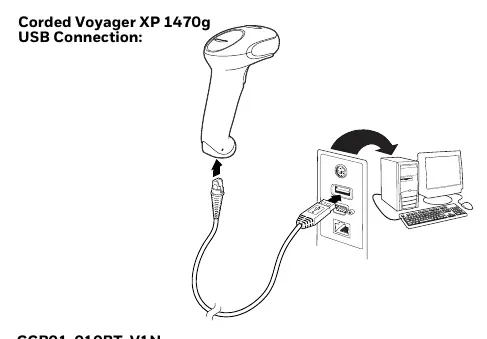
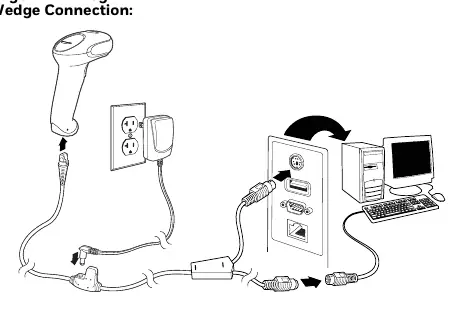
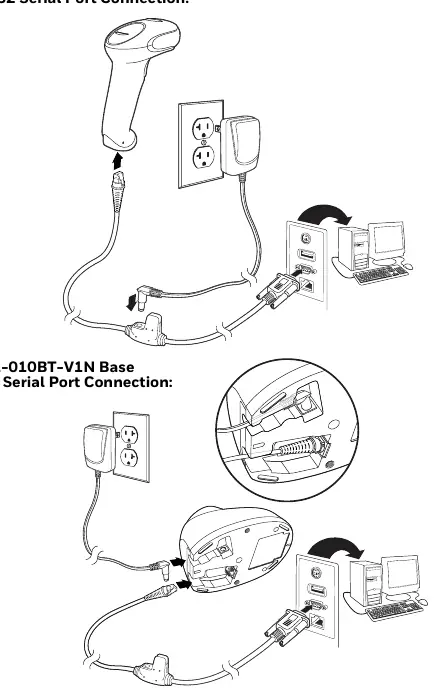
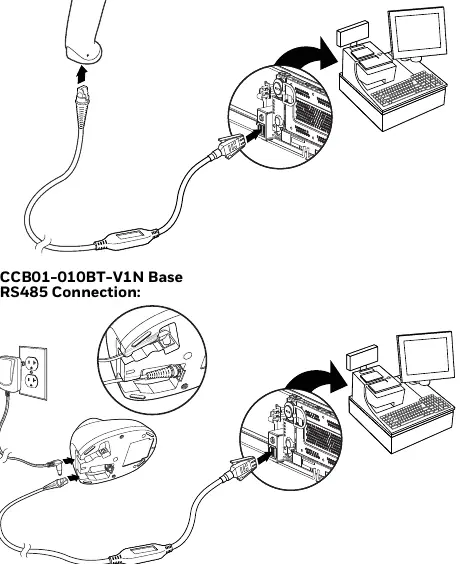
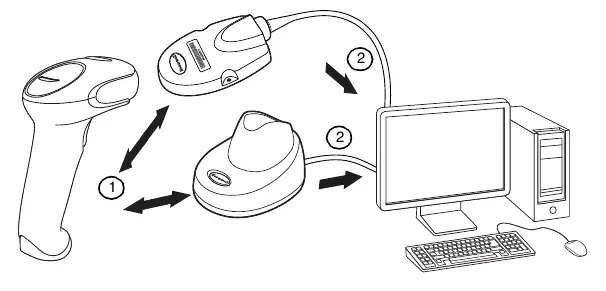
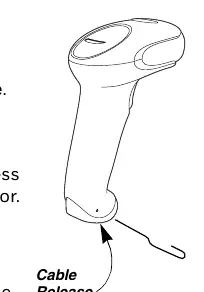
The scanner can be connected via USB, Keyboard Wedge, RS232 Serial Port, or RS485. Ensure the correct interface cable is used for your specific terminal or computer. For cordless models, secure cables in the wireways of the base and ensure it sits on a flat surface.
Programming the Interface
Plug and Play barcodes allow for instant configuration of common interfaces. If you need to change settings, such as keyboard country layout, baud rate, or data format, scan the corresponding barcodes in the manual. An asterisk (*) next to an option indicates the default setting.
Cordless System Operation
Cordless systems require linking the scanner to a charge base or Access Point. If the scanner is out of range, it may store data in Batch Mode (if enabled). The system supports multiple scanner operation (up to 3 scanners per base). The battery is integrated into the handle; replace only with Honeywell model BAT-SCN01.
Maintenance and Troubleshooting
Clean the scanner housing and window with a soft cloth dampened with water or a mild detergent solution. Do not use solvents or abrasive materials. If the scanner is not functioning, check cable connections, host power, and ensure the correct symbologies are enabled. For cordless systems, verify the battery is charged and the unit is linked to the base.
Product Specifications
The Voyager XP 1470g and 1472g scanners operate within a temperature range of 32°F to 122°F (0°C to 50°C). The cordless 1472g features a 2400 mAH lithium-ion battery providing up to 50,000 scans per charge. Both models are rated for multiple drops to concrete.
Manufacturer information
Honeywell International Inc.
Practical help
Common problems
Scanner not reading symbols
Check that the symbols are not smeared, scratched, or coated with moisture. Verify that the specific barcode symbology is enabled in the scanner settings.
Barcode displayed but not entered into application
You likely need to program a suffix (such as a Carriage Return or Tab) to trigger the 'Enter' function in your application.
Red LED on base is illuminated
This indicates an error. Check that the power cable is connected properly and that the host system is powered on.
Scanner out of range alarm
Move the scanner closer to the base or Access Point. If the alarm persists, check the link status.
Before use
- Check for damage during shipment.
- Verify items in the carton match your order.
- Save the shipping container for later storage.
- Charge the cordless scanner battery for a minimum of 4 hours before initial use.
- Ensure the correct interface cable is used for your terminal/computer.
- Verify the scanner or base operation by scanning a sample barcode.
Specs in practice
- Input Voltage
- 4.0 - 5.5VDC for the scanner.
- Operating Temperature
- 32°F to 122°F (0°C to 50°C).
- Drop Specification
- Operational after 30 drops to concrete from 5.9 ft. (1.8m).
- Battery (1472g)
- 2400 mAH lithium-ion, providing up to 50,000 scans per charge.
Images and diagrams
- USB connection diagram for corded and cordless models.
- Keyboard Wedge connection diagram.
- RS232 Serial Port connection diagram.
- RS485 connection diagram.
- Cordless system communication flow diagram.
Model compatibility
- Cordless system operation applies only to the 1472g model.
- Remote MasterMind settings are not supported by the 1472g.
- Intercharacter delays are not supported in USB serial emulation.

Manual page author
Emily Carter
User documentation editor
Prepares concise manual descriptions and highlights the most useful setup, operation, and maintenance information for readers.