Electronics / Fire Alarm Systems
Wiring and Programming Guide for Honeywell Vista 15SE and Uplink 5530M
A quick guide for wiring the Uplink 5530M cellular communicator to the Honeywell Vista 15SE alarm panel, including step-by-step keypad programming instructions for Contact ID reporting.
Table of contents
Manual images
Click an image to enlargeImportant Safety Information
It is strongly advised that an experienced alarm installer performs the programming to ensure proper performance and full functionality. Do not route any wiring over the circuit board. Full panel testing and signal confirmation must be completed by the installer.
Note: For 5530M Communicators, the status of the panel can be retrieved from the status PGM or from the Open/Close reports from the dialler. Open/Close reporting must be enabled during the initial pairing procedure.
Wiring the 5530M Communicator
Connect the Uplink 5530M cellular communicator to the Honeywell Vista 15SE alarm panel. Ensure all connections are secure and follow the wiring diagram provided in the documentation.

Programming the Alarm Panel
Use the system keypad to enable Contact ID reporting. Follow these steps:
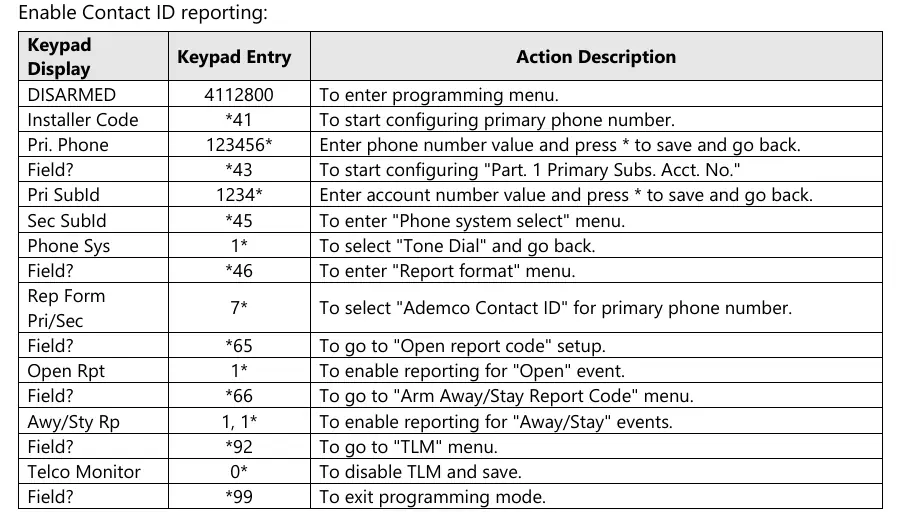
- Enter programming mode: 4112800
- Configure primary phone number: *41, enter phone number, then * to save
- Configure account number: *43, enter account number, then * to save
- Set phone system: *45, then 1* to select Tone Dial
- Set report format: *46, then 7* to select Ademco Contact ID
- Enable Open report: *65, then 1*
- Enable Away/Stay report: *66, then 1, 1*
- Disable TLM: *92, then 0*
- Exit programming: *99
Manufacturer information
Honeywell International Inc.
Practical help
Common problems
Panel status not retrieved
Ensure Open/Close reporting is enabled during the initial pairing procedure.
Improper system performance
Ensure the panel is programmed by an experienced alarm installer.
Before use
- Ensure an experienced installer is performing the setup.
- Do not route wiring over the circuit board.
- Verify signal confirmation after installation.
- Enable Open/Close reporting during pairing.
Images and diagrams
- The wiring diagram illustrates the connection points between the 5530M communicator and the Vista 15SE panel terminals.
Model compatibility
- Designed specifically for Honeywell Vista 15SE and Uplink 5530M cellular communicators.

Manual page author
Michael Turner
Technical manual editor
Reviews PDF manuals for structure, safety notes, and practical product details so readers can find the right information quickly.