Industrial / Gas Detection
Security Guide for Honeywell Searchline Excel Plus and Searchline Excel Edge
Comprehensive security guide for the Honeywell Searchline Excel Plus and Searchline Excel Edge gas detectors. Learn about system architecture, security controls, threat mitigation, and best practices for user access and network security.
Table of contents
Quick guide from the manual
This document outlines the security procedures and best practices for the Honeywell Searchline Excel Plus and Searchline Excel Edge gas detectors. It is intended for operators and engineering personnel responsible for configuring and maintaining the network infrastructure associated with these devices.
- System Access: Always monitor the Event History and Log for unexpected configuration changes.
- Credentials: Use unique usernames and passwords for each user. Never share credentials.
- Mobile Security: Ensure the mobile device used for configuration is free of malware and that its operating system is up to date.
- Connectivity: The system must be connected to the server at least once a year to refresh the detector certificate registration.
Introduction and Scope
This guide applies to the Searchline Excel Plus & Edge system, including associated mobile applications, devices, and wireless data transfer. It assumes users have a high degree of technical knowledge regarding mobile application management, networking systems, and security concepts.
Security Controls
The system includes several built-in security controls to protect the integrity of the gas detection system:
- Limitation of access to designated users.
- Password protection for all user accounts.
- Device and user certificates.
IT System Architecture
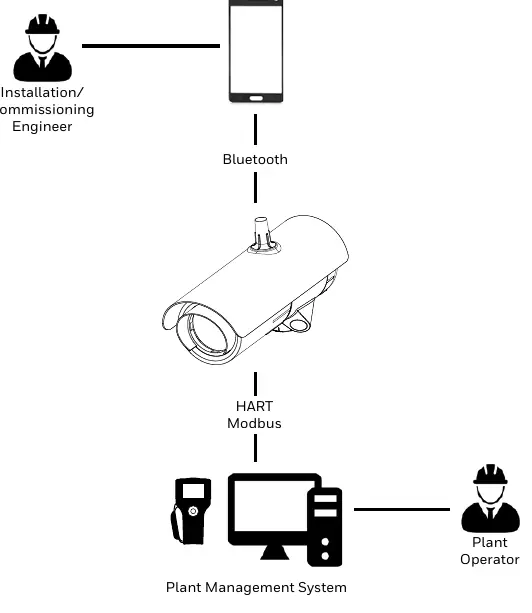
The system can be configured using Bluetooth, HART, or MODBUS communications. The architecture involves an Installation/Commissioning Engineer using a mobile app via Bluetooth, and a Plant Operator interacting with the Plant Management System via HART or MODBUS.
Threats
The manual identifies several potential security threats to the networked system:
- Unauthorized Access: Includes physical access to the detector or intrusion into the business network, which can lead to loss of system availability, incorrect execution of controls, or data manipulation.
- Communications Snooping: Tampering with the Bluetooth port via man-in-the-middle or packet replay attacks.
- Malicious Software: Viruses, spyware, and worms present on mobile devices used for setup or transmitted via infected media like USB drives or SD cards.
Mitigation Strategies
To secure the system, follow these strategies:
- Monitor System Access: Use the mobile app to view the event log and history regularly.
- User Access and Passwords: Administer usernames and passwords through the mobile app. Periodically audit accounts and remove those no longer required.
- Memory Media: Only use authorized removable media that has been scanned for viruses.
- Access PIN and Activation Key: Never share or write down your Access PIN or Activation Key.
Access Best Practices
Ensure that operating systems and browsers on connected devices are kept up to date. When a configuration session is open, do not leave the mobile application unattended. Access should be strictly restricted to authorized personnel only.
Manufacturer information
Honeywell International Inc.
Practical help
Common problems
Mobile application becomes unresponsive
Shut down the application and relaunch it.
Risk of unauthorized access
Ensure physical security of passwords, use unique credentials for each user, and audit accounts periodically.
Before use
- Ensure all users have unique usernames and passwords.
- Verify that the mobile device used for configuration is free of malware.
- Ensure the configuration port is closed when not in use.
- Check that operating systems and browsers are up to date.
- Ensure you have received your Access PIN and Activation Key.
Images and diagrams
- The system architecture diagram illustrates the connection between the Installation/Commissioning Engineer (via mobile app/Bluetooth) and the Plant Operator (via HART/Modbus to the Plant Management System).
Model compatibility
- Requires mobile application for configuration.
- Must be connected to server at least once a year to refresh detector certificate registration.

Manual page author
Emily Carter
User documentation editor
Prepares concise manual descriptions and highlights the most useful setup, operation, and maintenance information for readers.