Toys / RC Models & Drones
E-flite Night Radian 2.0m RC Glider User Manual
Comprehensive user manual for the E-flite Night Radian 2.0m RC glider. This guide covers assembly, transmitter configuration, SAFE Select and AS3X setup, flight operations, and troubleshooting.
Quick answers from the manual
Quick answer
- The E-flite Night Radian 2.0m is an RC glider featuring AS3X and SAFE Select. This manual provides instructions for assembly, transmitter setup, binding, and flight operation. p. 1, 3
Key actions
- Binding the transmitter p. 7
- Assembling the tail and wings p. 5
First start
- Follow the 15-step pre-flight checklist p. 4
Problems and fixes
Oscillations
Check propeller balance, tighten loose parts, secure receiver.
p. 14Maintenance and reset
- Motor maintenance and disassembly p. 13
Technical specifications
| Parameter | Value | Meaning | Pages |
|---|---|---|---|
| Wingspan | 2000mm | Total wingspan | p. 3 |
| Weight | 1020g | Weight without battery | p. 3 |
Where to find it in the PDF
- Assembly p. 5
Table of contents
Manual images
Click an image to enlargeQuick Guide
The E-flite Night Radian 2.0m is a high-performance RC glider equipped with AS3X and SAFE Select technologies. Before your first flight, ensure the battery is fully charged, the center of gravity (CG) is set to 80mm (+/- 5mm) behind the leading edge at the wing root, and the transmitter is configured according to the provided tables. Always perform a range test before flying.
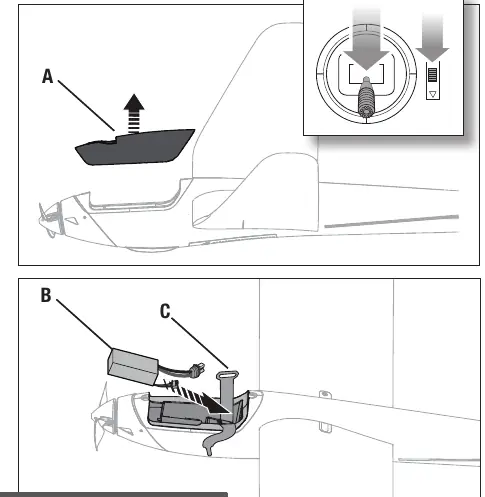
Assembly
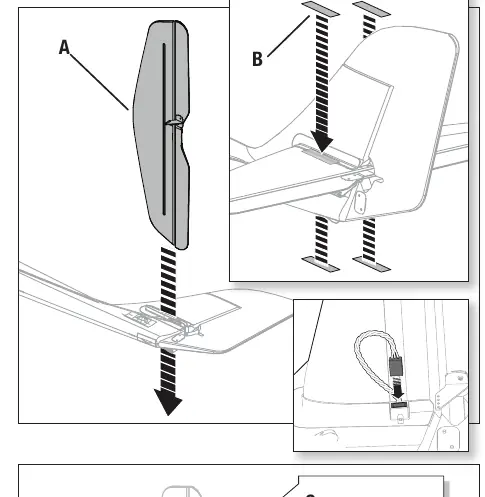
Tail Assembly: Slide the horizontal stabilizer into the fuselage slot. Center it and secure it with the provided tape. Connect the LED connector to the fuselage connector, ensuring the orange signal wire is at the front. Attach the clevis to the elevator control horn.
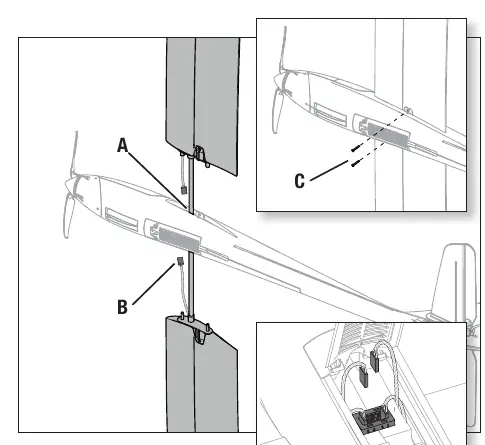
Wing Installation: Insert the wing tube into the fuselage. Slide the left and right wings onto the tube. Route the LED connectors into the fuselage and toward the bottom cover. Secure the wings to the fuselage using the two provided screws.
Transmitter & SAFE Select
The model supports SAFE Select, which provides flight envelope protection. You can configure it to be always off (AS3X only), always on, or switchable via a transmitter channel (5-9). To assign a switch, hold both transmitter sticks in the bottom-inner corners while toggling the desired switch five times.
Flight & Landing
For the first flight, use low rates. Always land into the wind. The glider has high lift efficiency, so plan for a long, shallow approach. Reduce throttle completely before touchdown to prevent damage to the propeller and motor.
Maintenance & Troubleshooting
Maintenance: Regularly inspect the propeller, motor, and control surfaces. If the motor pulses or loses power, the Low Voltage Cutoff (LVC) may have activated; land immediately to recharge the battery.
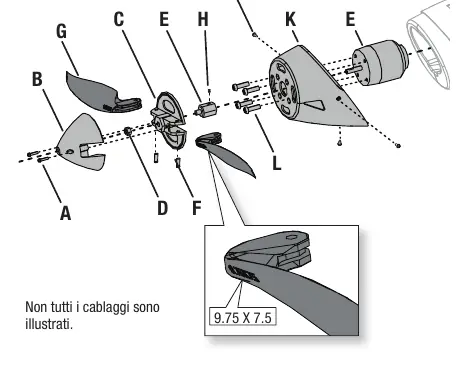
Troubleshooting: If you experience oscillations, check for loose parts, unbalanced propellers, or an insecure receiver. If the motor does not respond, verify the throttle trim is at zero and the ESC is properly connected.
Manufacturer information
Horizon Hobby
Practical help
Common problems
Oscillations during flight
Check for unbalanced propeller, loose control surfaces, or an insecure receiver. Tighten all fasteners.
Motor not responding
Ensure throttle trim is at zero and the throttle stick is at the lowest position. Check ESC connections.
Binding issues
Move the transmitter further away from the aircraft during binding. Ensure the Bind Plug is inserted correctly.
Before use
- Charge the flight battery fully
- Verify control surface direction
- Check Center of Gravity (80mm +/- 5mm)
- Perform a radio range test
- Configure transmitter settings (Dual Rates/Expo)
- Ensure all fasteners are secure
Images and diagrams
- Tail assembly steps
- Wing installation procedure
- LED controller button functions
- Binding procedure with SAFE Select
Model compatibility
- Requires 6-channel transmitter with DSM2/DSMX technology
- Compatible with Spektrum Smart batteries for telemetry

Manual page author
David Miller
Documentation analyst
Organizes user manual content into clear summaries, with attention to model details, product context, and everyday usability.