Documents / Warranty Safety
User Manual for HP 10bII+ Financial Calculator
Quick start guide for the HP 10bII+ Financial Calculator. Learn how to use TVM, amortization, depreciation, cash flow, statistics, and bond calculations, along with battery replacement instructions.
Table of contents
Manual images
Click an image to enlargeQuick guide from the manual
This guide provides an overview of the HP 10bII+ Financial Calculator features, including basic operations, financial calculations, and maintenance. The calculator uses two CR2032 coin batteries and features continuous memory, meaning stored data is preserved when the unit is turned off.
Keyboard and basic functions
The HP 10bII+ keyboard is designed with three levels of functionality for most keys:
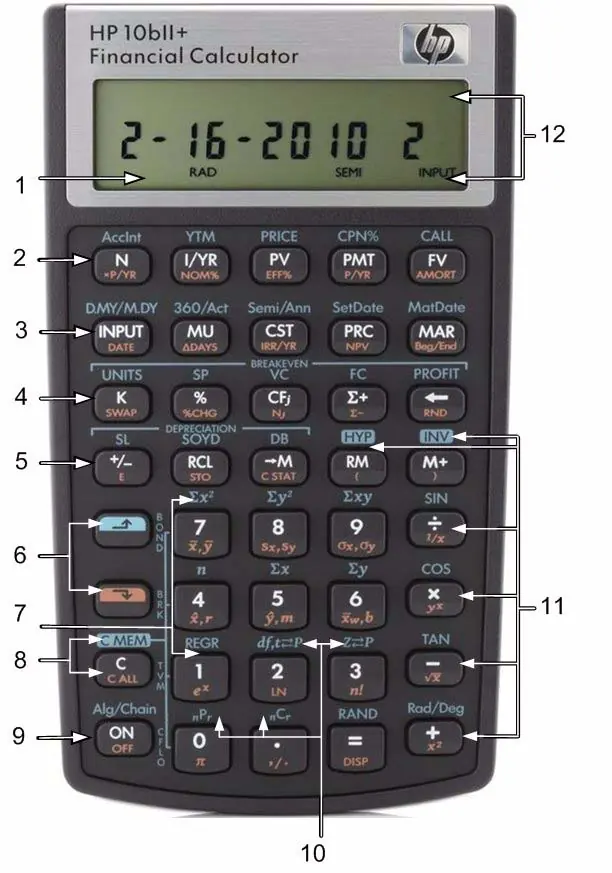
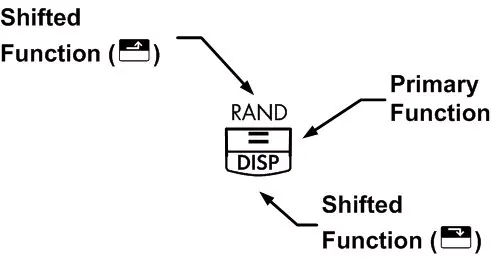
- Primary function: Printed in white on the key.
- Secondary function: Printed in orange on the bevel of the key.
- Tertiary function: Printed in blue above the key.
Use the orange shift key to access secondary functions and the blue shift key to access tertiary functions. Shift annunciators appear on the display to indicate when these functions are active.
Financial calculations
The calculator supports a wide range of financial functions:
- Time Value of Money (TVM): Used for loan and investment calculations (N, I/YR, PV, PMT, FV).
- Amortization: Allows you to calculate principal, interest, and remaining balance for specific payment periods.
- Depreciation: Supports straight-line, sum-of-the-years'-digits, and declining balance methods.
- Cash Flows: Handles IRR/YR, NPV, and NFV calculations.
- Bonds: Calculates bond price and yield.
- Break-even: Calculates units required for a specific profit.
Statistical and mathematical functions
The calculator includes tools for:
- Statistical Calculations: One-variable and two-variable statistics, including means, standard deviations, and linear regression.
- Probability: Normal and Student's T probability distributions, permutations, combinations, and factorials.
- Trigonometric Functions: Sine, cosine, tangent, and their inverses/hyperbolics.
Maintenance and support
To replace the batteries, ensure the calculator is off, remove the battery cover, and replace the two CR2032 batteries one at a time to preserve memory. For technical support, visit www.hp.com/support to find the nearest call center.
Official resources from the manual
Manufacturer information
HP Inc.
Practical help
Common problems
Calculator does not turn on
Check battery installation or replace with two fresh CR2032 batteries.
Low battery symbol in display
Replace both CR2032 batteries immediately.
Need to clear memory
Use the appropriate clear function (e.g., SHIFT + C ALL for all memory, or specific clear keys for TVM, Bonds, etc.).
Before use
- Ensure two CR2032 batteries are installed correctly.
- Understand the three key functions: primary (white), secondary (orange), and tertiary (blue).
- Use the SHIFT keys to access secondary and tertiary functions.
- Note that the calculator turns off automatically after 5 minutes of inactivity.
Images and diagrams
- The keyboard layout shows primary functions in white, secondary in orange, and tertiary in blue.
- Shift annunciators appear on the display when SHIFT keys are active.
Model compatibility
- Uses 3-volt CR2032 coin batteries.
- Default settings include 12 payments per year for TVM.

Manual page author
Emily Carter
User documentation editor
Prepares concise manual descriptions and highlights the most useful setup, operation, and maintenance information for readers.