Computers / Laptops
Reference Guide for HP 11807A,E Option 001 Software
A comprehensive reference guide for the HP 11807A,E Option 001 software, covering setup, test customization, parameter definitions, and troubleshooting for the HP 8920A,B,D test set.
Table of contents
Manual images
Click an image to enlargeQuick guide from the manual
The HP 11807A,E Option 001 software is designed to perform fast, accurate, automated tests on FM radios using the HP 8920A,B,D RF Communications Test Set. This guide provides instructions for setting up the test environment, customizing test procedures, and troubleshooting common issues.
Product Description
The software automates RF and audio performance testing for FM radios. It is based on industry standards such as EIA/TIA-603 and EIA/TIA-204-D. The package includes the test software, an SRAM memory card for saving procedures, and this reference guide.
Setup and Connections
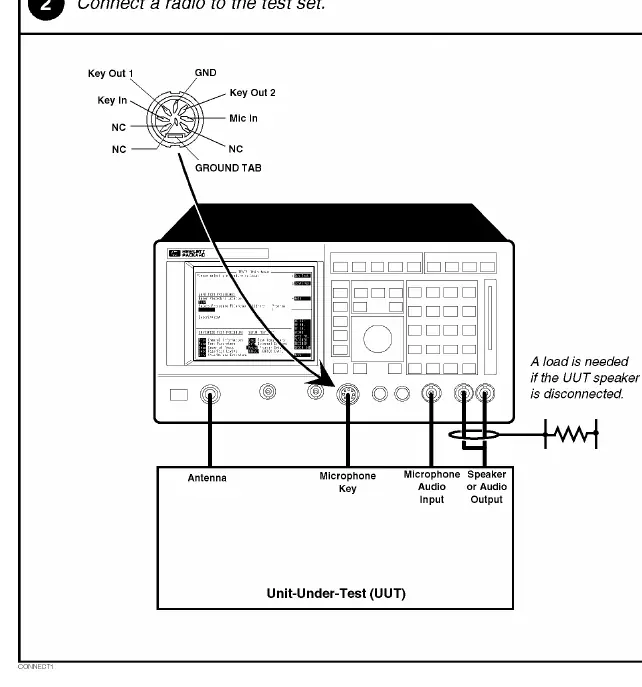
Before beginning, ensure you have the required equipment: an HP 8920A, B, or D RF Communications Test Set and the necessary RAM memory extension (Option 005). Hardware connections involve connecting the radio to the test set's antenna, microphone key, audio input, and speaker output ports.
Customizing Testing
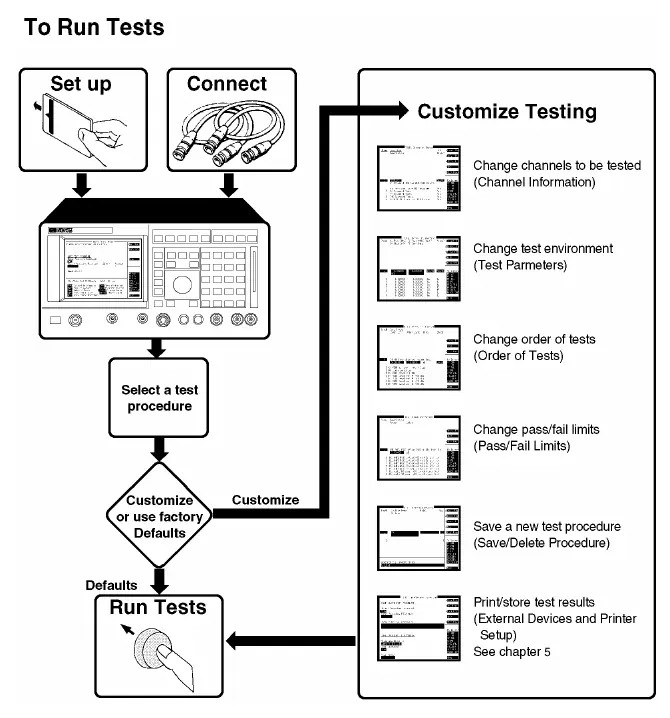
The software allows for extensive customization to meet specific testing needs:
- Order of Tests: You can define the sequence of tests, inserting or deleting tests as needed.
- Channel Information: Specify RX and TX frequencies, and CTCSS/CDCSS squelch settings for each channel.
- Pass/Fail Limits: Adjust upper and lower limits for measurements to match your specific requirements.
- Test Parameters: Optimize the test environment by adjusting parameters like cable loss, supply voltage, and audio settings.
- Saving Procedures: Customized test sequences, channel information, and parameters can be saved to an SRAM memory card or disk for future use.
Test Descriptions
The manual provides detailed descriptions for 21 different tests, including:
- TX and RX stand-by current drain
- TX frequency error and output power
- TX modulation limiting and audio distortion
- RX audio sensitivity, squelch sensitivity, and squelch blocking
- Quick tests for both receivers and transmitters
Problem Solving
If you encounter issues, the manual provides troubleshooting steps for:
- Test procedures not running (check memory card and procedure loading).
- Printer connection issues (verify printer configuration and cable connections).
- FM radio failing audio tests (check specifications and audio connections).
- Radio volume setting issues on the meter screen.
- CTCSS/CDCSS test failures.
Manufacturer information
HP Inc.
Practical help
Common problems
Test procedure does not run
Check that the memory card is correctly inserted, ensure a test procedure file is loaded, and check the MESSAGE screen for error messages.
Printer does not print test results
Verify the printer is turned on, check cable connections (serial, parallel, or HP-IB), and ensure the printer is correctly configured in the 'External Devices' or 'Printer Setup' screen.
FM radio fails audio tests
Verify radio specifications match software settings, check audio connections, and ensure the radio microphone is not picking up ambient noise.
Radio volume cannot be set on the meter screen
Ensure the radio is powered on and correctly connected. Verify that parameters like 'RX Audio Load Impedance' and 'RX Maximum Audio Power' are correctly set.
Before use
- Verify all materials are present (Software, SRAM card, Reference Guide).
- Ensure HP 8920A/B/D test set is available.
- Check the firmware revision of the test set.
- Ensure the memory card is initialized.
- Verify all hardware connections (antenna, audio, microphone).
Specs in practice
- RX Usable Sensitivity
- The RF signal level required to produce the standard SINAD ratio at the receiver output.
- TX Modulation Limiting
- Measures the ability of the transmitter to prevent deviations exceeding the rated system deviation.
- TX Audio Frequency Response
- Indicates the flatness of the audio output as the frequency is varied.
- RX Squelch Blocking
- Measures the tendency of the receiver's squelch circuit to close in the presence of modulation on the RF signal.
Images and diagrams
- The 'Making a Connection' diagram illustrates how to connect the radio to the test set's antenna, microphone key, audio input, and speaker output ports.
- The 'Customizing Testing' flowchart shows the process of setting up, connecting, and customizing test procedures.
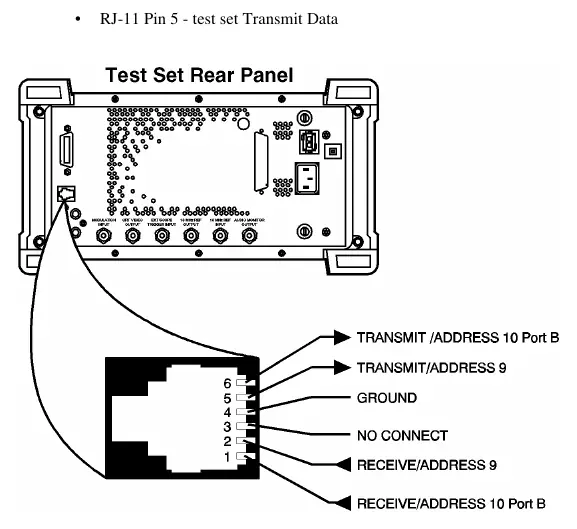
- The 'Serial Port Connections' diagram provides pinout information for the RJ-11 serial port.
Model compatibility
- HP 8920A, B, or D test sets are required.
- HP 8920A Option 005 (512 Kbyte RAM Memory extension) is required.
- Specific printer models are supported (e.g., HP ThinkJet, QuietJet, PaintJet, DeskJet, LaserJet, Epson FX-80, LQ-850).
- Firmware revision A.14.00 or higher is required for certain features.

Manual page author
David Miller
Documentation analyst
Organizes user manual content into clear summaries, with attention to model details, product context, and everyday usability.