Computers / Printer Accessories
User Guide for HP Latex 126-in Roll-to-Freefall Kit
A comprehensive user guide for the HP Latex 126-in Roll-to-Freefall Kit. This guide covers substrate loading configurations, hardware maintenance procedures, diagnostic checks, and troubleshooting for system errors.
Table of contents
Manual images
Click an image to enlargeQuick guide from the manual
The HP Latex 126-in Roll-to-Freefall Kit is an accessory designed to enhance printer productivity by allowing the finishing process to start on one print while the next is being printed. It is compatible with the HP Latex 1500 Printer and the HP Latex 2700/FS50/FS60 printer series.
Substrate configurations
Before loading, access the Internal Print Server and select the desired configuration under Substrate load/unload.
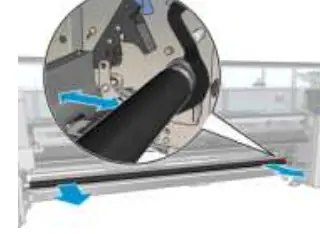
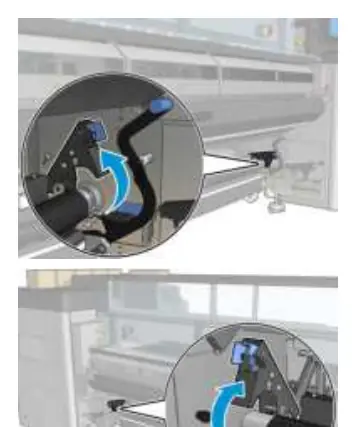
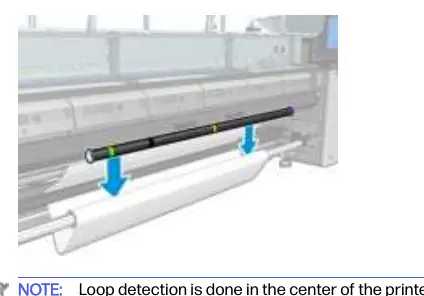
Roll-to-freefall configuration
This mode allows you to cut and remove prints immediately after they exit the printer. The substrate is kept under tension between the input roll and the tension roller.
- Ensure the tension roller lever is raised.
- Unlatch the tension roller at both ends.
- Move the roller to the front to pass the substrate behind it.
- Pass the substrate through, then push the roller backwards.
- Close the latches at both sides.
- Align the substrate edge using the rulers on the spindle and tension roller.
- Ensure the substrate is evenly tensioned and flat, then close the tension roller lever.
- Click the Finish button on the Internal Print Server.
Roll-to-collector configuration
This mode uses a collector roller and tension bar for winding.
- Select a tension bar of the correct length to match the substrate width using the supplied tubes.
- Follow the roll-to-freefall loading procedure first.
- Load an empty substrate core onto the output spindle.
- Advance the substrate leading edge to the core on the collector.
- Attach the leading edge to the core with tape, ensuring no wrinkles.
- Advance the substrate to create a loop between the tension roller and the collector.
- Place the tension bar into the substrate loop.
- Click Enable collector (HP Latex 1500) or Take-up reel (HP Latex 2700/FS50/FS60) on the Internal Print Server.
- Select winding direction (Outwards is recommended for rolls up to 300mm).
Hardware maintenance
Clean the roll-to-freefall roller and pinchwheels when they are visibly dirty or if substrate advance is not smooth.
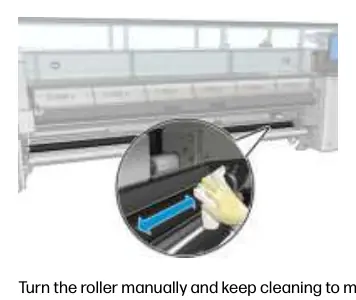
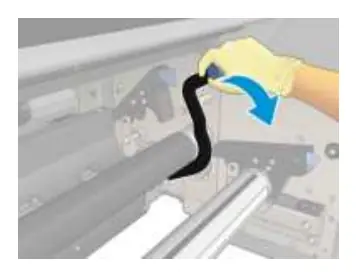
- Preparation: Ensure the printer is not printing, unload the substrate, and raise the pressure roller lever.
- Cleaning the roller: Use a clean cloth dampened with water (isopropyl alcohol for persistent dirt). Turn the roller manually to clean the entire rubber surface. Ensure parts are dry before use.
- Cleaning pinchwheels: Open roller latches, move the roller to the front, and lower the pressure roller lever to access the pinchwheels. Clean carefully with a damp cloth.
Diagnostics and troubleshooting
The Internal Print Server provides specific diagnostic tests for the kit, including electronic checks, sensor status checks, and motor tests. If an error code appears, follow the specific recommendations for your printer model (HP Latex 1500 or HP Latex 2700/FS50/FS60 series). Common issues involve sensor jams, fuse failures, or latch/lever status errors. Always ensure sensors are free of obstructions and cables are properly connected.
Manufacturer information
HP Inc.
Practical help
Common problems
Pinchwheels are up
Ensure the pinch bar is lowered using the tension-roller lever.
Tension roller latch open
Close the tension-roller latches at both ends and ensure they are properly secured.
Take-up-reel jam / Optical sensor error
Check that the substrate-collector sensor is working and that no objects are blocking its line of sight.
E-cabinet fuse blown
Indicates a potential short-circuit in the subsystem or cabling. Install a new fuse (F11 or F12 depending on model) and contact service if the problem persists.
Before use
- Ensure the printer is not printing before performing maintenance.
- Use a forklift or lifting equipment for heavy substrate rolls.
- Select the correct tension bar length to match the substrate width.
- Ensure the substrate is evenly tensioned and free of wrinkles.
- Verify winding direction (Outwards recommended for larger rolls).
Specs in practice
- Outwards winding
- Recommended setting; allows output roll diameter up to 300 mm (11.81 in).
- Inwards winding
- Limited setting; output roll diameter limited to 200 mm (7.87 in) to prevent contact with the tension bar.
Images and diagrams
- Tension roller lever: Used to release the roller for substrate loading and maintenance access.
- Substrate loop: Created between the tension roller and the collector to ensure proper winding tension.
Model compatibility
- Compatible with HP Latex 1500 Printer.
- Compatible with HP Latex 2700/FS50/FS60 printer series.

Manual page author
Michael Turner
Technical manual editor
Reviews PDF manuals for structure, safety notes, and practical product details so readers can find the right information quickly.