Computers / Laptops
User Guide for HP Spectre x360 13.5-inch 2-in-1 Laptop PC 14-ef0013dx
Quick guide and specifications for the HP Spectre x360 13.5-inch 2-in-1 Laptop PC 14-ef0013dx. Learn about key features, hardware specifications, ports, and included accessories.
Table of contents
Quick Guide from the Manual
This document provides an overview of the HP Spectre x360 13.5-inch 2-in-1 Laptop PC (model 14-ef0013dx). It highlights the key hardware specifications, design features, and included software tools. This device is designed for versatility, featuring a 360-degree geared hinge that allows for laptop, tablet, and tent modes.
Product Overview
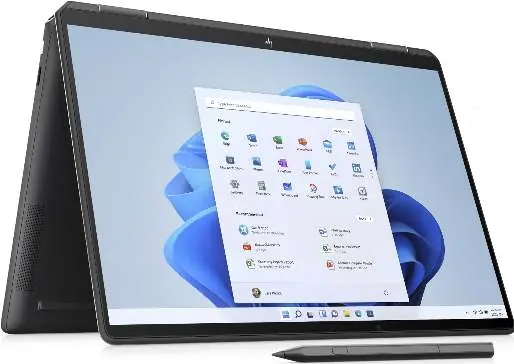
The HP Spectre x360 is a premium 2-in-1 laptop crafted with recycled aluminum and ocean-bound plastics. It is EPEAT Gold Certified and ENERGY STAR rated. The device features a 360-degree hinge, allowing you to use it in four different positions.
Key Specifications
- Processor: 12th Generation Intel Core i7-1255U (10-Core, up to 4.7 GHz with Intel Turbo Boost).
- Display: 13.5-inch diagonal, 3K2K (3000 x 2000), OLED, multitouch-enabled, UWVA, edge-to-edge glass, anti-reflection Corning Gorilla Glass NBT.
- Memory: 16 GB LPDDR4x-4266 MHz RAM (onboard).
- Storage: 1 TB PCIe Gen4 NVMe M.2 SSD.
- Graphics: Intel Iris Xe Graphics.
- Operating System: Windows 11 Home.
- Weight: 3.01 lb.
Ports and Connectivity
The device includes the following external ports:
- 2x Thunderbolt 4 with USB4 Type-C (supports 40Gbps signaling, USB Power Delivery, DisplayPort 1.4, and HP Sleep and Charge).
- 1x SuperSpeed USB Type-A (10Gbps signaling, HP Sleep and Charge).
- 1x Headphone/microphone combo jack.
- 1x Micro SD media card reader.
Camera and Audio
The laptop is equipped with an HP True Vision 5MP IR camera featuring a physical camera shutter for privacy, temporal noise reduction, and integrated dual array digital microphones. Audio is provided by Bang & Olufsen with quad speakers.
Battery and Charging
The device uses a 4-cell 66 Wh Li-ion polymer battery and comes with a 65 W USB Type-C power adapter. It supports HP Fast Charge, which can charge the battery from 0 to 50% in approximately 45 minutes when the system is shut down.
Included Accessories
- HP Protective Sleeve.
- HP Rechargeable MPP 2.0 Tilt Pen (in nightfall black).
Software and Features
The laptop includes several pre-installed tools to enhance your experience:
- HP Command Center: Customize performance, fan speed, and temperature.
- HP GlamCam: Camera enhancements including Auto Frame and backlight adjustment.
- HP QuickDrop: Wirelessly transfer files between your PC and mobile devices.
- Duet for HP: Use your tablet, phone, or another PC as a secondary display.
- HP Support Assistant: A tool for PC and printer support.
Manufacturer information
HP Inc.
Practical help
Common problems
Slow charging speed
Ensure you are using the provided 65W USB-C power adapter. Charging speed may vary based on system usage.
Wi-Fi 6E not performing at maximum speed
Wi-Fi 6E requires a compatible Wi-Fi 6E router, which is sold separately.
Secondary display not connecting via Duet for HP
Ensure the Duet app is downloaded on the secondary device (tablet/phone) and that the PC is connected to the same network.
Before use
- Verify that the HP Rechargeable MPP 2.0 Tilt Pen is included in the box.
- Ensure you have a high-speed internet connection for the initial Windows 11 setup.
- Register your device using the HP Support Assistant for easier access to support.
- Check for any available Windows or BIOS updates upon first boot.
Specs in practice
- 3K2K OLED Display
- A high-resolution screen (3000 x 2000 pixels) with deep blacks and high contrast, suitable for creative work.
- Thunderbolt 4
- A versatile port that supports high-speed data transfer (40Gbps), power delivery, and external display connections.
- HP Fast Charge
- Allows the battery to reach 50% charge in about 45 minutes when the laptop is powered off.
Model compatibility
- Wi-Fi 6E requires a Wi-Fi 6E router.
- Duet for HP requires the app to be installed on the secondary device.
- Graphics output may be limited by the maximum resolution of the display.

Manual page author
Michael Turner
Technical manual editor
Reviews PDF manuals for structure, safety notes, and practical product details so readers can find the right information quickly.