HVAC / Heat Pumps
User Manual for Husqvarna 1-8D Shot Blasting Machine
Quick guide for the Husqvarna 1-8D shot blasting machine. Includes safety instructions, operation steps, maintenance schedules, and troubleshooting.
Table of contents
Manual images
Click an image to enlargeQuick guide from the manual
The Husqvarna 1-8D is a pedestrian-controlled shot blasting machine designed for commercial use on dry, frost-free horizontal surfaces like concrete, asphalt, stone, and steel. It must be connected to a dust extractor during operation to minimize dust emissions.
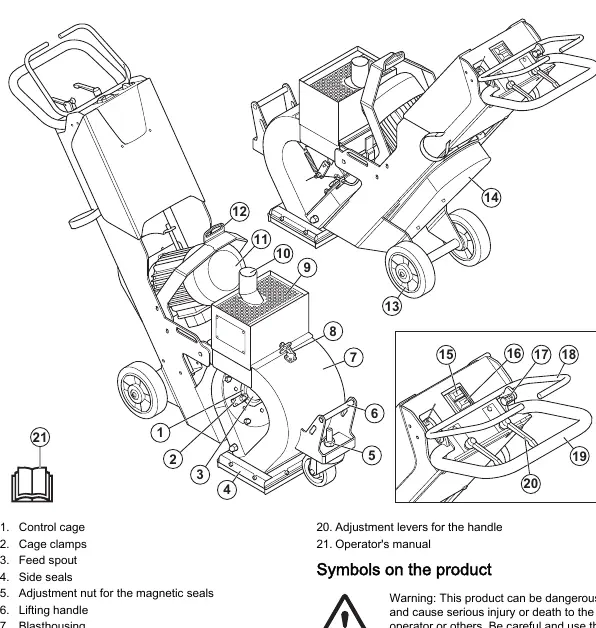
Safety
Dust Safety: Processing concrete and stone generates silica dust, which can cause fatal lung diseases like silicosis. Always use an approved dust extractor and wear appropriate respiratory protection.
Electrical Safety: Always use a power supply with an RCD (residual-current device). Ensure the power supply is sufficient and constant. Disconnect the power plug before opening the electrical enclosure or performing maintenance.
Vibration and Noise: Prolonged exposure to vibration and noise can cause health issues. Wear approved hearing and personal protective equipment. Stop the machine immediately if unusual vibrations or noise occur.
Operation
Before Use: Ensure the machine is assembled correctly, all bolts are tightened, and the blastwheel, feed spout, and seals are not damaged. Connect a dust extractor and ensure the separator is filled with abrasive.
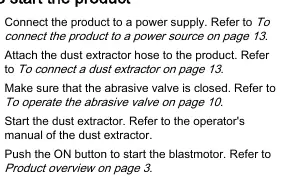
Starting: Connect to a grounded power source, attach the dust extractor hose, ensure the abrasive valve is closed, start the dust extractor, and then push the ON button to start the blastmotor.
Abrasive Valve: Disengage the safety lock, then push and hold the abrasive control lever to open the valve and start the flow of abrasive shots. Only open the valve when the machine is moving forward.
Stopping: Release the abrasive control lever to close the valve, push the OFF button, engage the safety lock, disconnect the power, and stop the dust extractor.
Maintenance
Schedule: Perform daily checks on nuts/screws, electrical components, RCD, motor, dust extractor hose, and safety devices. Check the abrasive separator, brush seals, and magnetic seals daily. Check V-belt tension every 12 hours of service and every 3 months.
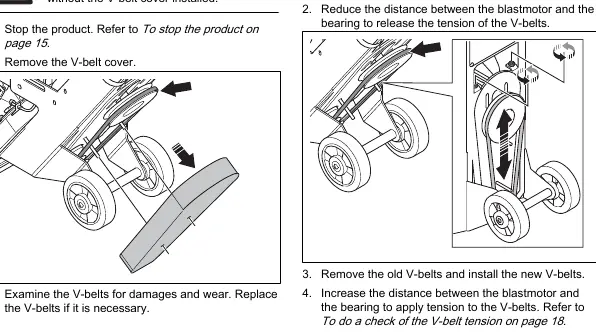
Cleaning: Always clean the equipment after use with a vacuum cleaner. Do not use a high-pressure washer.
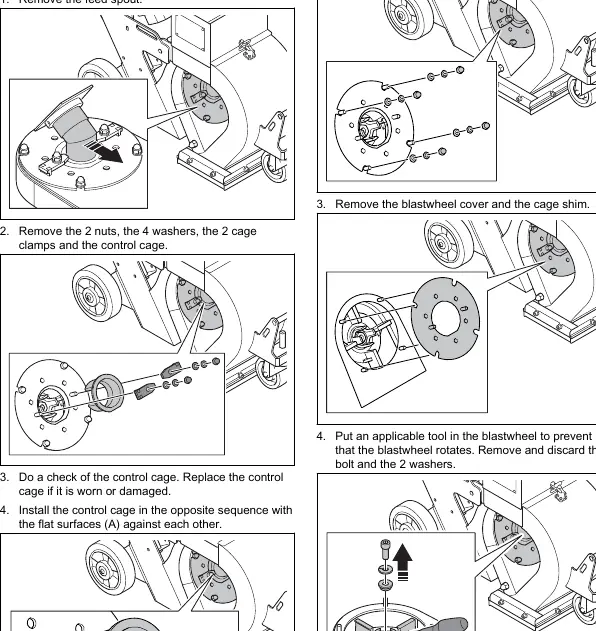
Components: The control cage and blastwheel require periodic inspection and replacement if worn. Always use a new wheel bolt when installing a new blastwheel.
Troubleshooting
If the machine experiences excessive vibration, check the blastwheel, alignment, and V-belt tension. If performance decreases, check the abrasive supply, abrasive type, and dust extractor suction. If the machine does not move, check the blasthead height.
Manufacturer information
Husqvarna
Practical help
Common problems
Too much vibration and/or unusual noises
Check for worn/damaged blastwheel, incorrect alignment, loose screws, incorrect V-belt tension, or damaged motor/wheels.
Decreased or no performance
Check abrasive supply, abrasive type, contamination, blastwheel/cage wear, or dust extractor suction.
Abrasive leaves the product
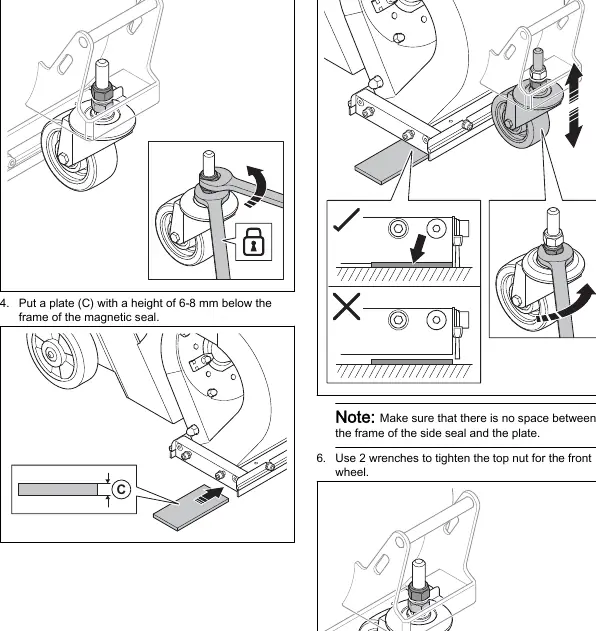
Adjust the height of the magnetic seals or check for damaged brush seals.
Motor does not start
Check power supply, capacitor, extension cable, or for damaged components.
Before use
- Ensure all nuts and screws are tight.
- Check power plug and extension cable for damage.
- Inspect electrical components and connections.
- Test the RCD.
- Examine the electric motor for dirt and damage.
- Verify the dust extractor hose is not damaged or blocked.
- Check the abrasive separator and tray.
Specs in practice
- Operation width
- 203 mm
- Operation temperature
- -10 to 45 °C
Images and diagrams
- Page 3: Product overview identifying controls and components.
- Page 11: Magnetic seal height adjustment procedure.
- Page 17: Control cage and blastwheel removal steps.
- Page 21: Lifting points and transportation tie-down locations.
Model compatibility
- Use only approved abrasive material.
- Must be connected to a dust extractor during operation.
- Use only grounded extension cables.

Manual page author
Emily Carter
User documentation editor
Prepares concise manual descriptions and highlights the most useful setup, operation, and maintenance information for readers.