Home Appliances / Vacuum Cleaners
User Manual for Hyundai 120W Cordless Wet & Dry Vacuum Cleaner
Quick guide for the Hyundai 120W Cordless Wet & Dry Vacuum Cleaner. Includes assembly, charging, cleaning, maintenance, and troubleshooting instructions.
Table of contents
Manual images
Click an image to enlargeQuick guide from the manual
The Hyundai 120W Cordless Wet & Dry Vacuum Cleaner is designed for indoor smooth floor cleaning. Before first use, ensure the battery is fully charged. The device features two operating modes: standard and turbo. It includes a self-cleaning function for the turbo brush roller, which should be used after each cleaning session. Always empty and dry the water tanks and filters after use to prevent odors and mold.
What's in the box
- Wet and dry vacuum cleaner
- Motor cover
- Extension handle
- Clean water tank with plug
- Dirty water tank with lid
- Fine filter with mesh filter
- Turbo brush cover
- Turbo brush roller with lock
- Spare turbo brush roller
- Power supply
- Base
- Accessories stand
- Cleaning brush
Display indicators
The display provides real-time information about the vacuum cleaner status:
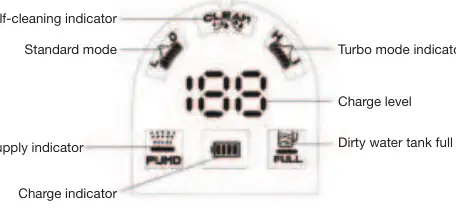
- Charge level: Displays battery percentage (0-100%).
- Charge indicator: Flashes green when charging, solid green when fully charged. Flashes red when below 10%.
- Mode indicators: Shows whether the device is in Standard or Turbo mode.
- Water supply indicator: Lights up when water supply is active.
- Dirty water tank full indicator: Flashes 5 times when the tank is full, then the unit turns off.
- Self-cleaning indicator: Lights up during the self-cleaning cycle.
Preparation and assembly
Before using the vacuum, ensure all packaging is removed and parts are wiped clean. To assemble:
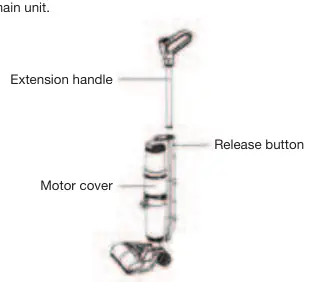
- Insert the extension handle into the main unit until it clicks.
- Install the clean water tank by inserting the bottom first, then pressing the top until it clicks.
- Install the fine filter with mesh filter into the dirty water tank lid.
- Close the dirty water tank and install it into the main unit.
- Install the turbo brush roller into the turbo brush head and attach the cover.
- Attach the accessory tray to the base.
Usage
To start cleaning, remove the vacuum from the base, place it on the floor, and pull the handle towards you to release it from the vertical parking position. Press the On/Off button to start. By default, the device starts in standard mode without water supply. Use the Mode button to switch to turbo mode for stubborn dirt. Press the Water Supply button to enable wet cleaning.
Cleaning and maintenance
Self-cleaning: Place the vacuum on the base, ensure the clean water tank has at least 200ml of water and the dirty water tank is empty. Press and hold the On/Off button for 5 seconds. The cycle lasts 70 seconds.
Filters and tanks: Empty and rinse both tanks after every use. Remove the fine filter from the dirty water tank lid and rinse under running water. Allow all parts to dry completely before reassembly.
Turbo brush: Remove the cover and roller. Use the cleaning brush (which includes a folding blade) to cut away tangled hair and debris. Wash the roller in warm water and let it dry thoroughly.
Troubleshooting
If the device stops working or displays an error, refer to these codes:
- E0: Battery low. Charge the battery.
- E3: Charging error. Use the original power adapter.
- E4: Battery temperature too high/low.
- E5: Turbo brush roller blocked. Clean the roller.
- E6: Dirty water tank full. Empty and clean it.
- E7: Device in vertical parking position. Lower the handle to operate.
- E8: Inlet obstruction. Check filters and airflow.
Manufacturer information
Hyundai
Practical help
Common problems
Device does not turn on
Check battery level or ensure it is not in the vertical parking position.
Device does not charge
Check power supply connection or contact service center if damaged.
Weak suction
Clean filters, check for blockages in suction hole, or switch to turbo mode.
Water spraying from housing
Ensure filters are installed, dry, and the clean water tank is not overfilled.
E5 error code
Turbo brush roller is blocked; clean it and ensure no debris obstructs rotation.
Before use
- Remove all packaging materials.
- Wipe unit with a damp cloth.
- Ensure clean water tank is filled to MAX.
- Ensure dirty water tank is empty.
- Charge the battery fully before first use.
Images and diagrams
- Part description diagram shows all components including tanks, filters, and brush.
- Display diagram shows indicators for modes, charge level, and tank status.
Model compatibility
- Intended for indoor smooth floor coverings only.
- Not suitable for carpets, upholstered furniture, or outdoor use.

Manual page author
Emily Carter
User documentation editor
Prepares concise manual descriptions and highlights the most useful setup, operation, and maintenance information for readers.