Power / Wireless Chargers
User Manual for Valore 18W-PD 20000mAh Power Bank PD09
Quick guide for the Valore 18W-PD 20000mAh Power Bank (PD09). Learn how to charge the device, use the power bank to charge your mobile devices, and troubleshoot common issues.
Quick answers from the manual
Quick answer
- The Valore PD09 is a 20000mAh power bank with PD technology. Charge it via USB-C or Micro USB. It features dual USB outputs and one USB-C input/output. p. 1
Key actions
- Charging the power bank p. 2
- Charging mobile devices p. 2
First start
- Charge the power bank fully using a 5V/2A adapter before first use. p. 2
Problems and fixes
Power bank unable to charge mobile device
Fully charge the power bank.
p. 3
Power bank drains quickly
Turn off running applications on the mobile device.
p. 3Maintenance and reset
- No specific reset procedure; ensure the device is kept away from water, fire, and mechanical shock. p. 4
Technical specifications
| Parameter | Value | Meaning | Pages |
|---|---|---|---|
| Capacity | 20000mAh-37Wh | Battery capacity | p. 1 |
| USB-C Output | Max PD18W | Fast charging output | p. 1 |
Where to find it in the PDF
- Specifications and Product Diagram p. 1
- Usage Instructions p. 2
- Troubleshooting p. 3
- Technical Support and Safety p. 4
Table of contents
Manual images
Click an image to enlargeQuick Guide
The Valore 18W-PD 20000mAh Power Bank (PD09) is designed to provide fast charging for USB-C enabled devices. Before first use, ensure the power bank is fully charged using a 5V/2A adapter and the provided cable. The device features dual inputs (USB-C and Micro USB) and dual outputs for versatile charging.
Product Overview
The power bank features the following components:
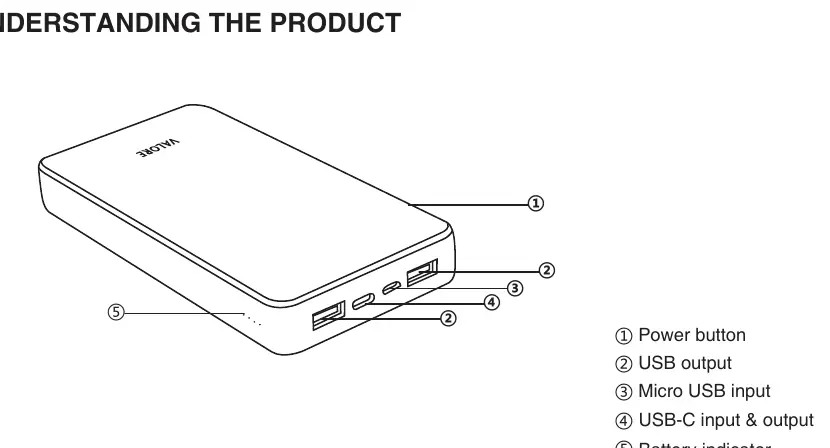
- Power button: Used to check the battery level.
- USB output: Standard USB ports for charging mobile devices.
- Micro USB input: Port for charging the power bank.
- USB-C input & output: Port for both charging the power bank and charging devices via Power Delivery.
- Battery indicator: LED lights showing the remaining charge level.
Using the Power Bank
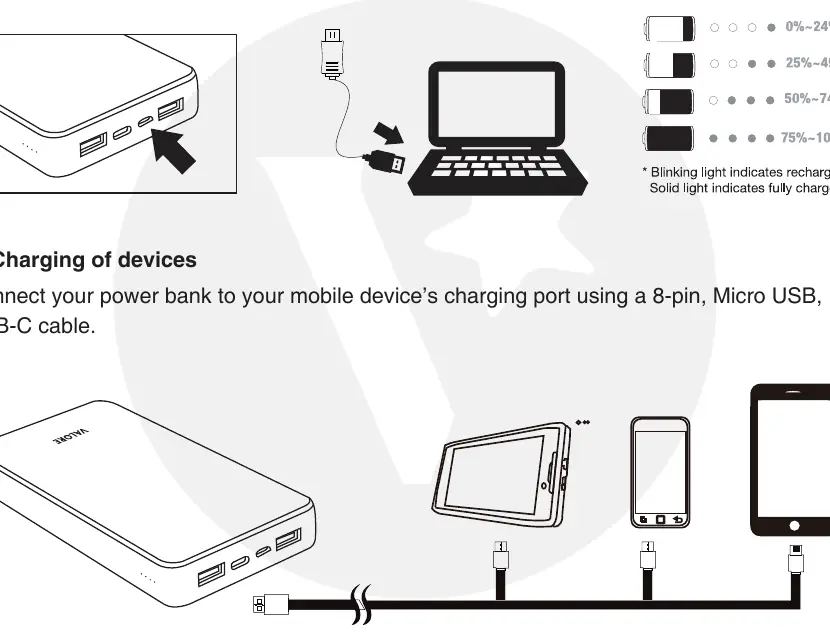
Charging the Power Bank
Connect the power bank to a USB adapter (2.0A) using the provided charging cable. The LED indicators will blink to show charging progress. When all LEDs are lit, the battery is fully charged.
Charging Mobile Devices
Connect your mobile device to the power bank's USB output or USB-C port using a compatible cable (8-pin, Micro USB, or USB-C). Press the power button once to display the battery indicator and initiate charging.
Troubleshooting
If you encounter issues, refer to these solutions:
- Power bank unable to charge mobile device: Ensure the power bank battery is not flat. Fully charge the power bank and try again.
- Power bank drains quickly: Running multiple applications on your mobile device may consume extra energy. Turn off running applications and allow the device to charge fully.
- Unable to charge the power bank: Ensure the power adapter voltage is sufficient (use a 5V supply with at least 800mAh). Check that the cable is well-connected or replace it if damaged.
Safety and Maintenance
To ensure safe operation and longevity of the device, follow these precautions:
- Do not dismantle or open the power bank.
- Do not subject the device to mechanical shock, such as crushing, bending, or puncturing.
- Keep the device away from water, liquids, fire, and direct sunlight.
- Do not insert foreign objects into the ports.
- Use only the provided charger or a compatible adapter.
- Supervise children when they are using the device.
Technical Specifications
- Capacity: 20000mAh-37Wh
- Battery Type: Built-in lithium polymer battery
- USB-C Input: 5V/3A, 9V/2A (Max)
- USB-C Output: 5V/3A, 9V/2A, 12V/1.5A (Max PD18W)
- Micro USB Input: 5V/2A, 9V/2A (Max)
- USB Output 1 & 2: 5V/2.4A, 9V/2A, 12V/1.5A (Max PD18W)
- Operating Temperature: 0°C – 35°C
- Dimensions: 154 x 77 x 21.2mm
- Weight: 410g
Practical help
Common problems
Power bank is unable to charge mobile device
Ensure the power bank battery is not flat. Fully charge the power bank and resume charging.
Power bank drains off quickly
Running multiple applications on your mobile device consumes extra energy. Turn off running applications and charge until full.
Unable to charge the power bank (indicator not flashing)
The voltage of the power adapter may be too low. Use a 5V supply with at least 800mAh. Check for a faulty cable.
Before use
- Charge the power bank fully before first use.
- Use a 5V/2A USB adapter for charging the power bank.
- Ensure you are using the provided USB to USB-C cable or a compatible cable for your device.
- Check that the power adapter provides at least 5V/800mAh.
Specs in practice
- USB-C Output
- Supports Power Delivery (PD) up to 18W.
- Operating Temperature
- Safe usage range is 0°C to 35°C.
Images and diagrams
- 1: Power button
- 2: USB output
- 3: Micro USB input
- 4: USB-C input & output
- 5: Battery indicator
Model compatibility
- Compatible with devices using 8-pin, Micro USB, or USB-C charging cables.
- Supports Power Delivery (PD) technology for fast charging.

Manual page author
Emily Carter
User documentation editor
Prepares concise manual descriptions and highlights the most useful setup, operation, and maintenance information for readers.