Tools / Drills
User Manual for IKEA TRIXIG Screwdriver/Drill
Quick guide for the IKEA TRIXIG 12V Li-ion screwdriver/drill. Includes charging instructions, torque settings, bit installation, safety warnings, and maintenance tips.
Table of contents
Manual images
Click an image to enlargeQuick guide from the manual
The TRIXIG screwdriver/drill is designed for drilling in wood, plastic, and soft metal, as well as tightening and loosening screws. Before first use, ensure the battery is fully charged. Always set the rotational direction switch to the center position when transporting, storing, or performing maintenance to prevent accidental activation.
Product Overview
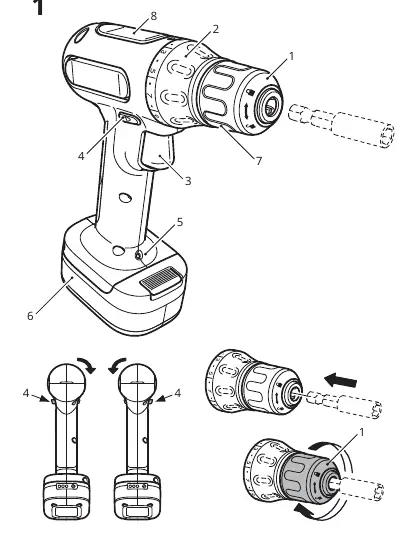
- Keyless chuck: For easy bit changes.
- Torque regulator: 19 settings for screws plus a drilling mode.
- Variable speed trigger: Controls speed based on pressure.
- Rotational direction switch: Forward, reverse, and lock (center).
- LED work light: Illuminates the work area.
- Magnetic bit holder: Keeps bits handy on top of the tool.
Charging Instructions
The tool uses a USB-C charging port on the battery pack.
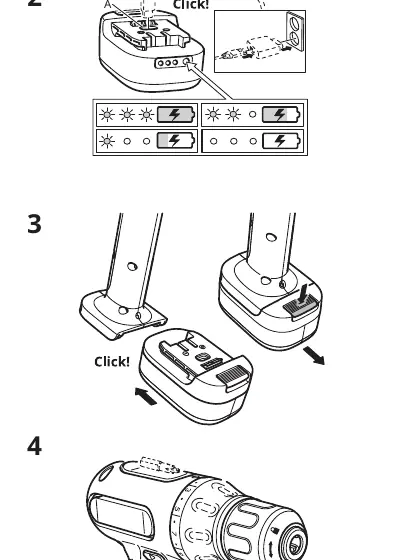
- Connect a USB-C cable to the battery pack and a suitable USB charger.
- Pulsating light: Charging in progress.
- Steady light for two minutes/no light: Charging completed.
- Disconnect the cable once charging is finished.
Note: USB-C cable and charger are not included. Do not charge in freezing temperatures.
Usage
Mounting bits and drills
Ensure the rotational direction switch is in the center position. Rotate the front sleeve to open the chuck, insert the bit, and tighten the chuck by rotating the sleeve.
Adjusting torque and speed
- Torque: Turn the torque regulator to the desired setting (1-19 for screws). Select the drill symbol for drilling.
- Speed: Regulate speed by varying the pressure on the trigger.
Safety Warnings
- Medical Implants: This tool produces an electromagnetic field that may interfere with medical implants. Consult your physician before use.
- Sparks: Sparks may be visible through motor housing slots; this is normal. Do not use near flammable liquids, gases, or dust.
- Trapping Risk: Do not hold the front sleeve of the chuck while the motor is running.
- Overload: If the tool becomes blocked or stuck, switch it off immediately.
Maintenance and Cleaning
Keep the tool clean and dry. Wipe off debris with a soft, water-moistened cloth. Do not use solvents or cleaning agents. Ensure ventilation slots remain clear.
Manufacturer information
IKEA
Practical help
Common problems
Tool stops rotating during use
The battery is empty. The Electronic Cell Protection (ECP) system has shut down the tool to prevent deep discharge.
Sparks visible through motor housing
This is a normal reaction of the motor components rubbing against each other and does not affect tool performance.
Chuck will not open or close
Ensure the motor is not running while you are holding the front sleeve to adjust the chuck.
Before use
- Charge the battery fully before first use.
- Set the rotational direction switch to the center position for storage or transport.
- Check for hidden utility lines (electric, gas, water) in the work area.
- Ensure the battery pack is a TRIXIG model.
- Wear appropriate personal protective equipment (eye protection, dust mask).
Images and diagrams
- Pic 1: Shows the numbered parts of the drill (chuck, torque regulator, trigger, switch, LED, battery, bit holder).
- Pic 2: Illustrates the USB-C charging process and battery status LED indicators.
Model compatibility
- Use only TRIXIG battery packs.
- USB-C cable and USB charger are not included.

Manual page author
Emily Carter
User documentation editor
Prepares concise manual descriptions and highlights the most useful setup, operation, and maintenance information for readers.