Tools / Drills
User Manual for Sealey CP108VDD Cordless Hammer Drill
Quick guide for the Sealey CP108VDD cordless hammer drill. Includes battery charging instructions, operation modes, safety precautions, and technical specifications.
Table of contents
Manual images
Click an image to enlargeQuick guide from the manual
This cordless hammer drill is designed for drilling and screwdriving. Before first use, ensure the battery is fully charged. Always check the tool for damage before operation and wear appropriate personal protective equipment, including eye, ear, and respiratory protection. The tool features variable speed control and a hammer function for masonry drilling.
Introduction
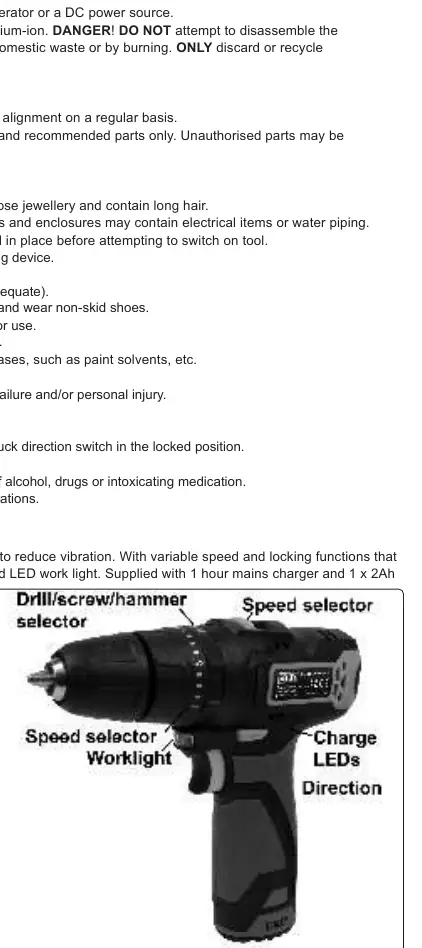
The CP108VDD is a compact, lightweight cordless impact drill featuring a soft-grip handle to reduce vibration. It includes an integrated LED battery level indicator and an LED work light. The unit is supplied with a 1-hour mains charger and a 2Ah Lithium-ion battery.
Specifications
- Battery: 10.8V 2Ah Lithium-ion
- Chuck size: 10mm
- Max. torque: 28Nm
- No-load speed: 0-400 / 0-1300rpm
- Impact frequency: 0-6000 / 0-19500bpm
- Noise level: 82/71dB(A)
Battery Charging
Warning: Only use the supplied charger. Do not use other transformers.
- Remove the battery from the tool by squeezing the buttons on each side.
- Insert the battery into the charging base.
- Connect the charger to the mains supply. The red LED indicates charging is in progress.
- Once the LED turns green, charging is complete.
- Remove the battery and insert it into the tool until a click is heard.
Maintenance: To maintain battery efficiency, do not fully discharge the battery. Charge it after every use and at least every 4 months if the tool is not in use. If performance decreases, charge the battery.
Operation
Ensure the direction selector is in the mid (lock) position before making adjustments.
- Direction: Use the direction selector to choose clockwise or anticlockwise rotation. Only adjust when the tool is stationary.
- Speed Selection: Use the top selector to choose Speed L (screwing) or Speed H (drilling).
- Torque/Hammer Selection: Select the 'screw' icon for small screws/soft materials, the 'drill' icon for drilling, or the 'hammer' icon for hammer function.
- Speed Selection Ring (1-21): Use this to adjust torque for large screws or hard materials.
- Trigger: Features variable speed control. The work light activates when the trigger is pressed.
Maintenance
Warning: Remove the battery before performing any maintenance.
- Clean the tool with a soft, dry cloth. Do not use solvents or compressed air.
- The tool is permanently lubricated and requires no special internal maintenance.
- Store in a child-free, dry location.
Safety
This tool is subject to vibration testing. Prolonged use may cause Hand Arm Vibration Syndrome. Ensure the tool is well-maintained and take regular breaks. Wear appropriate PPE, including gloves to keep hands warm and dry. Do not operate the tool near flammable liquids or gases.
Manufacturer information
Sealey Group
Practical help
Common problems
Battery not charging
Ensure the charger is connected to the mains. If the battery was just used, allow it to cool for 15 minutes before charging.
Tool performance is decreasing
Charge the battery fully. If the issue persists, the battery may need replacement.
LEDs not lighting
Press the trigger to check the battery charge status. If only one LED is lit, the battery needs charging.
Before use
- Inspect power supply leads and plugs for wear or damage.
- Ensure the battery is fully charged before first use.
- Check that the direction selector is in the mid (lock) position.
- Ensure the work area is clear of flammable liquids or gases.
- Wear appropriate safety gear (eye, ear, mask, gloves).
Images and diagrams
- The drill features a speed selector on top for switching between low and high gear.
- The torque/hammer collar allows switching between screw, drill, and hammer modes.
- The direction switch is located above the trigger for forward/reverse/lock control.
Model compatibility
- Use only the supplied charging base.
- Do not use other transformers with the charging base.
- Only use the battery pack designated for this product.

Manual page author
David Miller
Documentation analyst
Organizes user manual content into clear summaries, with attention to model details, product context, and everyday usability.