Hvac / Heat Pumps
User Manual for Immax NEO LITE Smart Thermostat 07534L
Quick guide for the Immax NEO LITE Smart Thermostat 07534L. Includes installation steps, wiring diagrams, app pairing instructions, and technical specifications for underfloor heating control.
Table of contents
Manual images
Jump to the sectionQuick guide from the manual
The Immax NEO LITE Smart Thermostat 07534L is designed for underfloor heating control. Before installation, ensure the power is turned off. The device requires a 2.4GHz WiFi network for smart features and app connectivity. Installation must be performed by a qualified electrician. Always ensure the device is not exposed to high humidity or extreme temperatures.
Installation
- Turn off the main power supply.
- Disconnect the display from the thermostat base.
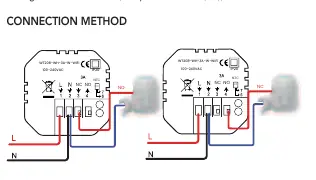
- Connect the cables according to the provided wiring diagram.
- Attach the thermostat base to the installation box using screws.
- Connect the front cover to the back cover.
- Installation is complete.
Wiring
The thermostat is compatible with standard 86mm installation boxes or 60mm European boxes. Ensure the power supply is connected to the appropriate terminals as shown in the wiring diagram. The device supports a 3A load for underfloor heating.
App Pairing
To control the thermostat via smartphone:
- Download the Immax NEO PRO app from the App Store or Google Play.
- Register and create an account using your email.
- Ensure WiFi and Bluetooth are enabled on your mobile phone.
- Put the thermostat into pairing mode by long-pressing the button on the home screen for more than 5 seconds until the WiFi icon flashes.
- In the app, select 'Add new device' and follow the on-screen instructions. Ensure your WiFi network is 2.4GHz.
Operation
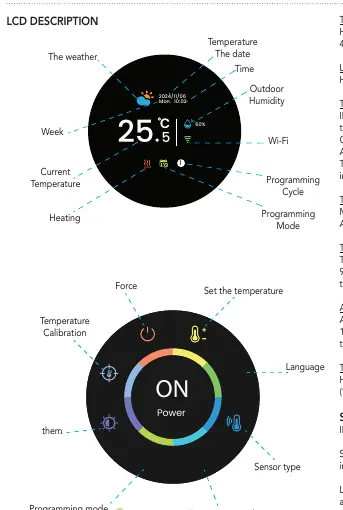
After turning on the thermostat, the home screen displays the current temperature and status. To enter the function interface, press the button to wake the device, then rotate the button to select a function and press to confirm. Long press the button to return to the home screen.
Functions
- Temperature Setting: Adjustable from 5°C to 45°C in 0.5°C steps.
- Sensor Modes: IN (internal sensor), OUT (external sensor), ALL (internal for room, external for floor limit).
- Thermostat Modes: Manual (direct temperature setting) or Automatic (weekly schedule).
- Calibration: Temperature sensor calibration range is -9°C to 9°C.
- Brightness: Adjustable from 0% to 100% in standby mode.
Safety and Maintenance
Protect the device from contamination and dirt. Wipe with a soft cloth; do not use solvents or aggressive chemicals. Do not disassemble the product due to the risk of electric shock. Keep out of reach of children as the product contains small parts.
Manufacturer information
Immax
Practical help
Common problems
Device not pairing with the app
Ensure your phone is connected to a 2.4GHz WiFi network (5GHz is not supported) and that Bluetooth is enabled.
Screen is blank
Press the button to wake up the device from standby mode.
Heating not turning on
Check the sensor settings (IN/OUT/ALL) and ensure the target temperature is set correctly above the current room temperature.
Before use
- Turn off the main power supply before starting installation.
- Ensure the installation box is a standard 86mm or 60mm European box.
- Verify that the wiring matches the provided diagram.
- Ensure a 2.4GHz WiFi network is available for pairing.
- Ensure the installation is performed by a person with appropriate electrical certification.
Images and diagrams
- The wiring diagram illustrates the connection of the power supply (L/N) and the NTC sensor terminals.
- The installation steps show the separation of the display from the base and the mounting process into the wall box.
Model compatibility
- Requires 2.4GHz WiFi network.
- Compatible with standard 86mm or 60mm European installation boxes.

Manual page author
Michael Turner
Technical manual editor
Reviews PDF manuals for structure, safety notes, and practical product details so readers can find the right information quickly.