Lighting / Fixtures
User Manual for Immax NEO LITE BEAUTY Smart LED Ceiling Light with Fan
Quick guide for the Immax NEO LITE BEAUTY Smart LED Ceiling Light with Fan. Includes installation steps, fan balancing procedures, remote control pairing, troubleshooting, and safety instructions.
Table of contents
Manual images
Jump to the sectionImportant Information
This manual provides instructions for the Immax NEO LITE BEAUTY Smart LED Ceiling Light with Fan (models 07280L, 07281L, 07282L). The device features Tuya WiFi connectivity and adjustable light color. Please read all safety warnings before installation and use.
Installation
Installation must be performed in accordance with local electrical regulations. Ensure the ceiling or mounting location has a load capacity of at least 45 kg. The fan must be properly grounded to avoid electric shock. Do not install in damp or wet rooms. Ensure a minimum distance of 150 cm from the tip of the blades to the wall and 2.3 m from the floor.
Fan Balancing
If the fan wobbles, it may be due to blade irregularity. Follow these steps to balance:
- Ensure all blades are screwed tightly to the flywheel.
- Check that the fan is firmly installed.
- If oscillation persists, use a balancing kit.
- Attach a balancing clip to one blade and test the fan at high speed.
- Repeat for all blades to identify which one improves the oscillation most.
- Move the clip to different positions on that blade to find the optimal spot.
- Remove the clip and install the balancing weight in its place.
Remote Control Pairing
To pair the remote control:
- Turn the fan off and then on.
- Within 30 seconds of turning it on, press and hold the Fan/on off button on the remote for 5 seconds.
- The remote is paired after you hear a long beep sound.
Troubleshooting
Fan not starting: Check all fuses or circuit breakers. Turn off power and verify all wire connections.
Fan makes noise: Allow a few days for the fan to break-in at medium or high speed. Check that all bolts in the fan assembly and light kit are tight. Ensure the mounting bracket is firmly installed. Check that wire nuts do not snap against the housing wall.
Fan does not heat the air: The fan may be running in reverse; check the direction. Ensure there are no obstructions in the room.
Maintenance and Safety
Always disconnect the fan from the power source before cleaning. Clean the outer surface with a soft damp cloth. Do not allow internal parts to get wet. Never use wire cloths, abrasive, or chemical cleaners. Do not connect the fan to a dimmer switch. Do not insert objects into the blades during operation.
Technical Specifications
- Light Color: 3000K, 4000K, 6000K
- Motor Power: 40W
- Lamp Wattage: 18W
- Input Voltage: AC 220-240V, 50Hz
- Luminous Flux: 1800 lm
- Illumination Time: 50,000 hours
Manufacturer information
Immax
Practical help
Common problems
Fan wobbling
Perform dynamic balancing using the provided balancing kit and clip method.
Fan makes clicking or rattling noises
Check all screws and bolts for tightness. Allow a few days for the fan to 'break-in'.
Fan does not start
Check fuses, circuit breakers, and verify all electrical wire connections.
Before use
- Ensure ceiling load capacity is at least 45 kg.
- Verify all electrical connections are secure.
- Ensure minimum 150 cm distance from blade tip to wall.
- Ensure minimum 2.3 m distance from floor.
- Do not connect to a dimmer switch.
- Ensure the fan is properly grounded.
Specs in practice
- Input Voltage
- Standard AC 220-240V, 50Hz power supply.
Images and diagrams
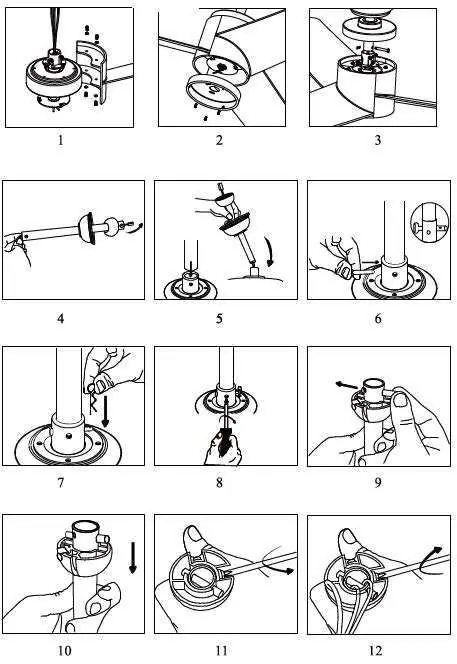
- Installation steps 1-12 illustrate the assembly and mounting process.
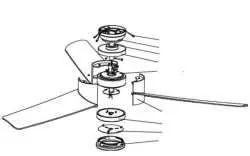
- Balancing diagram demonstrates the use of the balancing clip and weight on the fan blade.
Model compatibility
- Compatible with Tuya WiFi protocol.
- Not suitable for children under 8 years of age.
- Not for use with dimmer switches.

Manual page author
David Miller
Documentation analyst
Organizes user manual content into clear summaries, with attention to model details, product context, and everyday usability.