Lighting / LED Strips
User Manual for Saxby Lighting Aqualine Kit 51918
Quick guide for the Saxby Lighting Aqualine Kit 51918. Includes installation steps, remote control operation, safety warnings, and technical specifications for this 12V LED strip system.
Table of contents
Manual images
Click an image to enlargeQuick guide from the manual
The Aqualine Kit 51918 is a self-contained LED strip lighting system designed for indoor use. Before commissioning, ensure all connections are tight. The system is operated via the included remote control. Always switch off the power supply before cleaning or changing lightbulbs. This product is IP44 rated, meaning it is protected against splashing water but should not be used in very wet areas.
Layout and Installation
The LED strips are mounted on a sticky tape that can be applied to most surfaces. Follow these guidelines for installation:
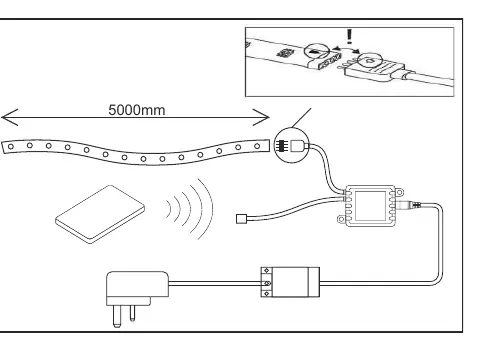
- Positioning: Avoid locating cables in positions where they may be at risk from being cut, trapped, or damaged. Cables in walls must be protected using suitable conduit or plastic trunking.
- Cutting: The LED strips can be shortened to a minimum of 100mm or multiples of 100mm. Look for the line on the strip with four copper pads. Use a sharp pair of scissors to cut only at these marked points. Seal the end with a small amount of silicone sealant.
- Connection: Position the plug, remote control sensor, and in-line LED driver next to the indoor outlet socket. Do not plug in at this stage. Ensure the cable can connect when in the desired position. Connect the LED driver connector to the connector on the Aqualine strip, ensuring the polarity is correct.
Operating the Remote Control
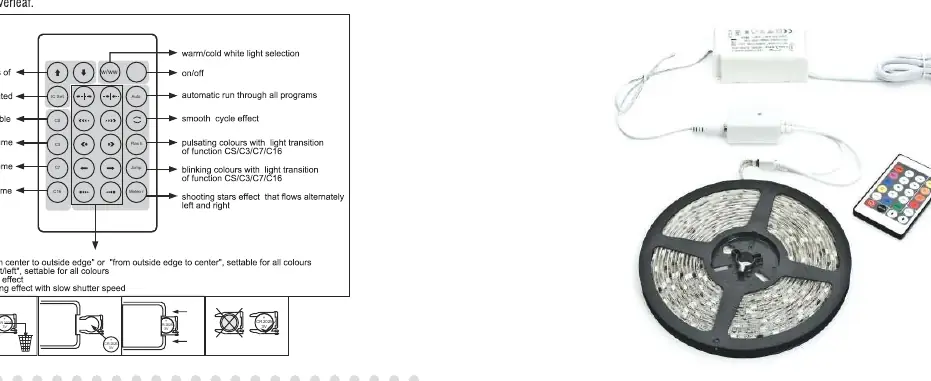
The remote control allows for various color and lighting effects. To replace the battery, release the compartment from inside the remote control by pushing the lever at the bottom left of the compartment. Pull the battery housing out and replace the exhausted battery with a new one, ensuring the correct polarity.
Safety and Maintenance
The power supply is double insulated and does not require connection to an Earth circuit. The LED strips are Safety Extra Low Voltage and must not be earthed. This system contains non-replaceable parts and cannot be serviced; if damage occurs, the part should be scrapped. Always remove exhausted batteries from the remote control and do not mix old and new batteries.
Technical Specifications
- Dimensions: 10mm wide, 3mm high x 5000mm long
- Voltage: 220-240V~ 50Hz
- LED Voltage: 12V d.c.
- Kit Contents: 1 x in-line driver with UK 3 Pin Plug, 1 x RGB Remote and Programmable Remote Control, 1 x 5000mm strip
Practical help
Common problems
LED strip does not light up
Check that all connections are tight and the power supply is plugged in. Ensure the remote control battery is not exhausted.
Need to shorten the strip
Cut only at the marked lines with four copper pads (every 100mm). Do not cut anywhere else as this may cause the strip to stop working.
Before use
- Ensure the power supply is switched off before starting installation.
- Verify the mounting surface is clean and suitable for adhesive tape.
- Confirm the LED driver is connected to an indoor outlet.
- Check that the remote control battery is installed with correct polarity.
- Ensure the cable length is sufficient for the desired layout.
Specs in practice
- Double Insulated
- The power supply does not require an Earth connection.
Images and diagrams
- The remote control diagram illustrates buttons for dimming, color selection, and specific lighting modes like 'Jump' and 'Meteor'.
- The installation diagram shows the 5000mm strip layout, the connection of the LED driver, and the specific cutting points marked by copper pads.
Model compatibility
- The kit is a self-contained unit and cannot be extended.
- For indoor use only.
- Not suitable for very wet areas.

Manual page author
David Miller
Documentation analyst
Organizes user manual content into clear summaries, with attention to model details, product context, and everyday usability.