Home Appliances / Air Fryers
User Manual for Instant Cuisine 18L Air Fryer Toaster Oven
Get started with your Instant Cuisine 18L Air Fryer Toaster Oven. This guide covers initial setup, smart cooking programs, cleaning instructions, and troubleshooting steps to ensure safe and efficient operation.
Quick answers from the manual
Quick answer
- The Instant Cuisine 18L is a countertop air fryer toaster oven. To use it, place it on a stable surface, select a smart program (Air Fry, Bake, Roast, Broil, Warm, or Toast) using the dial, adjust settings if needed, and press Start. p. 7, 9, 10
Key actions
- Initial setup p. 8
- Cleaning p. 15
First start
- Perform the initial test run p. 9
Problems and fixes
Black smoke
Clean heating elements and accessories; use high smoke point oil.
p. 16, 17Technical specifications
| Parameter | Value | Meaning | Pages |
|---|---|---|---|
| Power | 1800 W | Power consumption | p. 6 |
| Capacity | 18 Litres | Internal volume | p. 6 |
Where to find it in the PDF
- Important Safeguards p. 2, 3, 4, 5
- Product Parts p. 7
- Cooking Programs p. 13
Table of contents
Manual images
Click an image to enlargeQuick guide from the manual
Before using your Instant Cuisine 18L, ensure it is placed on a stable, level surface with at least 13 cm (5 inches) of clearance on all sides. Perform the initial test run as described in the manual to familiarize yourself with the operation. Always unplug the unit and allow it to cool completely before cleaning.
Product overview
The unit includes several accessories to enhance your cooking experience:
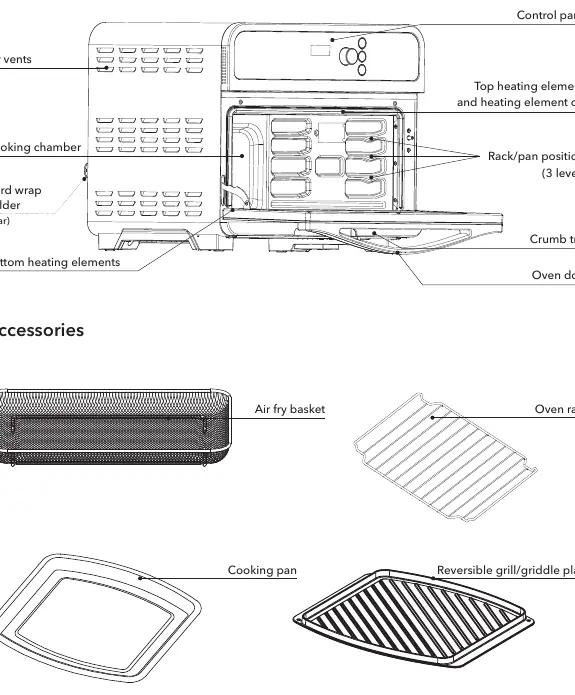
- Air fry basket: Perforated for airflow, ideal for air frying and roasting.
- Oven rack: Used for toasting, baking, and general cooking.
- Cooking pan: Best for messy foods like chicken tenders or roasted vegetables.
- Reversible grill/griddle plate: Provides flexibility for grilling or searing.
Control panel
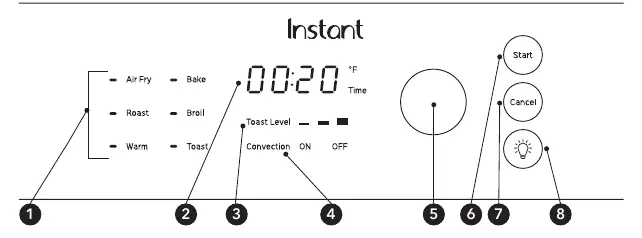
The control panel features a dial for navigation and selection, along with buttons for Start, Cancel, and Oven Light. Smart programs include Air Fry, Bake, Roast, Broil, Warm, and Toast. The display shows temperature, time, and status messages like On (preheating), turn Food (reminder to flip), and End (program finished).
Cooking
To cook, select a smart program, adjust the time and temperature if necessary using the dial, and press Start. The unit uses convection cooking for efficient results. Note that because the oven is highly efficient, you may need to reduce cooking times and temperatures compared to traditional recipes. Always use a meat thermometer to ensure food reaches safe internal temperatures.
Care, cleaning and storage
Clean the appliance and accessories after every use. Unplug the unit and let it cool. The cooking pan, air fryer basket, oven rack, crumb tray, and grill plate are dishwasher safe. The cooking chamber should be wiped with a damp cloth and a mixture of baking soda and vinegar for stubborn stains. Never immerse the main unit in water.
Troubleshooting
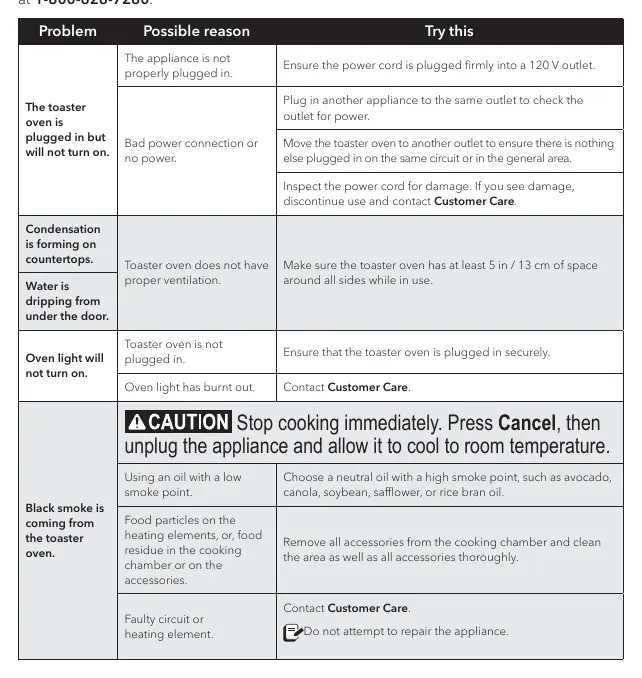
If the unit does not turn on, check the power connection and outlet. If black smoke appears, stop cooking immediately, unplug the unit, and clean the heating elements and accessories. Error codes E1 through E7 indicate a sensor error; contact Customer Care if these appear.
Practical help
Common problems
Black smoke coming from the oven
Stop cooking, unplug, and allow to cool. Clean heating elements and accessories thoroughly. Ensure you are using oil with a high smoke point.
Oven will not turn on
Ensure the power cord is plugged firmly into a 120V outlet. Try a different outlet to rule out power issues.
Condensation on countertops
Ensure the oven has at least 13 cm (5 inches) of space around all sides for proper ventilation.
Before use
- Remove all packaging materials from inside and around the oven.
- Place the unit on a stable, level, non-combustible surface.
- Ensure at least 13 cm (5 inches) of clearance above and around the unit.
- Wash all accessories before first use.
- Perform the initial test run as described in the manual.
Images and diagrams
- The control panel features a central dial for selecting programs and adjusting settings.
- The cooking chamber includes 3 rack/pan positions for versatile cooking.
Model compatibility
- For household countertop use only.
- Do not use with power converters, adapters, or extension cords.
- Do not use in electrical systems other than 120 V ~ 60 Hz.

Manual page author
David Miller
Documentation analyst
Organizes user manual content into clear summaries, with attention to model details, product context, and everyday usability.