Home Appliances / Air Fryers
User Manual for Instant Omni Plus 18L Air Fryer Toaster Oven
Comprehensive user guide for the Instant Omni Plus 18L Air Fryer Toaster Oven. Includes setup, cooking programs, rotisserie instructions, cleaning, and troubleshooting.
Quick answers from the manual
Quick answer
- The Instant Omni Plus 18L is a multi-function air fryer toaster oven. It features various smart programs like Air Fry, Roast, Bake, and Rotisserie. Always perform a test run before first use. p. 11, 13
Key actions
- Perform a test run p. 11
- Install rotisserie spit p. 22
First start
- Unpack, clean accessories, and perform a test run at 400°F / 205°C for 20 minutes. p. 11
Problems and fixes
Black smoke
Cancel program, unplug, let cool, and clean heating element/accessories.
p. 27Error codes
| Code | Meaning | Action | Pages |
|---|---|---|---|
| E1 | Temperature sensor open circuit | Contact Consumer Care | p. 29 |
| E2 | Short circuit | Contact Consumer Care | p. 29 |
| E3 | Abnormal circuit | Contact Consumer Care | p. 29 |
| E6, E7, E8 | Abnormal function | Contact Consumer Care | p. 29 |
Maintenance and reset
- Reset individual Smart Programs by holding the button for 5 seconds in Ready mode. p. 10
- Reset all Smart Programs by holding Cancel until the cooker beeps. p. 10
Technical specifications
| Parameter | Value | Meaning | Pages |
|---|---|---|---|
| Volume | 18 Litres | Capacity | p. 31 |
| Wattage | 1800 W | Power consumption | p. 31 |
| Power | 120 V / 60 Hz | Electrical requirements | p. 31 |
Where to find it in the PDF
- Parts and Accessories p. 7
- Control Panel p. 8
- Rotisserie Cooking p. 21, 22
Table of contents
Manual images
Click an image to enlargeQuick Start Guide
Before using your new appliance, ensure you have removed all packaging materials from inside and around the oven. Perform a test run to ensure the unit is working correctly:
- Plug the unit into an electrical outlet.
- Insert the cooking tray into the bottom rack position.
- Press the Control Dial, then press Temperature and set to 400°F / 205°C.
- Press Time and set to 20 minutes.
- Press Start.
Control Panel
The control panel allows you to select Smart Programs, adjust time and temperature, and monitor cooking status. Key features include:
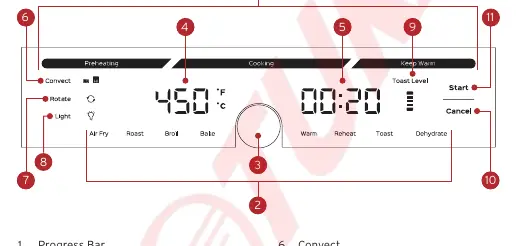
- Control Dial: Turn to toggle settings, push to confirm.
- Smart Programs: Air Fry, Roast, Broil, Bake, Warm, Reheat, Dehydrate, Toast.
- Convect: Toggle between Low and High convection settings.
- Rotate: Turn rotisserie rotation on or off.
- Light: Toggle internal light.
Cooking Programs
The Instant Omni Plus uses rapid air circulation. Always place food directly on the cooking utensil (Cooking Tray, Oven Rack, or Air Fry Basket) without using foil. Foods cook faster in the upper rack position.
- Air Fry: Ideal for fries, wings, and nuggets.
- Roast: Rotisserie is turned ON automatically.
- Broil: Uses direct top-down heating.
- Bake: Suitable for breads, cakes, and potatoes.
- Toast: Toast up to 6 slices of bread.
Rotisserie Cooking
You can use the rotisserie function during Air Fry, Bake, and Roast programs.
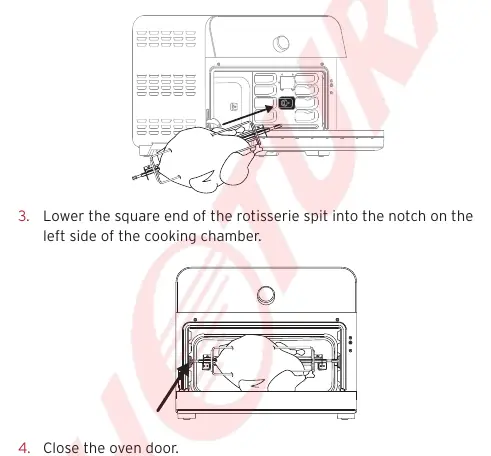
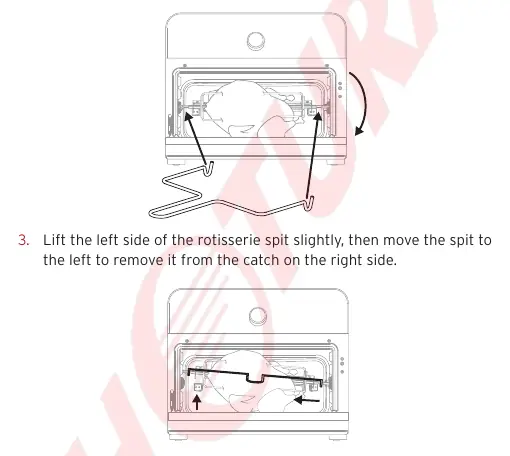
- Unscrew the 2 setting screws and remove forks from the spit.
- Push food onto the spit and secure with forks.
- Insert the pointed end of the spit into the rotisserie catch on the right side of the chamber.
- Lower the square end into the notch on the left side.
- Press Rotate to start rotation.
Cleaning and Maintenance
Always let the appliance cool completely before cleaning. Unplug before cleaning.
- Dishwasher Safe: Cooking Tray, Air Fry Basket, Oven Rack, Rotisserie Spit/Forks, Rotisserie Lift, Crumb Tray.
- Cooking Chamber: Clean with a damp cloth and mild dish soap. Use commercial oven cleaner for baked-on grease.
- Exterior: Wipe with a damp cloth and mild dish soap.
Troubleshooting
If the unit emits black smoke, cancel the program, unplug, and allow it to cool. Ensure you are using oil with a high smoke point and that the heating element is free of food residue. If the unit fails to turn on, check the power connection and ensure the door is fully closed.
Practical help
Common problems
Appliance will not turn on
Ensure the power cord is plugged in firmly, the outlet has power, and the oven door is fully closed.
Black smoke during use
Cancel the program, unplug, and let cool. Clean the heating element and accessories. Use oils with a high smoke point.
White smoke during use
Avoid high-fat foods, pat dry moist ingredients before air frying, and do not add water to the cooking chamber.
Before use
- Remove all packaging materials from inside and around the oven.
- Clean the interior with a damp cloth.
- Wash all accessories with hot water and dish soap.
- Perform a test run at 400°F / 205°C for 20 minutes without food.
Images and diagrams
- Control panel layout showing Smart Programs and dial.
- Rotisserie spit assembly with forks and screws.
- Rack positions (Top, Middle, Bottom).
Model compatibility
- Use only accessories authorized by Instant Pot Brands.
- Do not use ceramic-coated or stoneware pots for air frying.
- Do not use included accessories in microwaves or other ovens.

Manual page author
Michael Turner
Technical manual editor
Reviews PDF manuals for structure, safety notes, and practical product details so readers can find the right information quickly.