Electronics / Headphones Earbuds
User Manual for JBL Tune 125TWS Earbuds
Quick start guide for JBL Tune 125TWS earbuds. Learn how to pair, control playback, use mono/stereo modes, and understand LED indicators.
Table of contents
Manual images
Click an image to enlargeQuick guide from the manual
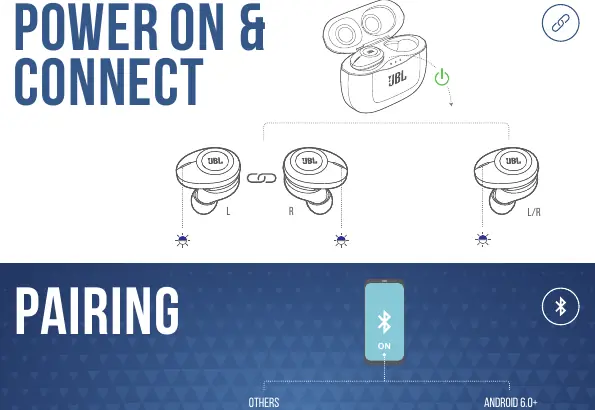
The JBL Tune 125TWS earbuds are designed for seamless wireless audio. To begin, ensure the earbuds are charged. For first-time use, open the charging case, and the earbuds will enter pairing mode automatically. On your device, select 'JBL TUNE125TWS' in the Bluetooth settings. For Android 6.0+ devices, use the Fast Pair feature for an instant connection.
What's in the box
- JBL Tune 125TWS earbuds
- Charging case
- Charging cable
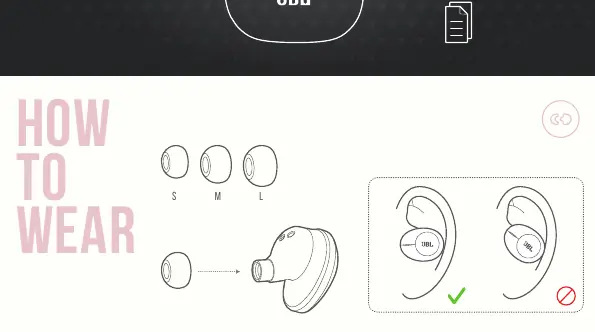
- Ear tips in sizes S, M, and L
How to wear
For the best sound quality and fit, try all three sizes of ear tips (S, M, L) included in the box. Ensure the earbuds are inserted securely into your ear canal to create a proper seal.
Power and connection
The earbuds power on automatically when removed from the charging case and power off when placed back inside. To manually power on, hold the button for 2 seconds. To power off, hold for 5 seconds. If the left and right earbuds lose connection with each other, they can be reconnected by tapping the buttons three times.
Button commands
The earbuds support both Stereo and Mono modes with seamless automatic switching.
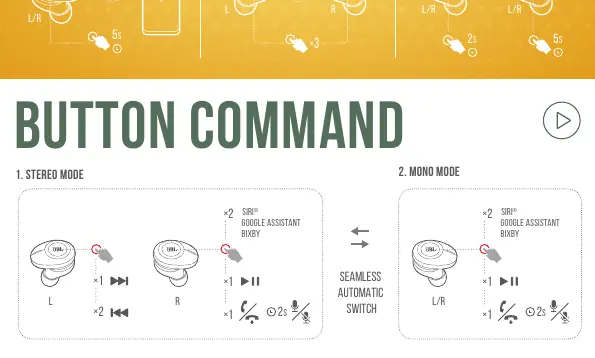
Stereo Mode
- Play/Pause: Tap once on either earbud.
- Next Track: Tap twice on the right earbud.
- Previous Track: Tap twice on the left earbud.
- Voice Assistant (Siri/Google Assistant/Bixby): Tap once, then hold for 2 seconds.
Mono Mode
- Play/Pause: Tap once.
- Voice Assistant: Tap once, then hold for 2 seconds.
Charging and LED behaviors
Charge the case using the provided cable. The LED indicators on the earbuds provide status updates:
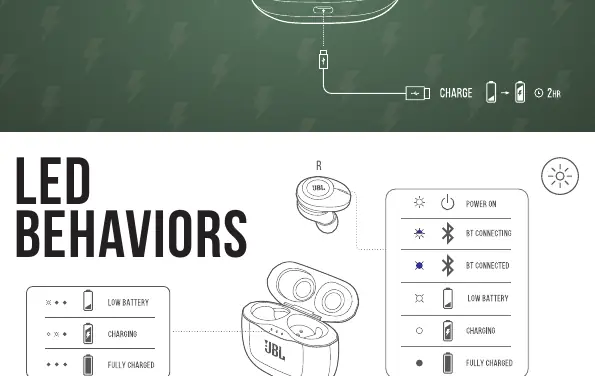
- Low Battery: Blinking light.
- Charging: Solid light.
- Fully Charged: Light turns off.
- Bluetooth Connecting: Blinking light.
- Bluetooth Connected: Light turns off.
Technical specifications
- Driver size: 5.8 mm Dynamic driver
- Frequency response: 20 Hz – 20 kHz
- Bluetooth version: 5.0
- Music playtime with BT on: Up to 8 hours
- Charging time: Less than 2 hours from empty
- Weight: 73 g
Manufacturer information
JBL
Practical help
Common problems
Earbuds not connecting to device
Ensure Bluetooth is enabled on your device and select 'JBL TUNE125TWS' from the list of available devices.
Left and right earbuds not syncing
Perform the manual reconnection procedure by tapping the buttons on both earbuds three times.
Earbuds not charging
Ensure the earbuds are correctly seated in the charging case and the case has sufficient battery or is connected to power.
Before use
- Charge the earbuds and charging case fully before the first use.
- Select the ear tip size (S, M, or L) that provides the most secure and comfortable fit.
- Ensure your smartphone or audio device has Bluetooth enabled.
Specs in practice
- Driver size (5.8 mm)
- The size of the speaker component inside the earbud, affecting sound output quality.
- Bluetooth 5.0
- Ensures a stable, efficient wireless connection with lower power consumption.
- Music playtime (8 hrs)
- The approximate duration the earbuds can play audio on a single charge.
Images and diagrams
- The manual provides visual guides for ear tip fitting, the pairing process, button control sequences for both stereo and mono modes, and LED status indicators.
Model compatibility
- Supports Android 6.0+ with Google Fast Pair.
- Compatible with voice assistants including Siri, Google Assistant, and Bixby.

Manual page author
Emily Carter
User documentation editor
Prepares concise manual descriptions and highlights the most useful setup, operation, and maintenance information for readers.