Electronics / Headphones Earbuds
User Manual for JBL Quantum 100X Console Headset
Quick start guide for the JBL Quantum 100X Console headset. Learn how to set up your device, connect the microphone, and understand the technical specifications.
Table of contents
Manual images
Click an image to enlargeQuick guide from the manual
This guide provides essential information for setting up and using your JBL Quantum 100X Console headset. Ensure you have all components before starting.
What's in the box
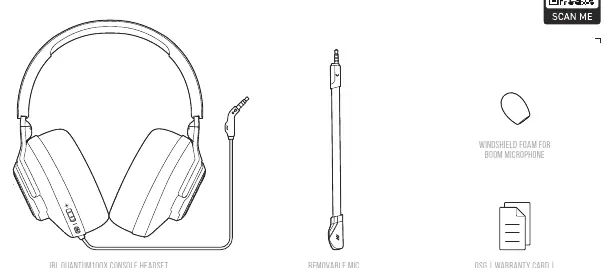
- JBL Quantum 100X Console headset
- Removable microphone
- Windshield foam for boom microphone
- Quick Start Guide, Warranty Card, and Warning Card
Device Overview
The headset features the following controls and components:
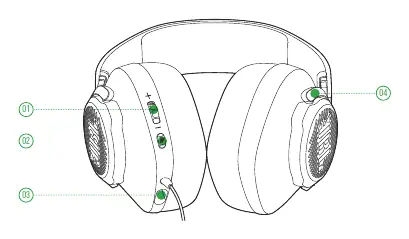
- Volume Control: Adjusts the audio output level.
- Microphone Mute/Unmute: Toggle the microphone on or off.
- 2.5mm Jack: Port for connecting the boom microphone.
- Flat-fold ear cup: Allows for easier storage.
Setup and Connection
The JBL Quantum 100X Console is designed for broad compatibility. You can connect the headset to the following devices:
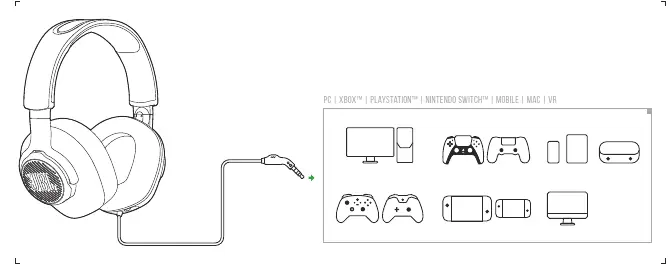
- PC
- Xbox
- PlayStation
- Nintendo Switch
- Mobile devices
- Mac
- VR systems
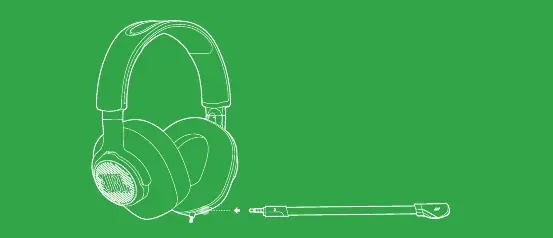
Microphone Setup
To use the microphone, insert the removable boom microphone into the 2.5mm jack located on the headset. Ensure it is securely connected.
Technical Specifications
- Driver size: 40 mm Dynamic drivers
- Frequency response: 20 Hz - 20 kHz
- Max input power: 20 mW
- Sensitivity: 96 dB @ 1 kHz / 1 mW
- Impedance: 32 ohm
- Microphone frequency response: 100 Hz - 10 kHz
- Microphone sensitivity: -42 dBV @ 1 kHz / Pa
- Microphone pickup pattern: Directional
- Cable length: 1.2 m
- Weight: 220 g
Manufacturer information
JBL
Practical help
Common problems
Microphone not working
Ensure the microphone is securely inserted into the 2.5mm jack on the headset.
No sound
Check the volume control wheel on the headset and ensure the cable is fully connected to your device.
Before use
- Check that the removable microphone is attached.
- Ensure the windshield foam is on the boom microphone.
- Verify the device is compatible (PC, Xbox, PlayStation, Switch, Mobile, Mac, VR).
Specs in practice
- Frequency response
- 20Hz - 20kHz, the range of sound the headset can reproduce.
- Microphone pickup pattern
- Directional, focuses on your voice.
Images and diagrams
- The overview diagram shows the volume control wheel, mute button, and microphone jack location.
- The setup diagram illustrates the universal compatibility with various gaming consoles and devices.
Model compatibility
- Compatible with PC, Xbox, PlayStation, Nintendo Switch, Mobile, Mac, and VR.

Manual page author
Michael Turner
Technical manual editor
Reviews PDF manuals for structure, safety notes, and practical product details so readers can find the right information quickly.