Electronics / Audio
User Manual for JBL Spinner BT Turntable
Quick start guide and setup instructions for the JBL Spinner BT turntable. Learn how to assemble, balance the tonearm, pair Bluetooth, and play records.
Table of contents
Manual images
Click an image to enlargeQuick guide from the manual
The JBL Spinner BT is a belt-drive turntable featuring Bluetooth connectivity with aptX HD. This guide provides essential steps for assembly, tonearm balancing, and operation. Ensure you remove the stylus cover before use and handle the tonearm with care.
What is in the box
The package includes the following components:
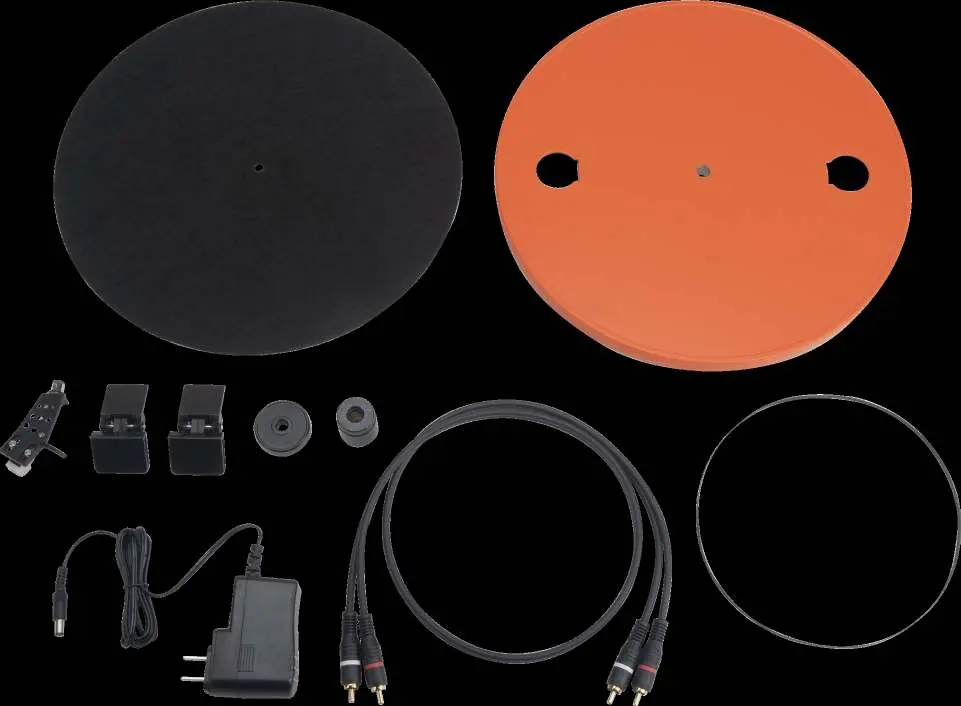
- Platter Matt
- Platter
- Headshell and Cartridge
- 2x Dust Cover Hinges
- Single Adaptor
- Counterweight
- Interconnect cable
- Belt (fitted to platter)
- Power Supply
Assembly
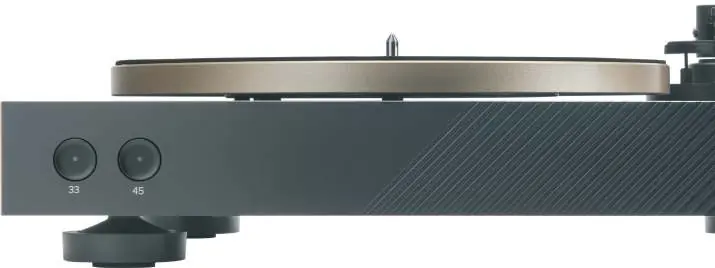
- Fit the platter onto the spindle.
- Fit the belt around the motor pulley.
- Place the platter matt on the platter.
- Attach the headshell to the tonearm.
- Install the counterweight.
- Fit the dust cover using the provided hinges.
Balancing the tonearm
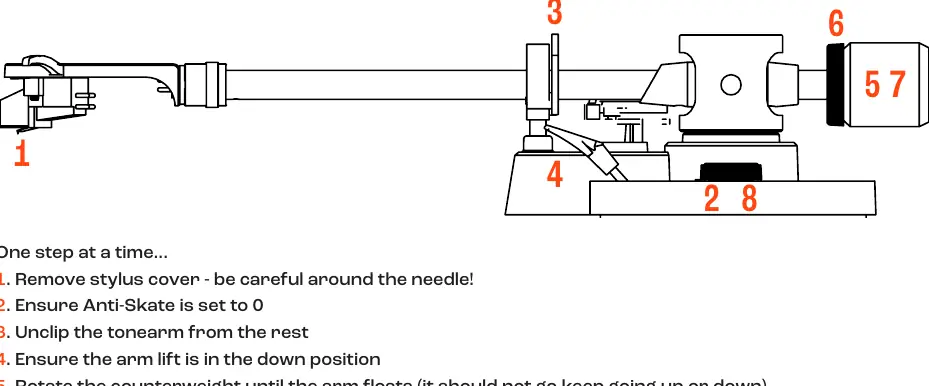
- Remove the stylus cover.
- Ensure Anti-Skate is set to 0.
- Unclip the tonearm from the rest.
- Ensure the arm lift is in the down position.
- Rotate the counterweight until the arm floats (it should not move up or down).
- Set the counterweight dial to 0 at the top without moving the counterweight itself.
- With the dial at 0, rotate the counterweight 1 full turn anti-clockwise so it moves toward the cartridge.
- Set the Anti-skate dial to 3.
Rear panel controls
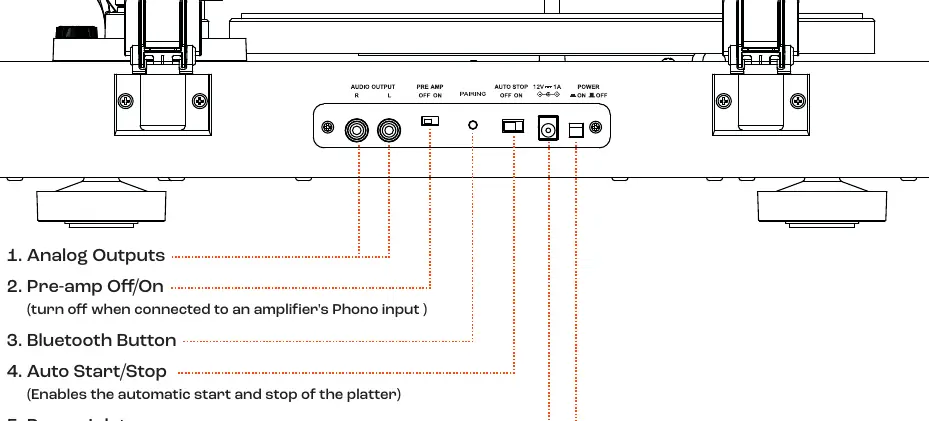
- Analog Outputs: RCA outputs for connection to amplifiers.
- Pre-amp Off/On: Turn off when connected to an amplifier's Phono input.
- Bluetooth Button: Used for pairing and connection.
- Auto Start/Stop: Enables automatic start and stop of the platter.
- Power Inlet: For the power supply.
- Power Switch: Turns the unit on or off.
Bluetooth pairing
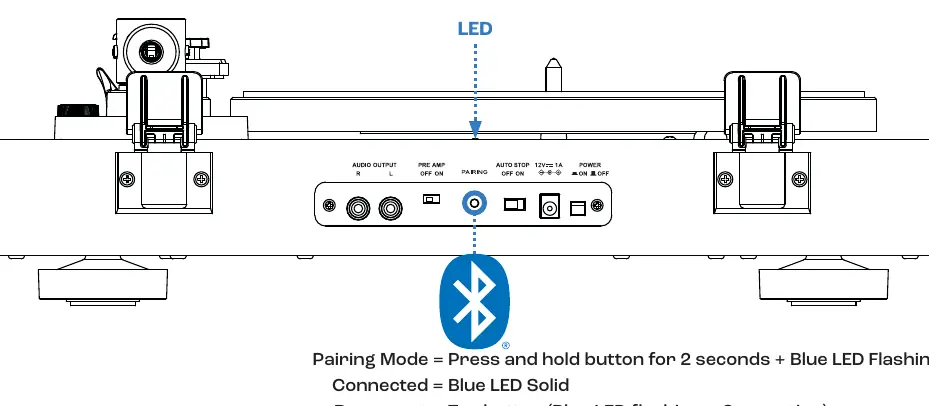
- Pairing Mode: Press and hold the Bluetooth button for 2 seconds until the blue LED flashes.
- Connected: Blue LED remains solid.
- Reconnect: Tap the button (Blue LED flashes while connecting).
- Clear pairing record: Press and hold the button for 10 seconds.
Playing records
- Remove the stylus cover.
- Place your record on the platter.
- Unclip the tonearm.
- Raise the arm lift lever.
- Move the tonearm so the cartridge is over the start of the record.
- Select 33 or 45 RPM speed.
- Lower the arm lift lever to gently drop the needle onto the record.
Specifications
- Bluetooth: Version 5.3, aptX HD support.
- Motor: DC Belt Drive.
- Cartridge: Audio Technica AT3600L (pre-installed).
- Power Supply: 12V DC 1A.
- Dimensions: 6.1 inch H x 17.1 inch W x 14.5 inch D.
Manufacturer information
JBL
Practical help
Common problems
Bluetooth not connecting
Ensure the device is in pairing mode by pressing and holding the Bluetooth button for 2 seconds until the LED flashes.
Tonearm not balanced
Follow the 8-step balancing procedure carefully, ensuring the arm floats before setting the dial to 0.
Distorted sound when connected to amplifier
If connected to a Phono input on an amplifier, ensure the Pre-amp switch on the rear is set to OFF.
Before use
- Remove the stylus cover.
- Ensure the turntable is on a stable surface.
- Check that the belt is properly fitted around the motor pulley.
- Verify the Anti-Skate is set to 0 before balancing.
- Ensure the arm lift is in the down position during balancing.
Specs in practice
- Bluetooth 5.2
- Supports high-quality wireless audio streaming with aptX HD.
- Defeatable MM Phono stage
- Allows connection to both line-level inputs and dedicated phono inputs.
Images and diagrams
- The rear panel contains the power switch, power inlet, auto start/stop switch, Bluetooth pairing button, pre-amp switch, and analog RCA outputs.
- The tonearm balancing procedure requires adjusting the counterweight until the arm floats freely.
Model compatibility
- The turntable includes a pre-installed Audio Technica AT3600L cartridge.
- The pre-amp can be turned off for use with external phono stages.

Manual page author
Michael Turner
Technical manual editor
Reviews PDF manuals for structure, safety notes, and practical product details so readers can find the right information quickly.