Electronics / Headphones Earbuds
JBL Wireless Microphone User Guide
Quick start guide for the JBL Wireless Microphone set, covering setup, battery installation, receiver charging, and technical specifications.
Table of contents
Manual images
Jump to the sectionProduct Overview
The JBL Wireless Microphone set provides a high-quality audio solution for various applications. This system includes two wireless microphones and a rechargeable receiver, designed for ease of use and reliable performance. The microphones utilize a cardioid polar pattern to capture clear sound while minimizing background noise.
Getting Started
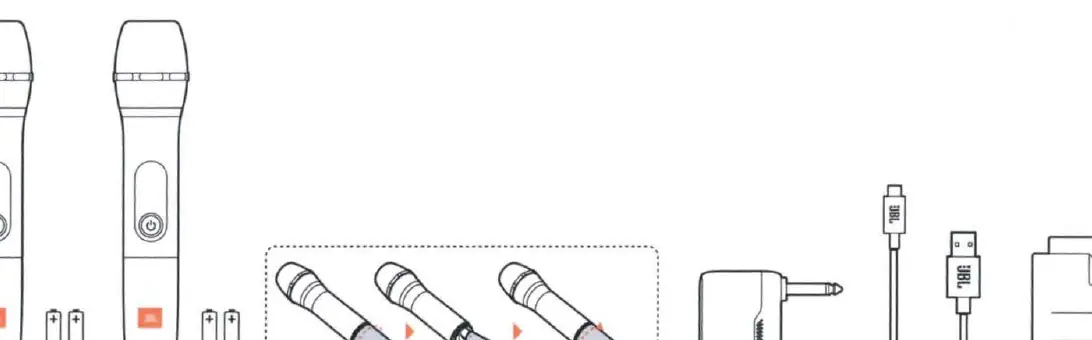
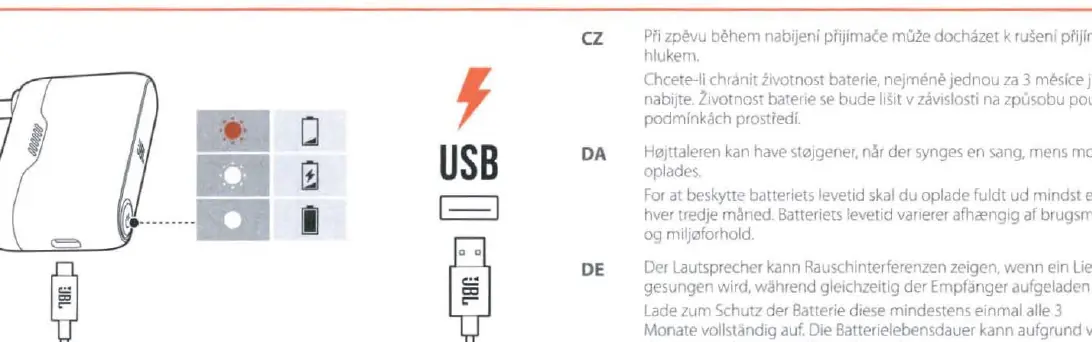
Before using the system, ensure you have read all safety instructions provided. To begin, install two AA alkaline batteries into each microphone. The receiver is equipped with a built-in rechargeable lithium-ion polymer battery. Use the provided USB cable to charge the receiver fully before the first use. A full charge takes approximately 3.5 hours and provides up to 6 hours of playtime.
System Setup
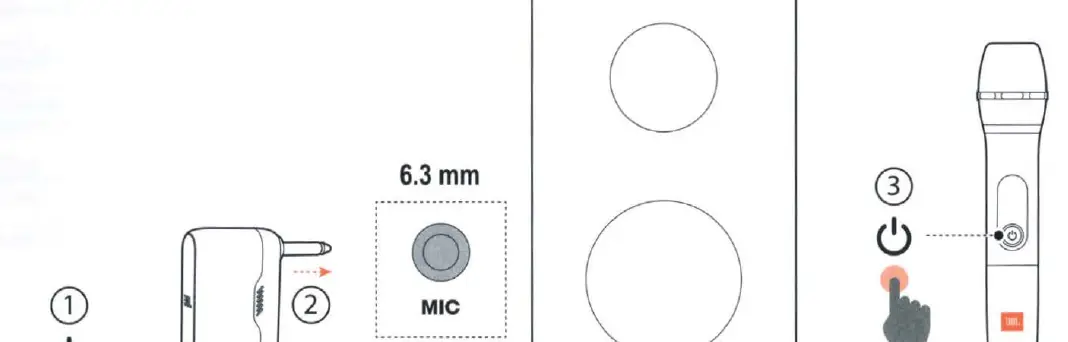
To set up the system, first power on the receiver and plug it into the 6.3 mm microphone input on your speaker or audio system. Next, power on the microphones. The system should automatically pair, allowing you to begin using the microphones immediately. Ensure the distance between the transmitter (microphone) and the receiver does not exceed 10 meters for optimal signal stability.
Maintenance and Safety
To maintain the battery lifespan of the receiver, it is recommended to fully charge it at least once every three months. Note that battery life may vary depending on usage patterns and environmental conditions. Avoid using the microphones near water and do not expose the apparatus to dripping or splashing. If you experience noise interference while singing, it may be caused by charging the receiver simultaneously; try disconnecting the charger if this occurs.
Technical Specifications
The system operates in the UHF frequency band (470-960 MHz, depending on the region). It features a frequency response of 65 Hz to 15 kHz and a signal-to-noise ratio greater than 60 dBA. The microphones are powered by AA batteries, while the receiver uses a 3.7V, 1000 mAh rechargeable battery. The total harmonic distortion (THD) is typically less than 0.5%.
Manufacturer information
JBL
Practical help
Common problems
Noise interference while singing
This may occur if the receiver is being charged simultaneously. Try disconnecting the charger.
Before use
- Read the safety sheet carefully.
- Install 2 AA batteries in each microphone.
- Fully charge the receiver using the provided USB cable.
- Ensure the receiver is connected to a 6.3 mm MIC input.
Specs in practice
- Frequency response
- The range of audio frequencies (65 Hz - 15 kHz) the microphone can capture.
- Polar pattern
- Cardioid, meaning it is most sensitive to sound from the front and rejects sound from the back.
- Signal-to-Noise (S/N) ratio
- Greater than 60 dBA, indicating a clear signal with low background noise.
Images and diagrams
- Page 3 shows battery installation for microphones and the included charging cable.
- Page 4 illustrates the power-on sequence and connection to a 6.3 mm microphone input.
- Page 5 demonstrates the receiver charging process via USB.
Model compatibility
- Receiver input is a standard 6.3 mm (1/4 inch) unbalanced jack.
- Operating frequency band depends on the specific SKU (470-960 MHz).

Manual page author
David Miller
Documentation analyst
Organizes user manual content into clear summaries, with attention to model details, product context, and everyday usability.