Tools / Electronic Test Equipment
User Manual for Johansson 14MM-PR07 Profiler Revolution
Quick guide for the Johansson 14MM-PR07 Profiler Revolution. Learn how to install, configure, and manage your programmable filter amplifier with this step-by-step manual.
Table of contents
Manual images
Click an image to enlargeQuick guide from the manual
The Johansson 14MM-PR07 Profiler Revolution is a programmable filter amplifier for terrestrial signals. Before starting, it is recommended to perform a hard reset to set the correct region (unpower the unit, hold the button, and repower until 'RESET FINISHED' appears). Navigation is performed using the rotary/push button: push to confirm, rotate to scroll. If you forget your lock code, the master code is 50.
Product Description
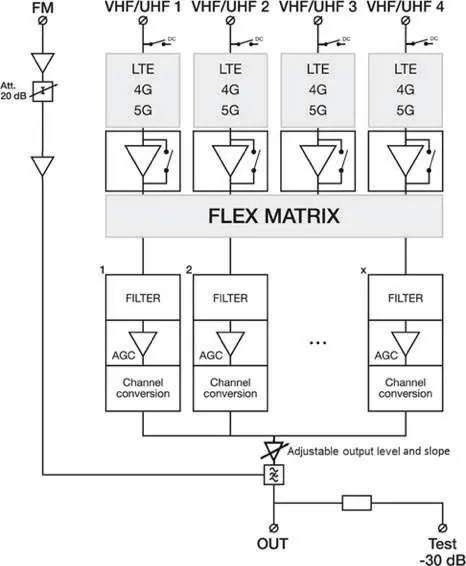
The Profiler Revolution optimizes terrestrial VHF/UHF and FM signals from multiple inputs. It features 5 inputs (1x FM, 4x VHF/UHF), real-time AGC on all filters, and the ability to convert channels using the Flex Matrix technology. It supports more than 50 channels and can be locked with a security code.
Installation
Important: Mount the module vertically to a wall in a well-ventilated room. Leave a minimum space of 15 cm around the product to ensure maximum ventilation.
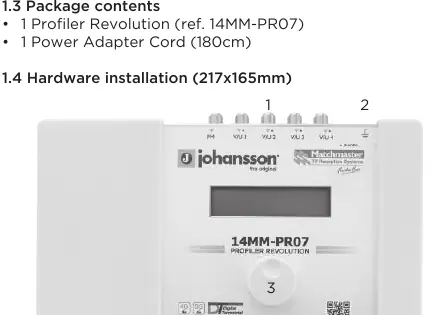
- Connect an earth wire to the grounding clamp.
- Connect the power adapter cord to the power supply socket.
- Connect the VHF/UHF and/or FM inputs to the device.
- Connect a coaxial cable to the output connector for signal distribution.
- Connect a network analyser to the test port to control signal quality.
Configuration and Menu Navigation
Use the Johansson rotary/push button to navigate the menu:
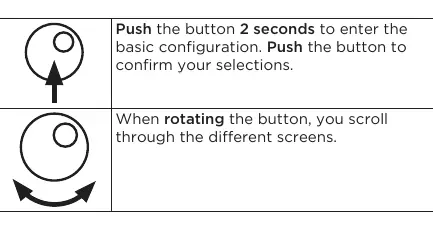
- Push (2 seconds): Enter basic configuration.
- Push: Confirm selections.
- Rotate: Scroll through screens.
The menu includes sections for Input FM, Input V/U 1-4, Output, Advanced, SD Card, and Exit. You can upload or save configurations using an SD card.
Channel Setup
To add channels, navigate to the ADD CHANNEL menu. Select the starting channel and the stop channel. You can convert channels by rotating the button. Ensure that only one input channel is assigned to one output channel; if two channels are assigned to the same output, a star (*) will appear on the display.
Advanced Settings
Advanced settings allow you to:
- Change the device language (English, Italian, Spanish, French).
- Define DC voltage for inputs (12V or 24V).
- Adjust filter bandwidth (from -2000 kHz to 0 kHz).
- Activate S-Band channels.
- Check firmware version and serial number.
Maintenance and Safety
To maintain the device, use only a dry soft cloth to clean the cabinet; do not use solvents. For repairs, refer to qualified personnel. Ensure the unit is installed in a dry location, away from rain, moisture, or heat sources, and ensure the mains plug remains readily operable.
Practical help
Common problems
A star (*) appears on the display
Two channels are assigned to the same output channel. Ensure each output channel is selected only once.
Forgot the lock code
Use the master code 50. This code is fixed and cannot be changed.
Bad image quality
Check if multiple input channels are assigned to the same output channel or adjust the output level using a network analyser.
Before use
- Mount the unit vertically with 15 cm of clearance for ventilation.
- Connect an earth wire to the grounding clamp.
- Perform a hard reset to set the correct region/country.
- Check the status LED for DC power indication.
- Ensure the mains plug is readily operable.
Specs in practice
- Output Level
- Adjustable between 98dBµV and 118dBµV.
- LTE Protection
- Automatic selection of 694MHz, 790MHz, or OFF.
Images and diagrams
- The block diagram illustrates the signal path from the 5 inputs (FM + 4x VHF/UHF) through the LTE filters, Flex Matrix, and AGC stages to the output.
Model compatibility
- Compatible with VHF/UHF and FM terrestrial signals.
- Supports S-Band output channels.
- Default region is Europe; supports Australia, Brazil, China, Hong Kong, Italy, New Zealand, Russia, South Africa, UK, and USA.

Manual page author
Emily Carter
User documentation editor
Prepares concise manual descriptions and highlights the most useful setup, operation, and maintenance information for readers.