Electronics / Satellite Equipment
User Manual for Televes OTDR Basic
Quick guide for the Televes OTDR Basic. Learn about its features, technical specifications, measurement modes, and how to use the device for fiber optic testing.
Table of contents
Quick guide from the manual
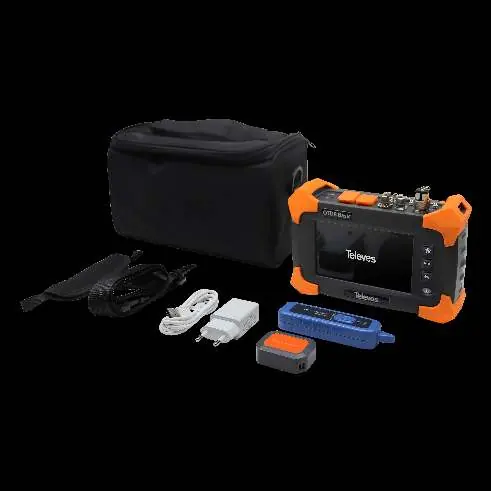
The Televes OTDR Basic is a professional optical time domain reflectometer designed for analyzing fiber optic networks. To ensure accurate measurements, it is essential to use a launch fiber at both the beginning and the end of the fiber network being tested. The device features a 5-inch touchscreen, an 8-hour battery life, and supports multiple measurement modes including OTDR, OPM, and VFL.
Device Description
The OTDR Basic is a compact, handheld device used to identify and analyze line losses and faults in fiber optic networks. It sends light pulses through the fiber and measures the reflected and attenuated light to calculate the location and nature of events.
Measurement Functions
The device integrates several testing functions into one unit:
- Expert and Auto OTDR: For comprehensive event detection and analysis. Auto mode uses pre-configured parameters for ease of use, while Expert mode allows manual configuration.
- OPM (Optical Power Meter): Measures optical power.
- SLS (Stabilized Laser Source): Provides a stable light source.
- OLT (Optical Loss Test): Tests for optical loss.
- VFL (Visual Fault Locator): Visually locates faults.
- RJ45 Network Cable Tester: Tests network cable length and type.
Usage and Data Management
Data can be displayed as a fiber trace, event table, or link schema. The included OTDR Trace Software allows for data processing on a computer via a Micro-SD card or USB connection. The device features an internal memory and supports storage on an SD card.
Technical Specifications
Key performance parameters include:
- Wavelength: 1310 and 1550 nm (± 20nm).
- Dynamic Range: 24dB.
- EDZ (Event Dead Zone): 1.5m.
- ADZ (Attenuation Dead Zone): 8m.
- Display: 5.0-inch color LCD touchscreen.
- Battery: Li-Ion 3.7V, 6.6Ah, providing up to 8 hours of continuous operation.
Maintenance and Safety
The device is designed for daily use. Ensure the battery is charged using the provided AC adapter (100-240V). The device supports multiple languages in the OSD menu. Keep the fiber connectors clean and use the provided carrying case for transport.
Practical help
Common problems
Inaccurate measurements at the start or end of the fiber
Always use a launch fiber (Vorlauffaser) at both the beginning and the end of the fiber network being measured.
Data not saving or accessible
Ensure the microSD card is properly inserted and has available storage space.
Before use
- Charge the device using the included AC adapter.
- Ensure the fiber connectors are clean.
- Connect a launch fiber to the test port.
- Select the appropriate measurement mode (Auto/Expert OTDR, OPM, etc.) based on your testing requirements.
- Verify the fiber type (Singlemode 1310/1550nm) matches the device specifications.
Specs in practice
- EDZ (Event Dead Zone)
- 1.5m - The minimum distance at which two events can be distinguished.
- ADZ (Attenuation Dead Zone)
- 8m - The minimum distance after an event where the fiber loss can be measured.
- Dynamic Range
- 24dB - The maximum loss the OTDR can measure.
Model compatibility
- Compatible with Singlemode 1310/1550nm fiber optic links.

Manual page author
Michael Turner
Technical manual editor
Reviews PDF manuals for structure, safety notes, and practical product details so readers can find the right information quickly.