Power / Solar Panels
User Manual for XTM 12V Watt Meter
Quick guide for the XTM 12V Watt Meter (WM12V-S1227T). Includes connection instructions for solar panels and appliances, safety limits, display explanations, and technical specifications.
Table of contents
Manual images
Click an image to enlargeQuick guide from the manual
The XTM 12V Watt Meter is designed to monitor power consumption or generation in 12V systems. It connects in-line between your power source and your load. The device is rated for a maximum of 60V and 50A continuous current (100A peak). Always ensure your wiring is appropriately sized and that you have installed fuses on all inputs and outputs to prevent damage or fire.
Important Safety Instructions
- Voltage Limit: Do not exceed 60V.
- Current Limit: Do not exceed 50A continuous current. Exceeding these limits may cause permanent damage, fire, or personal injury.
- Wiring: Ensure all wiring is safe, appropriately sized for the load, and free of exposed wires.
- Connections: Ensure input and output connections are tight to prevent short circuits.
- Battery Health: Ensure the battery is in good condition before connecting to the meter.
- Fuses: It is highly recommended to fit appropriately sized fuses to all inputs and outputs.
Display Indication
The LCD screen displays four key metrics in sequence:
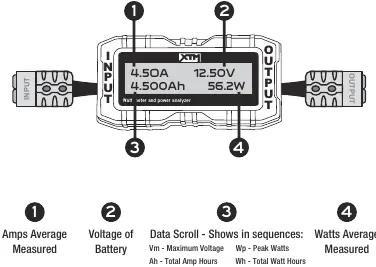
- Amps Average Measured: Current flow.
- Voltage of Battery: Real-time voltage.
- Data Scroll: Cycles through Maximum Voltage (Vm), Peak Watts (Wp), Total Amp Hours (Ah), Total Watt Hours (Wh), and Peak Amps (Ap).
- Watts Average Measured: Real-time power consumption or generation.
Operation Instructions
To monitor power generated by solar panels
- Connect the "Input" connection to the solar panel lead.
- Connect the "Output" connection to the battery lead.
- Read the power information on the display screen.
To monitor power used by an appliance
- Connect the "Input" connection to your battery lead.
- Connect the "Output" connection to your appliance.
- Read the power information on the display screen.
Specifications
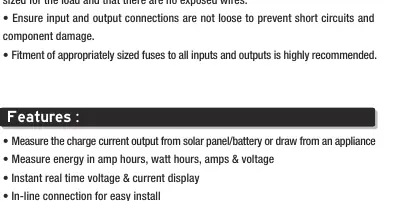
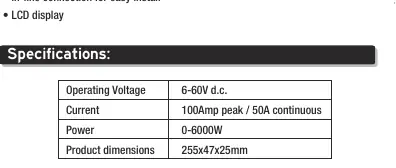
- Operating Voltage: 6-60V d.c.
- Current: 100A peak / 50A continuous.
- Power: 0-6000W.
- Product Dimensions: 255x47x25mm.
Maintenance
If you need to reset the data scroll to zero, disconnect the Watt Meter from both the input and the output for 30 seconds, then reconnect it.
Manufacturer information
XTM
Practical help
Common problems
Data scroll values are not resetting to zero
Disconnect the Watt Meter from both the input and output for 30 seconds, then reconnect.
Device damage or fire hazard
Ensure you do not exceed 60V or 50A continuous current. Always use appropriately sized fuses.
Before use
- Ensure the battery is in good condition.
- Verify all wiring is safe and appropriately sized for the load.
- Check that there are no exposed wires.
- Ensure input and output connections are tight.
- Install appropriate fuses on all inputs and outputs.
Specs in practice
- Operating Voltage
- 6-60V d.c. range.
Images and diagrams
- The device is installed in-line: Input connects to the power source (solar panel or battery), and Output connects to the load (battery or appliance).
Model compatibility
- Maximum voltage: 60V.
- Maximum continuous current: 50A.

Manual page author
Michael Turner
Technical manual editor
Reviews PDF manuals for structure, safety notes, and practical product details so readers can find the right information quickly.