Toys / Games
Owner's Manual for Kidzone 060-ROT-33L Licensed McLaren 765LT Ride-On
Quick guide for the Kidzone 060-ROT-33L Licensed McLaren 765LT Ride-On. Includes assembly steps, charging instructions, remote control pairing, and safety guidelines.
Table of contents
Manual images
Jump to the sectionQuick guide from the manual
This document provides essential instructions for the assembly, operation, and maintenance of the Kidzone 060-ROT-33L Licensed McLaren 765LT Ride-On. The vehicle is designed for children aged 37-72 months with a maximum weight capacity of 55 lbs (25 kg). Assembly must be performed by an adult. Always ensure the child wears a helmet and is supervised during use.
Assembly Instruction
The vehicle requires assembly of wheels, steering wheel, windshield, seat, and side mirrors. Ensure all small parts are kept away from children during this process.
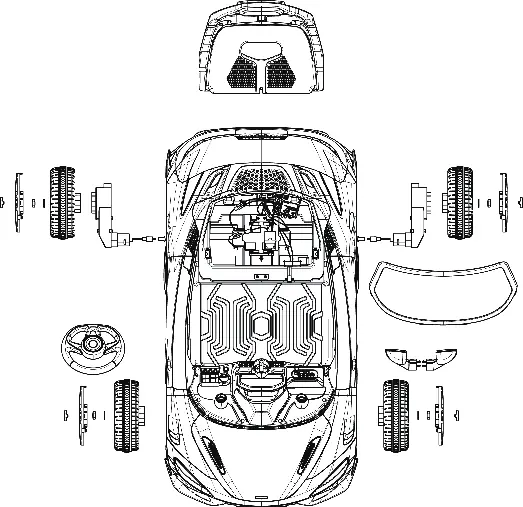
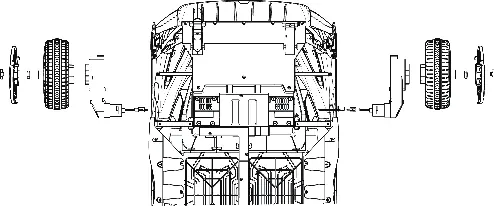
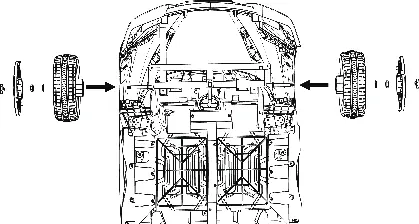
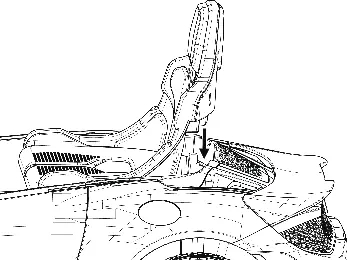
- Rear Axle: Remove pre-installed washers and nuts. Install motors and wheels, then secure with washers and nuts. Attach wheel covers and hubcaps.
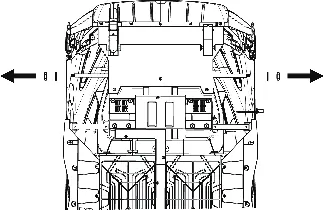
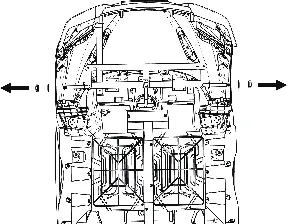
- Front Axle: Remove pre-installed washers and nuts (keep one washer on each side). Install wheels, secure with washers and nuts, and attach covers.
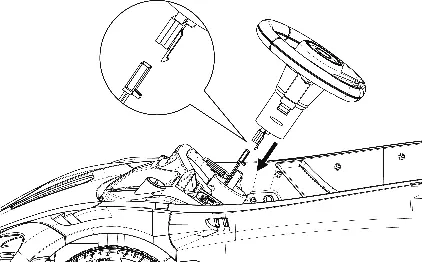
- Steering Wheel: Connect wires from the steering wheel to the vehicle and insert it into the steering column.
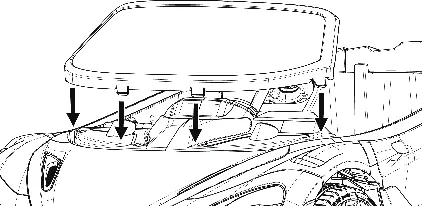
- Windshield: Fit the tabs into the grooves until they click into place.
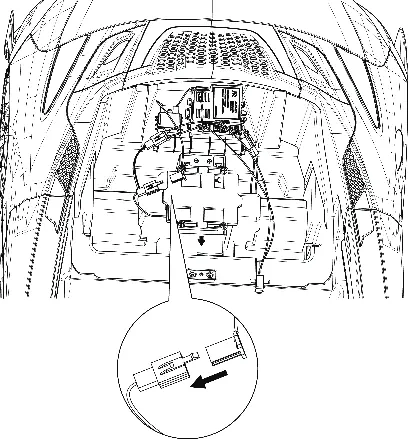
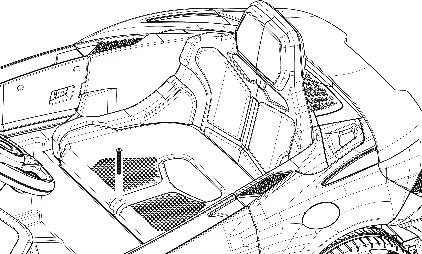
- Electrical: Connect motor cables and the battery cable to the control unit located under the seat.
- Seat: Remove the pre-installed screw, align the seat, and secure it with the screw.
- Side Mirrors: Insert the mirrors into the sides of the vehicle body.
Charging
The battery must be charged for 8-12 hours before the first use. Do not exceed 20 hours of charging. The vehicle must be turned OFF during charging. The charger indicator turns red while charging and green when complete. Charge the battery at least once a month to maintain its life.
Operation
The vehicle is controlled via a power button, forward/reverse switch, light switch, and a foot pedal. The media player features Bluetooth connectivity (select 'Kidzone Ride on' on your device), volume control, and horn buttons.
Remote Control
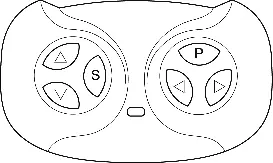
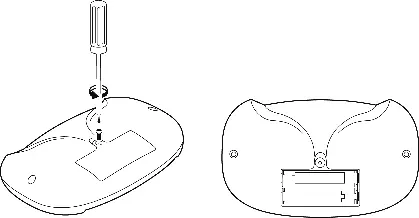
The remote control must be paired with the vehicle: insert 2 AAA batteries, press and hold the forward and reverse buttons for 3 seconds until the indicator flashes, then turn on the vehicle. The remote overrides the foot pedal and includes an emergency brake button.
Care and Maintenance
Regularly check for loose parts or cracked plastic. Clean with a cloth and non-wax furniture polish. Do not use a hose or immerse in water. The vehicle features a thermal fuse that resets automatically after 20 seconds if the system is overloaded.
Manufacturer information
Kidzone Toys
Practical help
Common problems
Vehicle does not move
Check battery charge, ensure battery is connected, or wait for the thermal fuse to reset.
Vehicle runs very slow
Charge the battery, check if the user is within the 55 lbs weight limit, or avoid harsh driving environments.
Battery does not charge
Ensure the charger is firmly plugged into the wall and the vehicle's charging port.
Remote control not working
Replace batteries in the remote and repeat the pairing process.
Before use
- Ensure the battery is fully charged (8-12 hours).
- Verify all parts are securely assembled and tightened.
- Ensure the child is wearing a helmet and protective gear.
- Check that the area is flat, dry, and free of obstacles.
- Confirm the child is within the 37-72 months age range and 55 lbs weight limit.
Specs in practice
- Charging Time
- 8-12 hours; do not exceed 20 hours.
Images and diagrams
- Page 7: Exploded view of parts and accessories.
- Page 8-9: Step-by-step wheel and motor assembly.
- Page 11: Battery and motor cable connection diagram.
- Page 16: Remote control button layout.
- Page 17: Battery replacement for the remote control.
Model compatibility
- Only use the provided charger and battery.
- Remote control requires 2 AAA 1.5V batteries (not included).
- Bluetooth media player compatible with mobile devices.

Manual page author
David Miller
Documentation analyst
Organizes user manual content into clear summaries, with attention to model details, product context, and everyday usability.