Power / Wireless Chargers
User Manual for Leader Premiums Pad Pal 15W Wireless Charging Pad
Quick guide for the Leader Premiums Pad Pal 15W Wireless Charging Pad (Model AB0614). Includes setup instructions, cable adapter usage, technical specifications, and safety precautions.
Table of contents
Quick guide from the manual
The Pad Pal 15W Wireless Charging Pad is designed for efficient wireless charging and includes a versatile 65W cable kit. For optimal performance, it is recommended to use a quick charge power adapter of at least 18W. Ensure the charging surface is free of obstructions like keys or coins before placing your device.
Functions
The device features the following components:
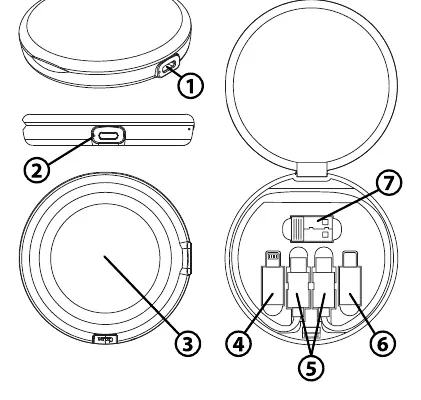
- Type-C Input Port: Main power input for the charging pad.
- LED Indicator: Illuminates white during charging.
- Wireless Charging Surface: Area where the device should be centered.
- 2-in-1 Reversible Output Tip: Versatile connector for various devices.
- Type-C to Type-C Cable: Primary connection cable.
- Micro Output Tip: Adapter for Micro-USB devices.
- USB-A Input Adapter: Allows connection to standard USB-A wall chargers.
Wireless Charging Instructions
- Connect the Type-C cable to a power source and the charging pad's Type-C Input Port.
- Place your wireless charging-compatible device on the charging surface.
- Ensure the device is centered for the best results.
- The LED indicator will illuminate white when charging begins.
Note: If the LED indicator flashes, the device may not be compatible, or there is an obstruction (like keys or coins) interfering with the process.
Using Charging Cable with Adapters
The included cable kit allows for wired charging with various devices:
- USB-A Adapter: Use this to connect the charging cable to a standard USB-A wall charger or laptop port.
- Micro-USB Devices: Attach the Micro output tip to the Type-C end of the cable.
- iOS Devices (Lightning): Use the 2-in-1 reversible tip. Insert the cable with the side with pins facing upwards.
- Micro-USB (via 2-in-1 tip): Insert the cable with the 5-PIN side facing up.
Technical Specifications
- Type-C Input Port: 5V/2A; 9V/2.2A
- Type-C Tip Output: 65W max
- 2-in-1/Micro Tips Output: 10W
- Wireless Output: 15W Max
Safety Precautions
- Do not expose the device to moisture.
- Do not exceed 104°F (40°C) operating temperature.
- Do not disassemble the device; seek qualified service for repairs.
- Remove attachments from the back of your phone before wireless charging.
- Do not overcharge; remove the phone after it is fully charged.
Practical help
Common problems
LED indicator flashes during charging
The device is not compatible with wireless charging, or there is an obstruction (keys, coins) on the charging surface.
Slow charging speed
Ensure you are using a quick charge power adapter of at least 18W.
Before use
- Check for obstructions (keys, coins) on the charging surface.
- Ensure the power adapter is at least 18W for optimal performance.
- Verify the device supports wireless charging.
- Ensure the cable is securely connected to the Type-C input port.
Specs in practice
- Wireless Output
- Maximum power delivery of 15W for compatible devices.
- Type-C Input
- Requires 5V/2A or 9V/2.2A power source.
- Operating Temperature
- Keep between 32°F (0°C) and 115°F (45°C).
Images and diagrams
- The diagram on page 2 illustrates the charging pad components (1-3) and the cable kit adapters (4-7), showing how to connect the tips for different device types.
Model compatibility
- Compatible with devices supporting wireless charging.
- iOS devices (including iPhone models below 15 series) require specific orientation of the 2-in-1 tip.
- Micro-USB devices require specific orientation of the 2-in-1 tip.

Manual page author
David Miller
Documentation analyst
Organizes user manual content into clear summaries, with attention to model details, product context, and everyday usability.