Electronics / Remote Controls
Levolor InMotion 15-Channel Remote Quick Start Guide
Quick start guide for the Levolor InMotion 15-Channel remote. Learn how to pair your remote with window coverings, install batteries, and operate your shades.
Table of contents
Quick guide from the manual
This guide provides instructions for pairing your Levolor InMotion 15-Channel remote with your window coverings. Please ensure you pair the remote before installing the window coverings.
Pairing the remote
- Use the - and + buttons on the remote to select the desired channel.
- Press and hold the programming button on the window covering for approximately 2 seconds until the shade jogs or beeps once.
- Within the next 10 seconds, press and hold the Stop (□) button on the remote until the shade jogs twice or beeps three times.
Remote controls
The remote features an LCD display and several control buttons:
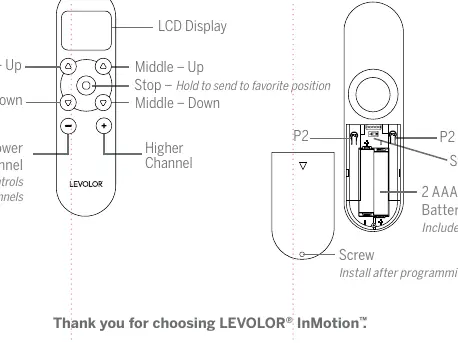
- Channel Selection: Use the + and - buttons to switch between channels. Channel 0 controls all channels.
- Stop Button: Used for pairing and sending the shade to a favorite position.
- Up/Down Buttons: Used to operate the shade movement.
Battery installation
The remote requires 2 AAA batteries. The battery compartment is located on the back of the remote. After inserting the batteries and completing the programming, secure the battery cover with the provided screw.
Support
For further assistance, visit levolor.com/InMotionSupport or use the QR code provided in the manual to download the complete remote guide.
Official resources from the manual
Manufacturer information
Levolor
Practical help
Common problems
Shade does not jog or beep during pairing
Ensure batteries are fresh and correctly installed. Verify you are pressing the programming button on the shade for 2 seconds and completing the remote step within 10 seconds.
Remote not controlling the shade
Verify the correct channel is selected on the remote. Channel 0 controls all channels.
Before use
- Ensure 2 AAA batteries are installed.
- Select the desired channel using the + and - buttons.
- Locate the programming button on the window covering.
- Have the remote ready to press the Stop button within 10 seconds of the shade signal.
Images and diagrams
- Remote Layout: Shows LCD display, channel selection buttons, and the Stop button.
- Battery Compartment: Located on the back; requires 2 AAA batteries and a screw for securing.
Model compatibility
- Designed for Levolor InMotion window coverings.

Manual page author
Michael Turner
Technical manual editor
Reviews PDF manuals for structure, safety notes, and practical product details so readers can find the right information quickly.