Home Appliances / Fans
User Manual for Living Co 15cm USB Desk Fan CL-F1570
Quick guide for the Living Co 15cm USB Desk Fan (Model CL-F1570). Learn how to charge, operate, adjust the tilt angle, and clean your fan safely.
Table of contents
Manual images
Click an image to enlargeQuick Guide
This guide provides essential information for the Living Co 15cm USB Desk Fan. Before first use, ensure the fan is fully charged. The fan features three speed settings and an adjustable tilt angle. Always disconnect the USB cable after charging is complete and do not operate the fan while it is charging.
Product Overview
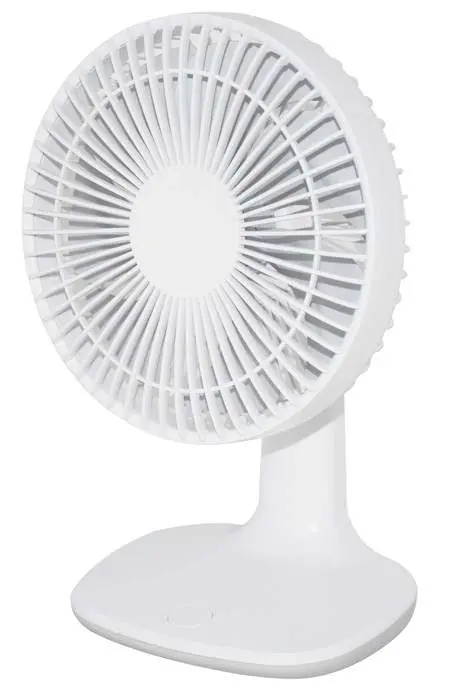
The fan consists of a front grille, blade, stand, base, and an ON/OFF speed switch. The charging port is located on the base. The package includes the desk fan, a USB cable, and this instruction manual. Please note that a power adapter is not included.
Charging the Battery
Connect the provided USB cable to the fan's charging port and a USB power source (adapter or power board). During charging, the red LED indicator will flash. When the battery is fully charged, the LED will turn white. Disconnect the cable once charging is complete. Do not leave the charge cable connected for more than 4 hours.
Operating the Fan
Ensure the fan is fully charged before use. Press the power/speed button to cycle through the settings:
- Press once: Low speed
- Press twice: Medium speed
- Press three times: High speed
- Press four times: Off
Adjusting the Fan Angle
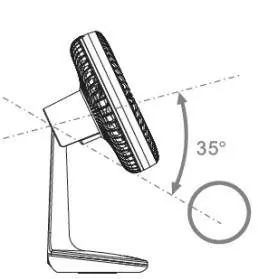
You can adjust the airflow angle by tilting the fan head. Gently lift or lower the fan head to your desired position. The maximum adjustment angle is approximately 35 degrees. Do not force the fan head beyond this range, and note that it cannot be rotated left or right.
Care and Cleaning
Always disconnect the USB cable before cleaning. Do not immerse the fan in water. Use a damp-dry cloth to wipe the grille, base, and blades. To clean the blades thoroughly, you must disassemble the front grille:
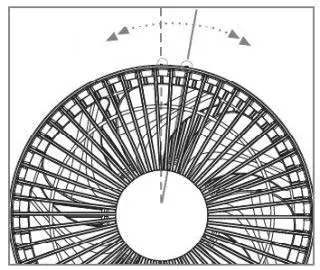
- Remove the small safety screw located on the lower back of the grille.
- Hold the rear grille with one hand and rotate the front grille anti-clockwise with the other to loosen it.
- After cleaning and drying, re-align the locking tabs to re-install the front grille and tighten the safety screw.
Safety Precautions
- Do not use the fan outdoors or near water.
- Do not operate the fan if the charge cord or plug is damaged.
- Keep fingers, hair, and clothing away from the blades.
- Do not place the fan near heat sources, open flames, or flammable materials.
- Do not cover ventilation openings.
- The fan is intended for household use only.
Practical help
Common problems
Fan does not charge or operate
Check the USB connection and ensure the power adapter is functional. If the protection device has triggered, let the fan rest for a few minutes before switching it back on.
Grille is difficult to remove
Ensure the small safety screw on the lower back of the grille has been completely removed before attempting to rotate the grille.
Fan stops during operation
The battery may be depleted or the safety protection device may have activated. Recharge the battery or allow the unit to rest.
Before use
- Remove all packaging materials.
- Place the fan on a stable, firm, level surface.
- Charge the fan fully before the first use.
- Ensure the fan is fully assembled before operation.
- Verify that the USB power source is compatible (5V DC).
Specs in practice
- Rated Voltage
- 5V DC, standard USB power requirement.
- Battery Capacity
- 1800 mAh Li-ion battery.
- Full Recharge Time
- 2.5-3 hours to reach full charge.
Images and diagrams
- The fan head can be tilted up or down by a maximum of 35 degrees.
- The front grille is removed by rotating it anti-clockwise after removing the safety screw.
Model compatibility
- USB cable is included, but a USB power adapter is not provided.
- Do not use with non-standard or damaged power adapters.

Manual page author
Michael Turner
Technical manual editor
Reviews PDF manuals for structure, safety notes, and practical product details so readers can find the right information quickly.