Automotive / Car Audio
Installation Guide for Metra 108-CH4 Car Kit
Step-by-step installation guide for the Metra 108-CH4 car kit, designed for 2006-2007 Jeep Commander vehicles. Includes instructions for dash disassembly, kit preparation, and radio assembly.
Table of contents
Quick guide from the manual
This document provides installation instructions for the Metra 108-CH4 car kit, specifically designed for the 2006-2007 Jeep Commander (without navigation) to accommodate the Pioneer DMH-C5500NEX 8-inch radio. Before beginning, ensure the vehicle has sat with the key out of the ignition for a few minutes to prevent electrical issues. Always test the aftermarket equipment before fully reassembling the dash.
Tools required
- 9/32" Socket wrench
- 5mm Allen screwdriver
- Cutting tool
- Panel removal tool
- Phillips screwdriver
- Solder gun
Dash disassembly
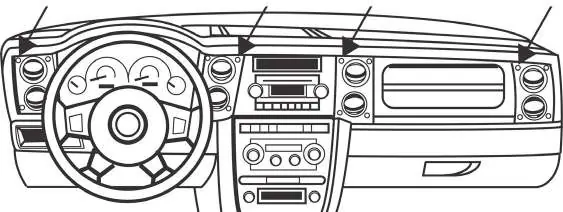
- Remove the (16) 5mm Allen screws securing the dashboard trim panel.
- Unclip and remove the dashboard trim panel.
- Remove the (4) 9/32" screws securing the factory radio.
- Slide the radio out, then unplug and remove it.
Kit preparation
- Using a solder gun or cutting tool, remove the plastic welds holding the factory radio bezel in place.
- Use a pry tool to remove the factory radio bezel from the center of the factory dash panel. Be careful not to damage the mounting holes.
- Clip the new radio bezel in, place the retaining caps over the (4) screw holes, and secure using the provided Phillips screws.
Kit assembly
- Secure the radio chassis to the radio brackets using (4) screws supplied with the radio.
- Secure the display screen to the radio brackets using (4) screws supplied with the radio.
- Locate the factory wiring harness and antenna connector in the dash. Connect them to the radio using the proper mating adapter (Metra or Axxess recommended).
- Test the radio for proper operation.
- Slide the radio into the dash and secure it using the factory screws.
- Reinstall the dash in reverse order of disassembly.
Troubleshooting and support
If you encounter difficulties, verify that the installation was performed exactly as stated in the manual. Ensure the vehicle is apart and ready for troubleshooting before contacting technical support. For assistance, call 386-257-1187 or email [email protected].
Practical help
Common problems
Radio not powering on or functioning correctly
Ensure all factory equipment is connected before cycling the key to ignition. Verify that the wiring harness and antenna adapter are properly connected.
Difficulty removing the factory radio
Ensure the vehicle has sat with the key out of the ignition for a few minutes before starting the disassembly process.
Before use
- Verify vehicle compatibility (Jeep Commander 2006-2007 without NAV)
- Ensure you have all required tools (9/32" socket, 5mm Allen, etc.)
- Let the vehicle sit with the key out of the ignition for a few minutes
- Have the Pioneer DMH-C5500NEX radio ready
- Ensure you have the correct wiring harness (CHTO-01) and antenna adapter (40-CR10)
Images and diagrams
- Figure A (Dash Disassembly): Illustrates the location of the 16 screws securing the dashboard trim panel.
- Figure B (Kit Assembly): Shows the correct orientation for securing the radio chassis and display screen to the radio brackets.
Model compatibility
- Designed specifically for the Pioneer DMH-C5500NEX 8-inch radio.
- Compatible with Jeep Commander (without NAV) 2006-2007.

Manual page author
Emily Carter
User documentation editor
Prepares concise manual descriptions and highlights the most useful setup, operation, and maintenance information for readers.