Automotive / Car Audio
Installation Guide for Metra 108-GM1G Dash Kit
A comprehensive installation guide for the Metra 108-GM1G dash kit. This manual provides step-by-step instructions for disassembling the dashboard, assembling the radio kit, and connecting wiring for compatible Chevrolet Silverado and GMC...
Table of contents
Manual images
Click an image to enlargeQuick guide from the manual
This document provides installation instructions for the Metra 108-GM1G dash kit, designed for specific Chevrolet Silverado and GMC Sierra vehicles (2014-up). Important: Before starting, disconnect the negative battery terminal to prevent electrical shorts. Ensure the key is removed from the ignition. This kit is specifically designed for the Pioneer DMH-C5500NEX 8-inch radio.
Tools required
- Panel removal tool
- Phillips screwdriver
- 9/32" socket wrench
- Cutting tool
Dash Disassembly
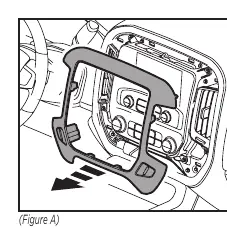
- Use a panel removal tool to unclip and remove the trim panel surrounding the radio and climate control panel.
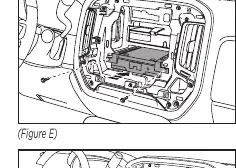
- Remove the (4) 9/32" screws securing the radio/climate control panel, then unclip and unplug the panel.
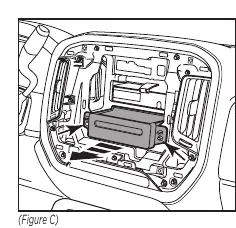
- Remove the (2) 9/32" screws securing the CD player, slide it out, and unplug it.
- Use a cutting tool to modify the sub-dash to create space for the aftermarket radio.
Kit Assembly
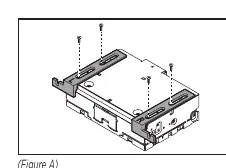
- Radio Chassis: Secure the radio chassis brackets to the radio chassis using the (4) screws supplied with the radio.
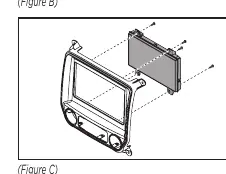
- Radio Display: Secure the radio display to the radio display brackets using the (6) screws supplied with the radio.
- Assembly: Secure the display/bracket assembly to the radio trim panel using the (4) Phillips screws provided.
- Climate Controls: Clip the factory climate controls into the new radio trim panel.
- Connections: Locate the factory wiring harness and antenna connector. Metra recommends using the proper mating adapter from Metra or AXXESS. Complete all connections to the radio and vehicle.
- Final Installation: Slide the radio chassis into the dash and secure it using the factory screws. Secure the radio display and trim panel assembly to the vehicle using the factory screws. Finally, clip the factory trim panel over the completed assembly.
Technical Support
If you encounter difficulties, contact Metra Tech Support at 386-257-1187 or via email at [email protected]. Support hours are Monday-Friday 9:00 AM - 7:00 PM, Saturday 10:00 AM - 7:00 PM, and Sunday 10:00 AM - 4:00 PM (Eastern Standard Time).
Practical help
Common problems
Radio does not fit in the dash
Ensure the sub-dash has been cut properly as instructed in the Dash Disassembly section to provide adequate clearance.
Confusion regarding which screws to use
The display screen and radio chassis use two different types of screws. Refer to the installation manual provided with your specific radio for hardware guidance.
Before use
- Disconnect the negative battery terminal.
- Ensure the key is out of the ignition.
- Verify vehicle compatibility (Chevrolet Silverado/GMC Sierra 2014-up).
- Gather required tools: panel removal tool, Phillips screwdriver, 9/32" socket wrench, cutting tool.
- Obtain necessary wiring harness and antenna adapter (sold separately).
Specs in practice
- 9/32" socket wrench
- Required for removing the factory screws that secure the radio and climate control panel.
- Cutting tool
- Required to modify the sub-dash to accommodate the aftermarket radio.
Images and diagrams
- Dash Disassembly: Illustrates the removal of the trim panel and the radio/climate control assembly.
- Kit Assembly: Shows the attachment of brackets to the radio chassis and display, and the final assembly into the trim panel.
Model compatibility
- Designed specifically for the Pioneer DMH-C5500NEX 8-inch radio.
- Compatible with Chevrolet Silverado 1500 (2014-2018, 2019 LD), 2500/3500 (2015-up).
- Compatible with GMC Sierra 1500 (2014-2018, 2019 Limited), 2500/3500 (2015-up).

Manual page author
Michael Turner
Technical manual editor
Reviews PDF manuals for structure, safety notes, and practical product details so readers can find the right information quickly.