Electronics / Video Transmission
Minix C1 Wireless USB-C to HDMI Dongle
Quick start guide for the Minix C1 Wireless USB-C to HDMI Dongle. Learn how to connect the receiver and transmitter, set up screen mirroring, and troubleshoot connection issues.
Table of contents
Quick Start Guide
The Minix C1 Wireless USB-C to HDMI Dongle allows for wireless screen mirroring from devices with USB-C video output to an HDMI display. Follow these steps to set up your device.
Installation
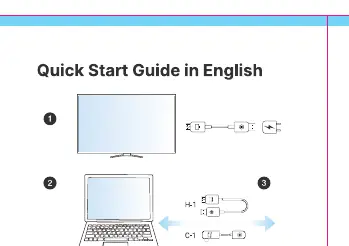
- Connect Receiver: Plug the wireless HDMI receiver into your TV or monitor. Connect the USB cable to a powered USB port to provide power to the receiver.
- Connect Transmitter: Plug the C1 transmitter into the USB-C port of your laptop, smartphone, or tablet. Ensure your device supports DP Alt mode for video output.
- Pairing: Wait for the device to establish the wireless screen mirroring or extension automatically.
Troubleshooting
If the connection fails or the screen mirroring stops:
- Restart: Unplug the C1 transmitter from your device's USB-C port.
- Reconnect: Plug the transmitter back into the USB-C port to restart the pairing process.
- Power Check: Ensure the receiver is properly connected to a stable USB power source.
Safety Information
This equipment complies with FCC radiation exposure limits for an uncontrolled environment. It is designed to be installed and operated with a minimum distance of 0cm between the radiator and your body. Any unauthorized changes or modifications to this device could void your authority to operate the equipment.
Manufacturer information
Minix
Practical help
Common problems
Connection not established
Unplug the transmitter from the USB-C port and plug it back in to restart the pairing process.
Before use
- Ensure your source device (laptop/phone/tablet) supports DP Alt mode for video output
- Connect the receiver to a reliable USB power source
- Ensure the receiver is securely connected to the TV or monitor HDMI port
Images and diagrams
- The setup diagram illustrates connecting the receiver to the display and power, followed by connecting the transmitter to the source device.
- The diagram confirms the automatic pairing process between the transmitter and receiver.
Model compatibility
- Requires a USB-C port capable of video output (DP Alt Mode).

Manual page author
David Miller
Documentation analyst
Organizes user manual content into clear summaries, with attention to model details, product context, and everyday usability.