Electronics / Two-Way Radios
Yaesu WIRES-X PC Software Installation and Update Guide
Comprehensive guide for installing and updating the Yaesu WIRES-X PC software. Includes system requirements, version compatibility charts, and step-by-step installation instructions.
Quick answers from the manual
Quick answer
- This document provides instructions for installing the Yaesu WIRES-X PC software and details important updates, system requirements, and version compatibility. p. 1, 2, 3
Key actions
- Install software p. 3
- Check compatibility p. 1
First start
- Close existing software, download and unzip the file, run Install.exe, and follow the setup wizard. p. 3
Problems and fixes
Connection issues between versions
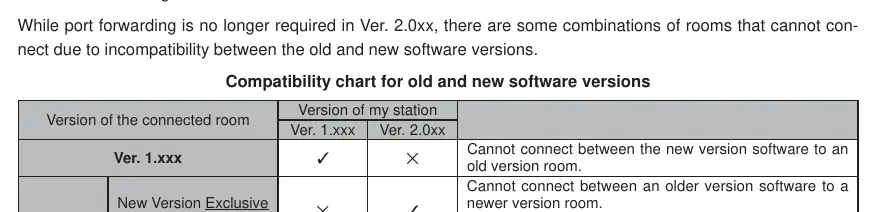
Refer to the compatibility chart on page 1 to ensure your station version matches the connected room version.
p. 1Technical specifications
| Parameter | Value | Meaning | Pages |
|---|---|---|---|
| OS | Windows 11 | Required operating system | p. 2 |
| Processor | 2.0GHz+ | Minimum clock frequency | p. 2 |
| RAM | 4GB+ | Recommended memory | p. 2 |
Where to find it in the PDF
- Software Updates and Compatibility p. 1
- System Requirements p. 2
- Installation Guide p. 3
Table of contents
Manual images
Click an image to enlargeQuick guide from the manual
This document provides essential information for updating and installing the Yaesu WIRES-X PC software. Users must verify system requirements and consult the compatibility charts before connecting nodes to ensure proper operation. The software update process involves downloading the firmware, running the installer, and following the setup wizard.
System Requirements
To ensure stable operation of the WIRES-X software, your PC must meet the following specifications:
- OS: Microsoft Windows 11
- Processor: 2.0GHz or faster
- RAM: 4GB or more recommended
- Storage: 64GB or more free space (256GB SSD recommended)
- Display: 1366 x 768 resolution or higher (32-bit true color recommended)
- Connectivity: Full-speed USB port, LAN port (100BASE-TX/1000BASE-T) or Wi-Fi (IEEE 802.11 b or higher)
- Audio: 3.5mm speaker and microphone terminals (required for specific modes)
Compatibility and Updates
The software includes important updates for node functionality, including support for FTX-1 and changes to port forwarding requirements. Users must refer to the compatibility charts provided in the manual to determine if their current node and room versions can connect. Some combinations of old and new software versions are incompatible and may require specific port forwarding setups or software upgrades to function correctly.
Installation Procedure
- Close any running WIRES-X software. If "Enable WIRES-X Auto Start" was selected, right-click the icon in the taskbar and select "Quit".
- Download and unzip the "wx2xxxen.zip" file.
- Execute the "Install.exe" file from the unzipped folder.
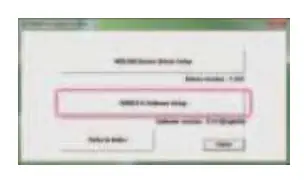
- Click "WIRES-X Software Setup" in the installer window.
- Click "Next" to proceed to the license agreement.
- Accept the terms in the License Agreement and click "Next".
- Confirm the installation destination folder and click "Next".
- Click "Install" to begin the process.
- Once complete, click "Finish" to close the setup wizard.
- Click "Close" in the main installer window to complete the installation.
Important Notes
All responsibility for using this firmware lies with the customer. Redistribution, transfer, and resale of downloaded files are prohibited. The software is intended for personal use only. If assistance is required, consult authorized sales sites or service centers.
Official resources from the manual
Practical help
Common problems
Cannot connect between new and old software versions
Consult the compatibility chart on page 1. Some combinations require specific port forwarding or software upgrades.
Audio dropouts during Uplink transmission
Update to Ver. 2.010 or later to resolve issues where multiple nodes initiate transmission simultaneously.
Node disconnection
Ensure all nodes are updated to compatible versions, specifically addressing issues with Ver. 1.5 nodes connecting to FTX-1.
Before use
- Verify your PC is running Windows 11.
- Ensure the processor is 2.0GHz or faster.
- Check that you have at least 64GB of free storage space.
- Close any existing WIRES-X software before starting the update.
- Download and unzip the software package before running the installer.
Images and diagrams
- The compatibility chart on page 1 identifies which software versions can successfully connect to each other.
- The installation screenshots on page 3 guide you through the setup wizard steps.
Model compatibility
- Port forwarding is no longer required for Ver. 2.0xx when connecting to new version rooms.
- Rooms compatible with older versions still require port forwarding setup.
- Ver. 2.010 is recommended for both node and room to ensure correct display of connected stations.

Manual page author
Michael Turner
Technical manual editor
Reviews PDF manuals for structure, safety notes, and practical product details so readers can find the right information quickly.