Automotive / Car Audio
User Manual for Musway DSP68 8-Channel DSP Processor
Quick guide for the Musway DSP68 8-Channel DSP Processor. Includes installation, wiring, software setup, and technical specifications.
Table of contents
Manual images
Click an image to enlargeQuick Guide
The Musway DSP68 is an 8-channel digital signal processor designed for automotive audio systems. This guide covers the essential steps for installation, connection, and initial setup. Always ensure the vehicle's ground connection is disconnected from the battery before starting any installation work to prevent short circuits.
Safety Instructions
- The device is intended for use with a 12V vehicle electrical system.
- Do not operate the sound system in a way that distracts from safe driving.
- Ensure sufficient air circulation around the device; do not cover cooling vents or heat sinks.
- Do not open the device, as this voids the warranty and poses a risk of electric shock.
- Installation should be performed by skilled staff.
- Ensure all cables are protected from sharp edges and are not routed near moving parts or heat sources.
Mechanical Installation
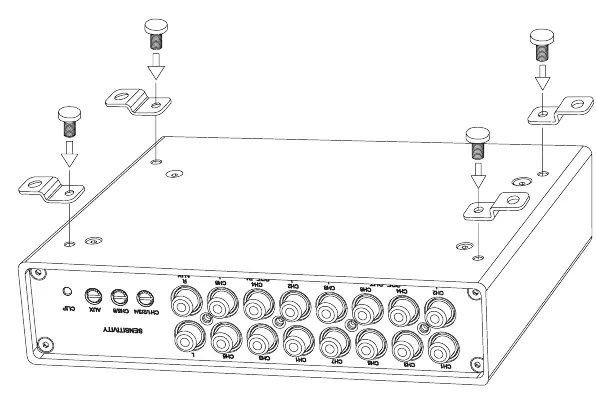
Choose a location that provides sufficient air circulation and is protected from high humidity and dust. Avoid mounting the device on vibrating surfaces like subwoofer boxes. Secure the device firmly to the vehicle chassis using the provided mounting points.
Electrical Interconnection
Use appropriate wiring kits with a sufficient cross-section (at least 2.5 mm). Clean all contact points on the battery and ground connection to ensure good conductivity.
- Power: Connect the +12V terminal to the battery positive pole with an in-line fuse (distance less than 30 cm). Connect the GND terminal to a solid, unpainted metallic point on the vehicle chassis.
- Remote: Use the REM IN terminal to turn the device on via a signal from the head unit. The POW ON SEL switch must be set to REM.
- High Level Input: Connect amplified speaker outputs from the head unit using the supplied 12-pole connector.
Description of Operation
The device features several inputs and controls:
- USB: Connects to a PC for software configuration.
- BT: Input for an external Bluetooth dongle for audio streaming or app control.
- DRC: Input for an optional Musway digital remote controller.
- OPT IN: Optical input for PCM stereo signals (up to 96 kHz / 24 bit).
- POW ON SEL: Switch to select turn-on method (SPK for auto turn-on via high-level input, REM for remote signal).
- CLIP LED: Lights up red if high-level inputs are overdriven; reduce input sensitivity if this occurs.
Initial System Start-up
- Download and install the Musway DSP software from www.musway.de/dsp.
- Install the device in the vehicle.
- Turn the ignition to ACC or ON.
- Connect the device to a PC via the included USB cable.
- Open the software to configure audio settings.
- The device is operational when the top logo lights up in orange.
Accessories
The DSP68 supports optional accessories:
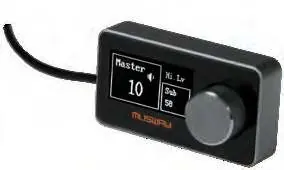
- DRC1: Remote control for volume, subwoofer level, and preset selection.
- BTS/BTA: Bluetooth dongles for wireless audio streaming and app-based control.
Technical Specifications
- Voltage: 7 - 15 VDC
- Input Sensitivity: 3V - 21V RMS (High Level); 1V - 5V RMS (Low Level)
- Bandwidth: 15 Hz - 22 kHz
- Crossover: Full / Hi Pass / Lo Pass / Band Pass (Bessel/Butterworth/Linkwitz)
- Dimensions: 181 x 123.5 x 41 mm
Official resources from the manual
Practical help
Common problems
CLIP LED lights up red
The input signal is overdriven. Reduce the input sensitivity using the corresponding controller until the LED goes out.
Device does not turn on
Check the power and ground connections. Ensure the POW ON SEL switch is set correctly (SPK or REM) and the remote signal is present if using REM mode.
Audio interference or noise
Ensure audio cables are routed separately from power supply wires. Check that the ground connection is secure and on a clean, unpainted metal surface.
Before use
- Disconnect the ground wire from the vehicle battery.
- Ensure the vehicle has a 12V electrical system.
- Download the Musway DSP software from the official website.
- Verify crossover and speaker configuration before turning on the system.
- Ensure all terminals are connected with correct polarity.
Specs in practice
- Input Sensitivity
- Adjustable to match the output voltage of the connected signal source (head unit).
- Time Alignment
- Adjustable delay (0-20 ms) to synchronize sound arrival from different speakers.
Images and diagrams
- Mechanical installation diagram shows the device mounting points.
- Electrical connection diagram illustrates power, ground, remote, and high-level input wiring.
- Panel layout diagram identifies USB, BT, DRC, and input/output ports.
Model compatibility
- Requires PC with Windows XP, Vista, 7, 8, or 10.
- Compatible with Musway DRC1 remote control.
- Compatible with Musway BTS and BTA Bluetooth dongles.

Manual page author
Michael Turner
Technical manual editor
Reviews PDF manuals for structure, safety notes, and practical product details so readers can find the right information quickly.