Computers / PC Components
NZXT 12VHPWR Adapter Cable User Manual
Quick installation guide and critical compatibility information for the NZXT 12VHPWR Adapter Cable. Learn how to safely connect your PCIe 5.0 cable and verify your power supply model compatibility.
Table of contents
Manual images
Click an image to enlargeImportant Information
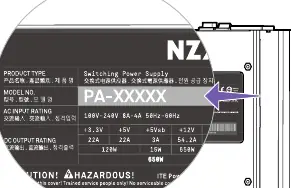
The NZXT 12VHPWR Adapter Cable is designed to connect specific NZXT power supplies to PCIe 5.0 graphics cards. Crucial Compatibility Warning: This cable is only compatible with NZXT C Series PSUs with the model number PA-xxxxx. Do not attempt to connect this cable to NZXT PSUs with the model number NP-xxxxx, as this may cause damage. Always verify your PSU model number on the product label before installation.
Installation
Follow these steps to install the adapter cable:
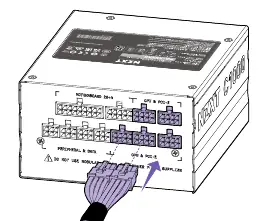
- Step 1: Connect the dual 8-pin connectors to the corresponding PCIe ports on your NZXT C Series power supply.
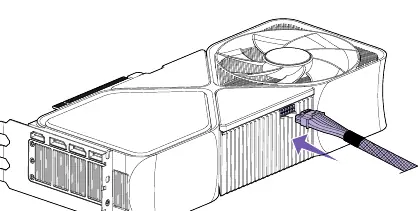
- Step 2: Connect the 16-pin connector to your graphics card. Ensure the connection is fully seated and secure.
Warranty
This product includes a 2-year warranty for accessories. The warranty covers manufacturing defects but does not cover damage resulting from accident, abuse, misuse, neglect, fire, water, lightning, or unauthorized product modifications. Proof of purchase is required for warranty service.
Support
If you encounter issues, contact NZXT support via their website at support.nzxt.com or email [email protected]. Please include a detailed explanation of the problem and your proof of purchase when contacting support.
Official resources from the manual
Practical help
Common problems
Incompatible Power Supply
Ensure your NZXT C Series PSU has the model number PA-xxxxx. Do not use this cable with NZXT PSUs labeled NP-xxxxx.
Before use
- Verify your PSU model number is PA-xxxxx
- Ensure the computer system is powered off
- Check that the 16-pin connector is fully seated in the GPU
- Ensure the dual 8-pin connectors are fully seated in the PSU
Images and diagrams
- Step 1: Connect the dual 8-pin connectors to the PSU.
- Step 2: Connect the 16-pin connector to the GPU.
Model compatibility
- Compatible only with NZXT C Series PSUs with model number PA-xxxxx.
- Do not connect to NZXT PSUs with model number NP-xxxxx.

Manual page author
Emily Carter
User documentation editor
Prepares concise manual descriptions and highlights the most useful setup, operation, and maintenance information for readers.