Computers / PC Components
Gigabyte Graphics Card Anti-Sag Bracket Installation Guide
A step-by-step installation guide for the Gigabyte graphics card anti-sag bracket. This manual covers the part list, assembly, and mounting procedures to secure your GPU and prevent sagging.
Quick answers from the manual
Quick answer
- The Gigabyte anti-sag bracket is installed by mounting the bracket base to the PC case expansion slots, attaching the support arm to the graphics card, and then securing the card into the PCIe slot while fastening the bracket components together. p. 3, 4, 5
Key actions
- Mount bracket to case p. 3
- Attach support arm to GPU p. 4
- Secure GPU and bracket p. 5
Where to find it in the PDF
- Part List p. 2
- Installation p. 3, 4, 5
Table of contents
Manual images
Click an image to enlargeQuick guide from the manual
This document provides instructions for installing the Gigabyte graphics card anti-sag bracket. Before beginning, ensure your PC case and graphics card are compatible with the bracket mounting system. Always power off and unplug your computer before performing any hardware installation.
Part list
Verify that you have all the necessary components before starting the installation:
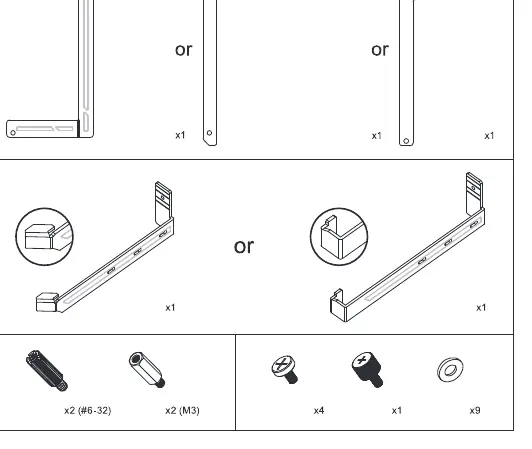
- Anti-sag brackets (various configurations)
- Screws (#6-32 and M3)
- Spacers
- Washers
Installation steps
Step 1: Installing the bracket to the case
Align the bracket with the expansion slots on the back of your PC case. Secure the bracket to the case using the provided screws and spacers. Ensure the bracket is firmly attached to the chassis.
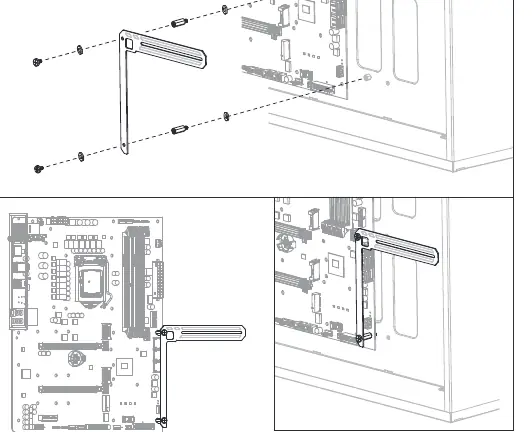
Step 2: Attaching the bracket to the graphics card
Attach the support arm to the graphics card using the appropriate screws. Ensure the arm is positioned correctly to provide support for the weight of the card. Refer to the diagrams for the correct orientation of the support arm relative to the card's cooling shroud.
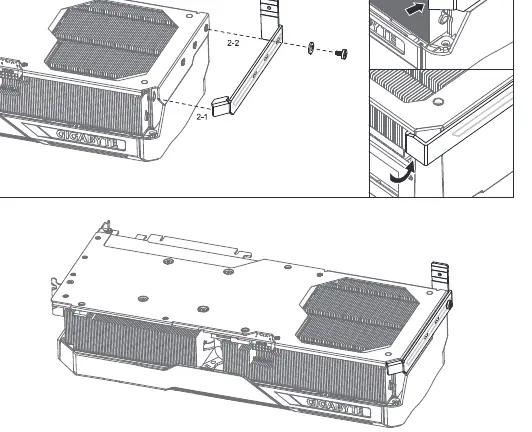
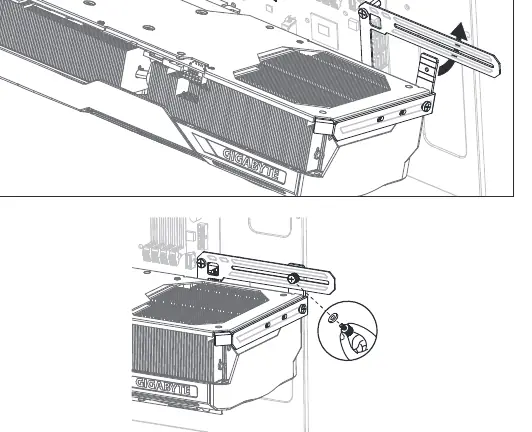
Step 3: Final assembly
Insert the graphics card into the PCIe slot on your motherboard. Align the bracket attached to the card with the bracket already installed in the case. Secure the connection using the remaining screws and washers to lock the assembly in place.
Manufacturer information
Gigabyte Technology Co., Ltd.
Practical help
Common problems
Bracket does not align with case slots
Ensure the bracket is oriented correctly and check if your PC case supports standard PCIe expansion slot mounting.
Graphics card still sags after installation
Adjust the position of the support arm on the bracket to ensure it is firmly supporting the weight of the card.
Before use
- Verify all parts are present (brackets, screws, spacers, washers).
- Ensure the PC is powered off and unplugged.
- Check that your graphics card has mounting points compatible with the bracket.
- Prepare a screwdriver.
Images and diagrams
- The diagrams illustrate the assembly sequence: mounting the bracket base to the case, attaching the support arm to the GPU, and finally securing the GPU into the case.
Model compatibility
- Compatible with standard PC cases and graphics cards with mounting points for anti-sag brackets.

Manual page author
Michael Turner
Technical manual editor
Reviews PDF manuals for structure, safety notes, and practical product details so readers can find the right information quickly.