Power / Portable Power Stations
User Manual for OUPES Exodus 1200 Portable Power Station
Quick guide for the OUPES Exodus 1200 portable power station. Learn how to charge, operate, use EPS mode, troubleshoot error codes, and maintain your device.
Table of contents
Manual images
Click an image to enlargeQuick Guide
The OUPES Exodus 1200 is a portable power station designed for off-grid power needs. To start, press and hold the main power button for 3 seconds. The LCD screen will light up, indicating the device is active. You can charge the unit via AC wall outlet, solar panels, or a car cigarette lighter. Always ensure the device is stored in a dry, well-ventilated area and charged to approximately 60% before long-term storage.
Product Overview
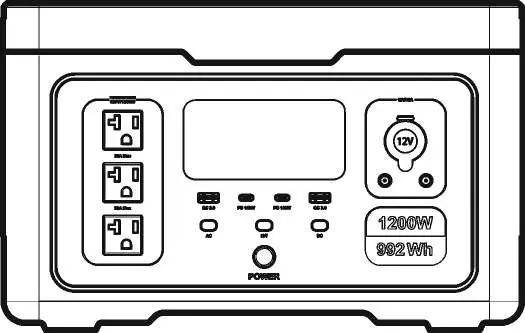
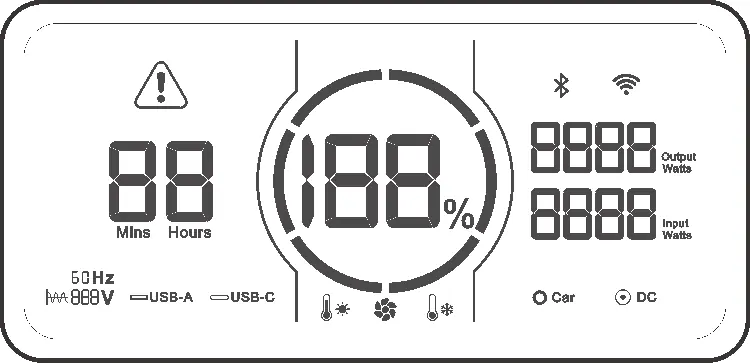
The front panel features the LCD screen, AC output ports, USB-A and USB-C output ports, a 12V car charging output, and a DC 5521 output port. The side panel contains the AC input port and the AC input overload protection button. The LCD screen displays battery percentage, input/output power, remaining runtime, and various status indicators like temperature protection and error warnings.
Operating Instructions
Power On: Press and hold the main power button for 3 seconds. The capacity circle and percentage will illuminate. The fan may start briefly to confirm power-on.
Power Off: Press and hold the main power button for 3 seconds until the screen displays OFF.
Output Activation: Once the main power is on, press the button corresponding to the desired functional area (AC, DC, or USB). The corresponding icon on the LCD will light up.
Recharge Methods
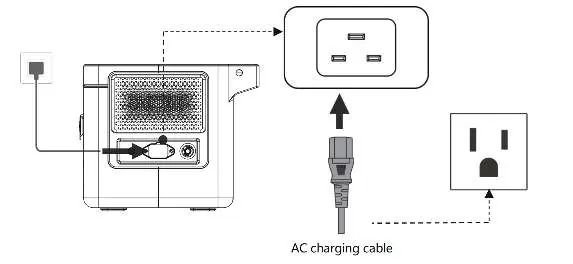
AC Charging: Connect the AC charging cable to the wall outlet and the AC input port on the side of the unit. The device supports up to 600W fast charging when the battery is below 20%.
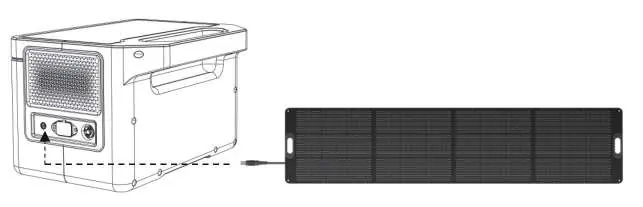
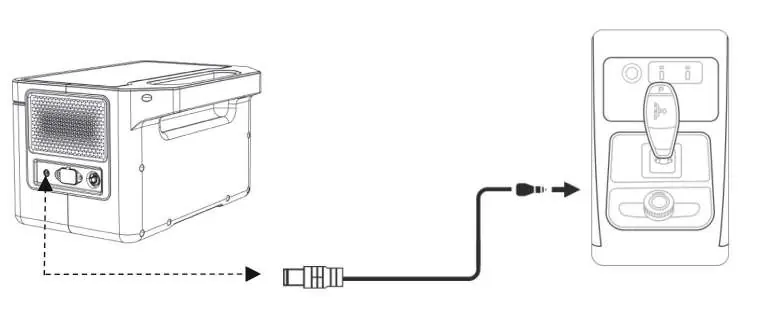
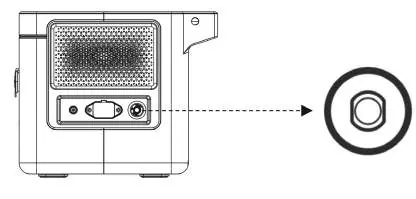
Solar Charging: Connect a 100W or 240W solar panel to the 7909 charging port. Ensure the solar panel is positioned at a perpendicular angle to the sun for maximum efficiency. Confirm the open circuit voltage of the panel is within 30V.
Car Charging: Connect the car charging cable to the car cigarette lighter and the 7909 charging port. Ensure the car is started before connecting to prevent battery drain.
Advanced Features
Boost Mode: Automatically activates when total output power exceeds 1200W, allowing the unit to supply power to high-power units up to 1500W. This is suitable for heating and motor-driven equipment.
EPS (Emergency Power Supply) Mode: When connected to the grid via AC cable, the unit can pass power through to devices. If the grid fails, the unit switches to battery power within 20ms. Note: This is not a professional UPS; do not use for critical equipment like data servers.
Troubleshooting
If an error occurs, the LCD will display an error code. Common codes include:
- E000: AC output short circuit. Press the AC output power button to restore.
- E001: Output overload. Check the load and restart the function.
- E006: Inverter over-temperature. Wait for the unit to cool down.
- E027: System overload. Ensure total AC+DC load is within limits.
Maintenance
Clean the product with a dry, soft cloth. For long-term storage, discharge and charge the battery to 100% once every 3 months to maintain battery health. Store in a dry, well-ventilated place at room temperature.
Practical help
Common problems
E000 Error Code
AC output short circuit protection. Press the AC output power on/off button to restore.
E001 Error Code
Output overload protection. Reduce the load and restart the function.
E006 Error Code
Inverter over-temperature. The unit will automatically resume once the temperature returns to normal.
E027 Error Code
System overload. Ensure total AC+DC power is not greater than 1500W.
Before use
- Ensure the device is placed in a well-ventilated area.
- Check that the battery capacity is sufficient for your needs.
- Verify that the input voltage matches the device requirements.
- Ensure all cables are securely connected to the correct ports.
- Confirm that the total power consumption of connected devices is within the rated 1200W.
Specs in practice
- Battery Type
- LiFePO4 (Lithium Iron Phosphate) for long cycle life and safety.
Images and diagrams
- The front panel contains the LCD screen, AC/DC/USB output ports, and power buttons.
- The side panel houses the AC input port and the AC input overload protection reset button.
Model compatibility
- Not suitable for air travel due to lithium battery regulations.
- Compatible with pure sine wave generators.
- EPS function is not a professional UPS; do not connect to critical data servers or workstations.

Manual page author
Emily Carter
User documentation editor
Prepares concise manual descriptions and highlights the most useful setup, operation, and maintenance information for readers.