Power / Portable Power Stations
User Manual for ESL Vision Portable Power Station 1000W and Solar Panel 120W
Comprehensive user guide for the ESL Vision Portable Power Station (ESL-PB-1000W-01) and Portable Solar Panel (ESL-SP-120W-01). Includes setup, charging instructions, safety warnings, maintenance tips, and troubleshooting.
Table of contents
Manual images
Click an image to enlargeQuick Guide from the Manual
Before using your ESL Vision Portable Power Station or Solar Panel, please note the following critical information:
- Initial Setup: The battery may be in sleep mode. Plug the power station into a wall outlet for 10 minutes to reactivate it before first use.
- Maintenance: Recharge the power station at least once every three months to preserve battery health.
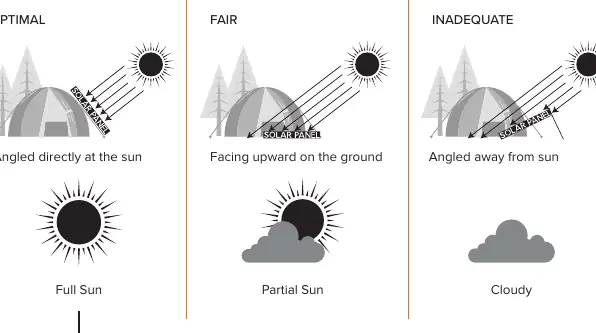
- Solar Panel Usage: For optimal results, angle the solar panel directly at the sun (90°) in full sun conditions.
- Safety: Do not expose the power station or solar panel to water, extreme temperatures, or corrosive materials. Do not disassemble the units.
Portable Power Station Overview
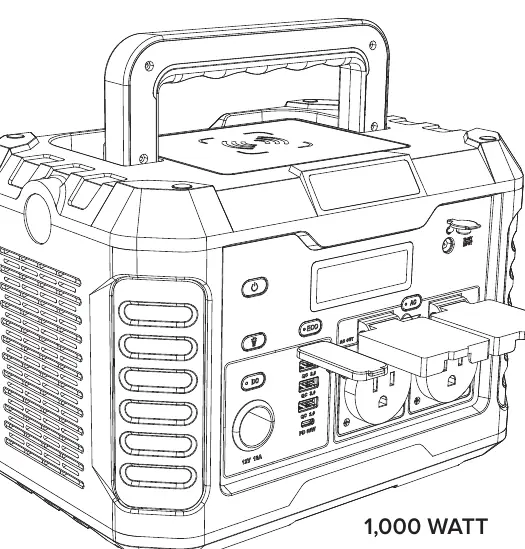
The ESL Vision Portable Power Station (Advance 1000) is a high-capacity lithium battery unit designed for portable power needs.
Features and Controls
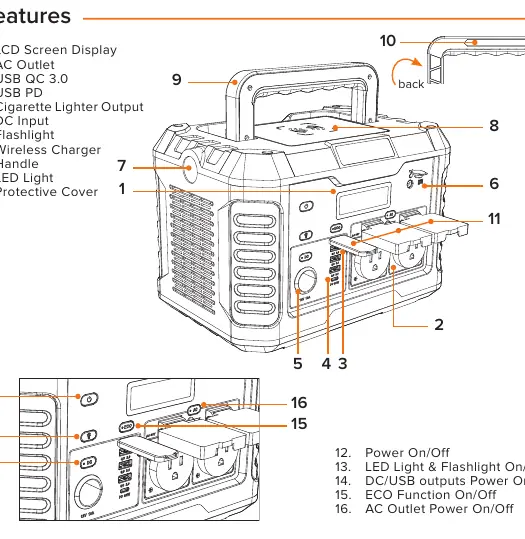
- LCD Screen: Displays battery level, input/output power, and warning indicators.
- Outputs: Includes AC outlets, USB QC 3.0, USB PD, and a 12V cigarette lighter port.
- Buttons: Master Power On/Off, LED/Flashlight control, DC output control, ECO mode, and AC output control.
- Wireless Charger: Located on top of the unit.
LCD Display Indicators
- Battery Level: Percentage of charge remaining. Charge when below 20%.
- Input/Output Power: Real-time wattage monitoring.
- Warnings: Low voltage, temperature warnings, and low battery alarm (TO EMPTY).
Operating Instructions
Charging the Power Station
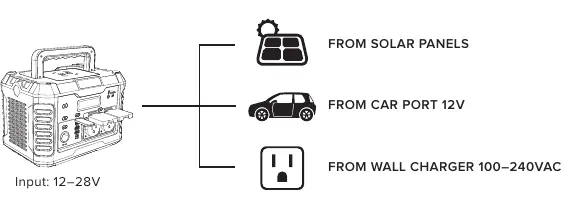
The unit can be charged via:
- Solar Panels (12–28V input).
- Car Port (12V).
- Wall Charger (100–240VAC).
Powering Devices
- Press the Master Power On/Off button.
- Select the desired output type (DC/USB, AC, or ECO) by pressing the corresponding button.
- The indicator light on the button will illuminate green when active.
- Connect your device.
Pass-Through Charging: The unit supports charging connected devices while the power station itself is being charged.
Maintenance and Storage
- Cleaning: Use a clean, dry, lint-free cloth. Do not use abrasive cleaners, solvents, or compressed air on vents.
- Storage: If storing for more than 1 month, charge fully. Store in a cool, dry place away from direct sunlight. Avoid extreme temperatures.
Troubleshooting
If an error occurs, the LCD will display a code:
- E1/E2: AC Output Overload or Off. Unplug devices and press AC button to restart.
- E3/E7/E8: DC/USB Output Overload or Voltage issues. Unplug devices and press DC button to restart.
- E62: Over-Charge Reminder. Stop charging after 100%.
- E72: Charging Safety Protection. Unplug and let the unit cool down.
Portable Solar Panel
The ESL-SP-120W-01 is a 120W monocrystalline solar panel.
Usage
- Optimal: Angled directly at the sun (90°).
- Fair: Facing upward on the ground.
- Inadequate: Angled away from the sun or in cloudy conditions.
The panel can be used to charge the Portable Power Station, power banks, phones, tablets, and flashlights.
Practical help
Common problems
Unit will not charge
Ensure the power adapter is securely plugged into both the DC input and the power source.
No output from ports
Ensure the specific output button (DC, AC, or ECO) is pressed and the indicator light is green.
Unit shuts down when devices are plugged in
Check if ECO mode is on (it shuts off if draw is low) or if the device exceeds wattage limits.
Solar panel not charging devices
Ensure the device input voltage is compatible (5V or QC3.0/PD) and the panel is in direct sunlight.
Before use
- Fully charge the power station before first use.
- Plug into a wall outlet for 10 minutes if the unit is in sleep mode.
- Verify charging cable compatibility before connecting.
- Ensure the solar panel is angled 90 degrees toward the sun for best results.
- Check that the solar panel connectors are dry before use.
Specs in practice
- 933Wh Capacity
- The total energy storage capacity of the power station battery.
- 1,000W AC Output
- The maximum continuous power the AC outlets can provide (2,000W surge).
- 120W Peak Power
- The maximum power output of the solar panel under ideal conditions.
Images and diagrams
- The LCD display shows input/output wattage, remaining time, and battery percentage.
- The features diagram identifies the location of all ports, buttons, and the wireless charging pad.
- The solar panel positioning guide illustrates optimal (90°), fair (flat), and inadequate (away from sun) angles.
Model compatibility
- Solar panel is compatible with the Portable Power Station, power banks, cell phones, tablets, and flashlights.
- Solar panels can be chained in parallel if they share the same nominal output voltage.

Manual page author
David Miller
Documentation analyst
Organizes user manual content into clear summaries, with attention to model details, product context, and everyday usability.