Power / Portable Power Stations
User Manual for Oupes 600W Portable Power Station
Quick guide and user manual for the Oupes 600W Portable Power Station. Learn how to charge, operate outputs, understand fault codes, and maintain your device.
Table of contents
Manual images
Click an image to enlargeQuick Guide
The Oupes 600W Portable Power Station is designed for emergency power, camping, and home use. Before first use, ensure the device is fully charged. Always operate within the ambient temperature range of 0-45°C. Turn off all switches when the device is not in use to conserve battery life.
Product Overview
The device features multiple output ports and a clear LCD display. Key components include:
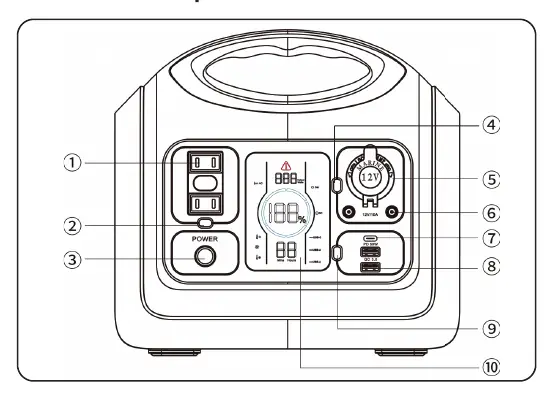
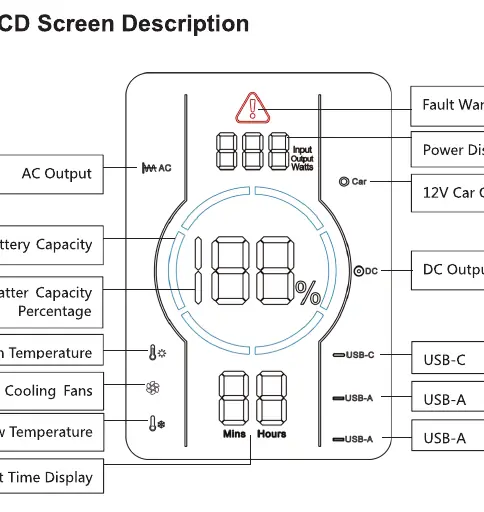
- AC Output Ports: For standard AC appliances.
- DC/Car Output: 12V output for car accessories.
- USB Ports: USB-C (PD 60W) and USB-A ports for mobile devices.
- LCD Screen: Displays battery percentage, input/output power, and fault warnings.
- LED Light: Built-in light with brightness and SOS modes.
Charging Methods
The power station can be recharged in five different ways:
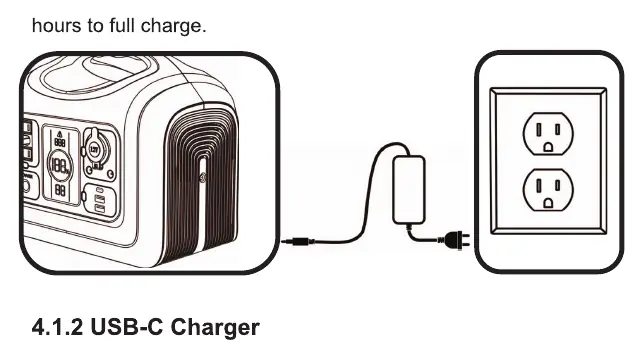
- Standard AC Adapter: Connect to a wall outlet (approx. 7.5 hours).
- USB-C Charger: Supports PD protocol (at least 10 hours).
- Car Charger: Connect to a 12V cigarette lighter port (at least 8 hours).
- Solar Panel: Connect to the 7909 input port (at least 8 hours, depending on sunlight).
- Adapter + USB-C: Combined charging for faster results (approx. 5 hours to 100%).
Operating Instructions
Powering On/Off: Long press the main power button for 2 seconds to turn the unit on or off. The LCD screen and battery ring will illuminate when active.
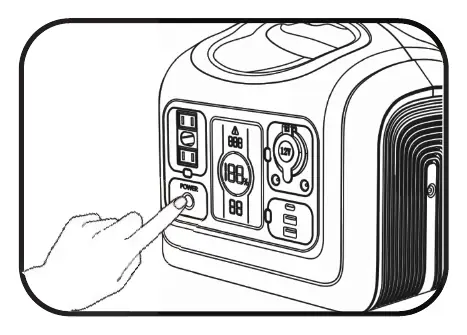
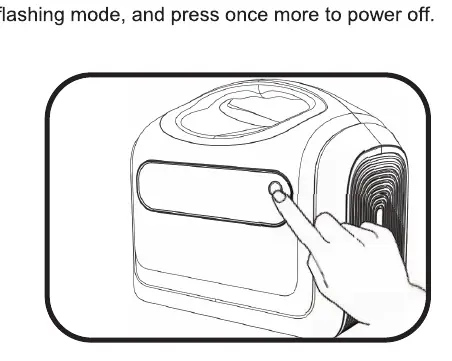
Using Outputs: Once the main power is on, press the specific button for the desired output area (AC, DC/Car, or USB). An icon will appear on the LCD screen indicating the function is active. Press the button again to turn off the output.
LED Light: The LED light operates independently of the main power button. Press the light button to cycle through 50% brightness, 100% brightness, SOS flashing mode, and off.
Storage and Maintenance
- Turn off all switches when not in use.
- Store in a dry, ventilated, and dustless environment (0-40°C).
- Keep the surface clean and avoid contact with gasoline, volatile oils, or thinners.
- Charge the battery at least once every 6 months to prevent dormancy.
- For long-distance transport, keep battery power between 40%-60%.
Troubleshooting
If a fault occurs, the LCD screen will display a code. Common codes include:
- E00: AC Short Circuit Protection. Press AC button to recover.
- E01: Overload Protection. Check output ports and restart.
- E02: Battery Low Voltage. Recharge the unit.
- E03: System Overload. Reduce load on AC/DC outputs.
- E04: Inverter Fault. Check for overheating or short circuits.
- E05: BMS Fault. Restart the unit.
Practical help
Common problems
E00 - AC Short Circuit
Press the AC Output Power on/off button to recover.
E01 - Overload Protection
Check if output ports are overloaded, then restart the unit.
E02 - Battery Low Voltage
Charge the product immediately. Restart after charging.
E03 - System Overload
Total load exceeds 600W. Shut down AC output or reduce load.
E04 - Inverter Fault
Check for overheating or abnormal load, then restart.
Before use
- Fully charge the device before first use.
- Ensure the ambient temperature is between 0-45°C.
- Verify all connections are secure.
- Turn off all switches when the device is not in use.
Specs in practice
- Battery Capacity
- 595.2Wh (Total energy storage).
Images and diagrams
- The LCD screen displays battery percentage, input/output wattage, and active output icons.
- The battery ring segments represent capacity (17% to 100%).
- The 7909 port is used for AC adapter, car, and solar charging inputs.
Model compatibility
- USB-C charging supports PD protocol (Max 60W).
- Car charging is limited to 12V systems.
- Solar panels should be positioned at a vertical angle to the sun for maximum efficiency.

Manual page author
David Miller
Documentation analyst
Organizes user manual content into clear summaries, with attention to model details, product context, and everyday usability.