Power / Portable Power Stations
Oupes 1800W Portable Power Station User Manual
Quick start guide and user manual for the Oupes 1800W Portable Power Station. Includes instructions for charging, using AC/DC outputs, LED light operation, frequency switching, and troubleshooting fault codes.
Table of contents
Manual images
Click an image to enlargeQuick guide from the manual
The Oupes 1800W Portable Power Station is designed for emergency power, camping, and home use. Before first use, ensure the device is fully charged. Always turn off all switches when the device is not in use to conserve battery life. The device operates within an ambient temperature range of 0-40°C.
Product overview
The package includes the Portable Power Station, AC Adapter, 7909 connected wire for Vehicle's 12V Output, User Manual, and Warranty Card.
Function description
The front panel features the following components:
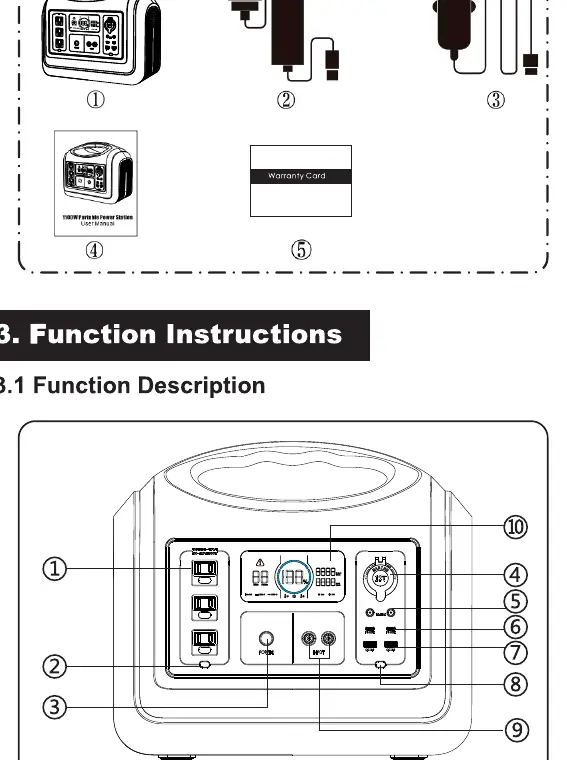
- AC Output Port: For powering AC appliances.
- AC Output Power On/Off Switch: Controls AC output.
- Main Power On/Off Switch: Master power control.
- 12V Car Charger Output Port: For vehicle-compatible devices.
- 12V DC5521 Output Port: For DC devices.
- USB-C Output Ports (x2): For fast charging mobile devices.
- USB-A Output Ports (x2): Standard USB charging.
- DC Output Power On/Off Switch: Controls DC and USB outputs.
- 7909 Recharging Input Ports (x2): For charging the station.
- LCD Screen: Displays battery status, input/output power, and warnings.
- LED Light Power On/Off Switch: Controls the integrated light.
- LED Light: Integrated illumination.
LCD screen description
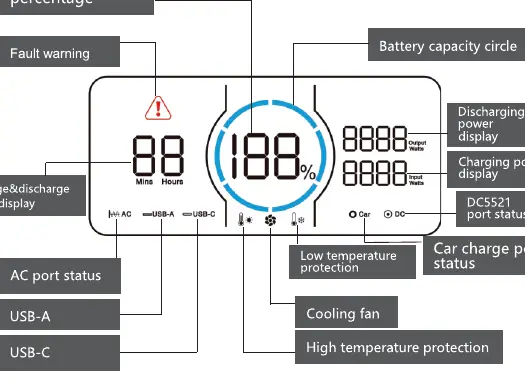
The LCD screen provides real-time data including battery capacity percentage (indicated by a ring divided into 6 segments), input/output power in Watts, remaining charge/discharge time, and status icons for AC, DC, USB, and protection modes (high/low temperature, cooling fan, fault warning).
Charging instructions
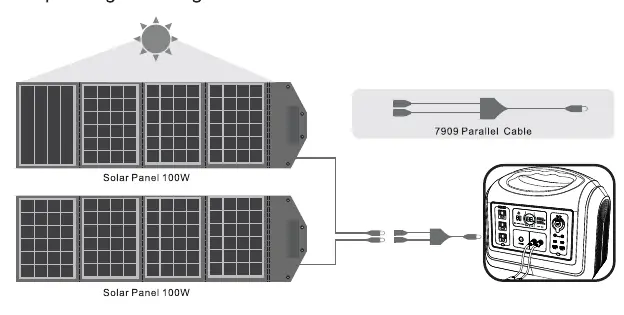
There are three ways to recharge the unit:
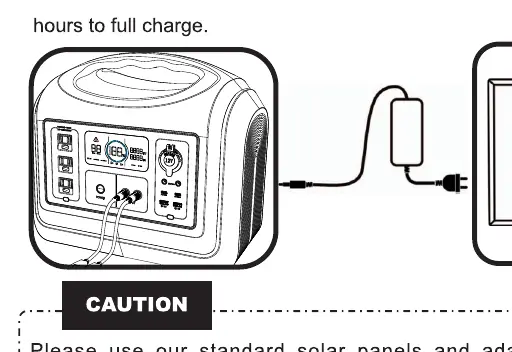
- Wall Socket: Connect the 7909 input port to a wall outlet using the standard AC adapter.
- Car Charger: Connect the 7909 input port to the vehicle's 12V cigarette lighter port using the provided transfer cable.
- Solar Panels: Connect up to 4x100W solar panels to the 7909 input port.
Caution: Always use standard adapters and solar panels to avoid damage. Charge at ambient temperatures between 0-40°C.
Usage instructions
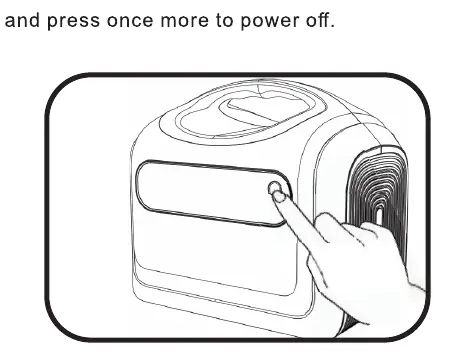
- Power On/Off: Long press the main power button for 3 seconds to turn the unit on or off.
- AC Output: With the main power on, press the AC Output button. The AC icon will light up on the LCD.
- DC Output: With the main power on, press the DC Output button to activate DC, Car, USB-C, and USB-A ports.
- LED Light: Press the light button to cycle through modes: 50% brightness, 100% brightness, SOS flashing, and Off.
Frequency switching
To switch between 50Hz and 60Hz:
- Turn on the unit and ensure AC output is off.
- Press the Main Power button and DC button simultaneously to enter the frequency menu.
- Press the AC Output button to toggle between 50Hz and 60Hz.
- Long press the Main Power button to save the setting (display will show SUC).
- Long press the Main Power button again to exit.
Storage and maintenance
- Turn off all switches when not in use.
- Keep the surface clean and avoid contact with corrosive substances like gasoline or thinners.
- Store in a dry, ventilated, dustless environment (0-40°C).
- Charge the battery fully before storage and recharge at least every 3-6 months to prevent dormancy.
- For long-distance transport, keep battery power between 40%-60%.
Practical help
Common problems
E000: AC Short Circuit Protection
Press the AC Output Power button to recover.
E001: Over Load Protection
Press the corresponding output button to recover.
E002: Battery Low Voltage Protection
Charge the unit immediately.
E003: System Overload
Reduce the load on the AC output or shut down the AC output.
E004: Inverter Fault
Check for short circuits or overheating; press the button to recover.
Before use
- Ensure the device is fully charged.
- Verify all switches are turned off when not in use.
- Check that the ambient temperature is between 0-40°C.
- Ensure all cable connections are secure and standard.
- Check the LCD screen for any fault codes before operation.
Specs in practice
- Battery Type
- LiFePO4 (Lithium Iron Phosphate) for safety and longevity.
Images and diagrams
- The LCD screen displays battery percentage, input/output power, and active port status.
- The front panel contains all control buttons and output ports for easy access.
- The rear/side panel houses the LED light.
Model compatibility
- Supports 100-120V or 220-240V AC output depending on regional configuration.
- Frequency is user-switchable between 50Hz and 60Hz.

Manual page author
Michael Turner
Technical manual editor
Reviews PDF manuals for structure, safety notes, and practical product details so readers can find the right information quickly.