Power / Portable Power Stations
User Manual for OUPES Mega 1 Lite 2000W Portable Power Station
Quick guide for the OUPES Mega 1 Lite 2000W Portable Power Station. Learn how to operate, charge, troubleshoot error codes, and use the EPS function.
Quick answers from the manual
Quick answer
- To turn the OUPES Mega 1 Lite on or off, press and hold the main power button for 3 seconds. p. 8
Key actions
- Frequency Switching p. 8
- Using EPS Function p. 9
First start
- Charge the unit fully before first use. p. 2
Problems and fixes
E000 (Short circuit of AC output)
Press the AC output power button to restore.
p. 14
E006 (Over temperature of Inverter)
Turn off output power and rest the device to restore.
p. 14Error codes
| Code | Meaning | Action | Pages |
|---|---|---|---|
| E000 | Short circuit of AC output | Press the AC output power button to restore. | p. 14 |
| E027 | System overload | Reduce AC loads and press the AC power button to restore. | p. 15 |
Maintenance and reset
- If the AC input protector pops out, disconnect connections and press the protector button to resume. p. 11
Technical specifications
| Parameter | Value | Meaning | Pages |
|---|---|---|---|
| AC Output | 2000W (4500W Surge) | Maximum power output for AC devices. | p. 5 |
| Battery Capacity | 1024Wh | Total energy storage capacity. | p. 5 |
Where to find it in the PDF
- Product Overview p. 6
- Troubleshooting p. 14, 15
Table of contents
Manual images
Click an image to enlargeQuick guide from the manual
The OUPES Mega 1 Lite 2000W is a portable power station designed for off-grid power needs. To turn the unit on or off, press and hold the main power button for 3 seconds. The device features an EPS (Emergency Power Supply) function enabled by default, which provides power within 20ms during outages, provided the total load is under 2000W. Always ensure the device is placed on a stable, flat surface and kept away from water, heat, and dust.
Product Overview
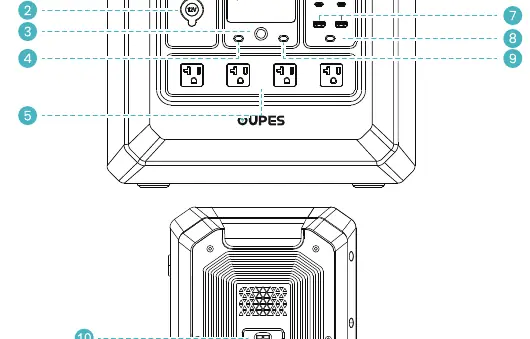
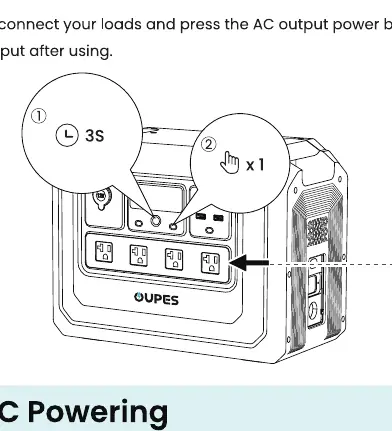
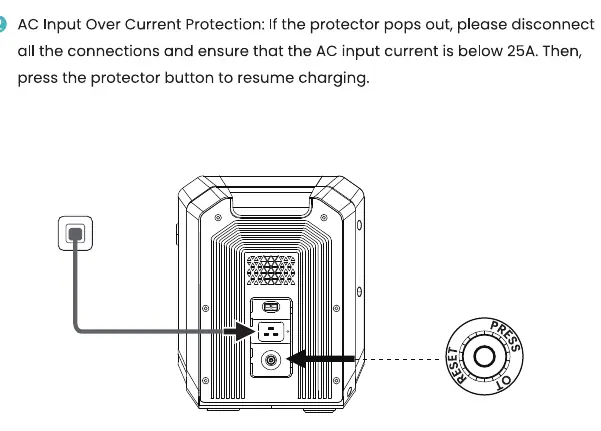
The front panel includes the LCD screen, cigarette lighter output, main power button, IOT button, AC output sockets, and USB-A/USB-C ports. The rear panel contains the solar/car input port, AC input port, and AC input overload protection button.
Operation
Powering Devices: Connect your devices to the appropriate ports (AC, DC, or USB). Press the corresponding power button to activate the output. Always disconnect loads and turn off the output after use.
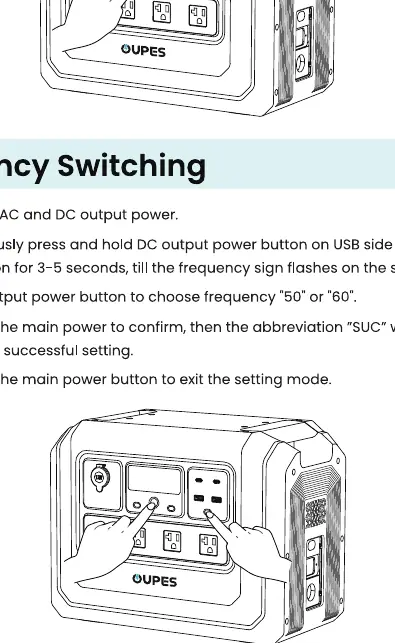
Frequency Switching: To change the AC output frequency (50Hz/60Hz):
- Turn off AC and DC output power.
- Simultaneously press and hold the DC output power button (USB side) and the main power button for 3-5 seconds until the frequency sign flashes.
- Press the AC output power button to select 50 or 60.
- Long press the main power button to confirm; "SUC" will flicker to indicate success.
- Long press the main power button to exit setting mode.
Charging Methods
AC Charging: Connect the AC charging cable to the AC input port. If the AC input over-current protector pops out, disconnect connections, ensure input current is below 25A, and press the protector button to resume.
Solar Charging: Connect solar panels to the solar input port. Ensure the open-circuit voltage of the solar panel is below 78V. Adapter cables are required and sold separately.
Cigarette Lighter Charging: Start the vehicle first, then connect the cable to the car's cigarette lighter and the power station's input port.
Troubleshooting
The LCD screen displays error codes when a fault occurs. Common issues include:
- E000: Short circuit of AC output. Press the AC output power button to restore.
- E006: Over temperature of Inverter. Turn off output power and let the device rest.
- E027: System overload. Reduce AC loads and press the AC power button to restore.
Specifications
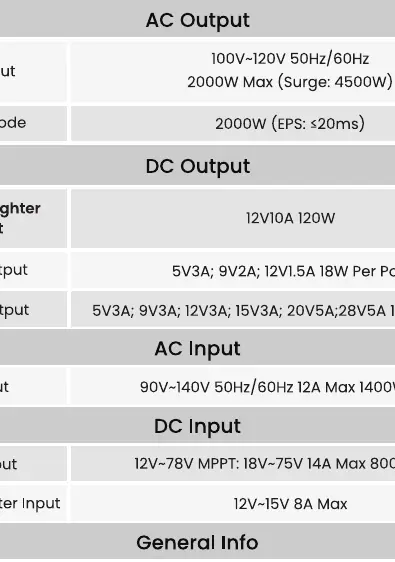
- AC Output: 100V-120V 50Hz/60Hz, 2000W Max (Surge 4500W).
- Battery Capacity: 1024Wh (51.2V/20Ah).
- Battery Type: LiFePO4.
- Working Temperature: 32°F-104°F (0°C-40°C).
- Dimensions: Approx. 15.1 x 9.1 x 11.6 in (384 x 232 x 295 mm).
- Weight: Approx. 26.75 lb (12.05 kg).
Practical help
Common problems
E000: Short circuit of AC output
Press the AC output power button to restore.
E006: Over temperature of Inverter
Turn off output power and let the device rest.
E027: System overload
Reduce AC loads and press the AC power button to restore.
E020: BMS communication failure
Contact after-sales service team for support.
Before use
- Inspect the unit for physical damage.
- Ensure the environment is dry, well-ventilated, and stable.
- Charge the unit fully before first use.
- Verify solar panel open-circuit voltage is below 78V before connecting.
- Ensure the device is turned on before connecting loads.
Specs in practice
- EPS Function
- Emergency Power Supply with <20ms switch time; not for 0ms critical equipment.
- Battery Type
- LiFePO4, known for safety and longevity.
Images and diagrams
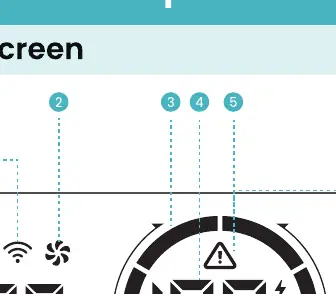
- The LCD screen displays input/output power, battery percentage, and error codes.
- The rear panel houses the AC input and the AC input overload protection button.
Model compatibility
- Do not use to power medical equipment or precision instruments.
- Not compatible with equipment requiring 0ms uninterruptible power supply.

Manual page author
Emily Carter
User documentation editor
Prepares concise manual descriptions and highlights the most useful setup, operation, and maintenance information for readers.