Power / Solar Inverters
User Manual for Powertech 2048Wh Power Station MB4104
Comprehensive user guide for the Powertech 2048Wh Power Station (MB4104). Includes setup, charging instructions, app connectivity, error code troubleshooting, and maintenance tips.
Quick answers from the manual
Quick answer
- The Powertech 2048Wh Power Station (MB4104) is a portable power supply. To start, fully charge it using the AC cable. Power on by holding the Main Power button. Use the dedicated switches for AC, USB, and IoT outputs. p. 1, 7
Key actions
- Powering On p. 7
- Charging p. 8, 9, 10
- Resetting Circuit Breaker p. 12
First start
- Fully charge the unit via the included mains charging cable before first use. p. 6
Problems and fixes
E000: AC output short circuit
Press the AC output power button to recover.
p. 22
E001: Output overload
Restore manually.
p. 22
E027: System overload
Press the AC power ON/OFF button to recover.
p. 23Error codes
| Code | Meaning | Action | Pages |
|---|---|---|---|
| E000 | AC output short circuit protection | Press the AC output power on/off button for recovery | p. 22 |
| E001 | Output overload protection | Restore manually | p. 22 |
Maintenance and reset
- Charge and discharge the battery every 3 months for long-term storage. p. 24
Technical specifications
| Parameter | Value | Meaning | Pages |
|---|---|---|---|
| Rated Capacity | 2048Wh | Total energy storage | p. 25 |
| AC Output | 2500W | Rated power | p. 25 |
| Battery Type | LiFePO4 | Battery chemistry | p. 25 |
Where to find it in the PDF
- Product Diagram p. 5
- Error Codes p. 22, 23
- Specifications p. 25
Table of contents
Manual images
Click an image to enlargeImportant Information
Before using your Powertech 2048Wh Power Station, please note the following:
- First Use: Ensure the unit is fully charged using the included mains charging cable before first use.
- Standby: The default standby time is 6 hours. If no load is connected and no buttons are pressed, the unit will shut down automatically.
- Wi-Fi: The device only supports 2.4GHz frequency Wi-Fi connections.
- Solar Charging: Do not plug in an external solar controller; the unit has an internal one. Ensure solar panel open circuit voltage is under 80V.
- Car Charging: Only charge via the car charging cable while the vehicle is running to avoid draining the starter battery.
Product Overview
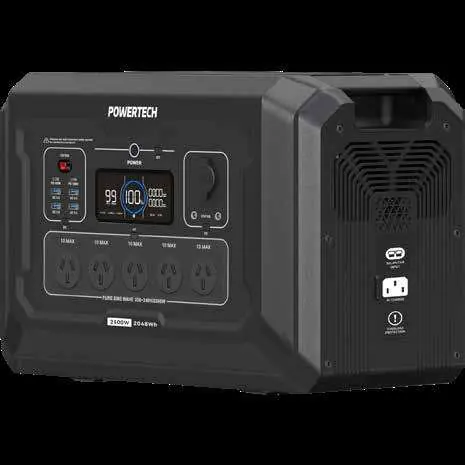
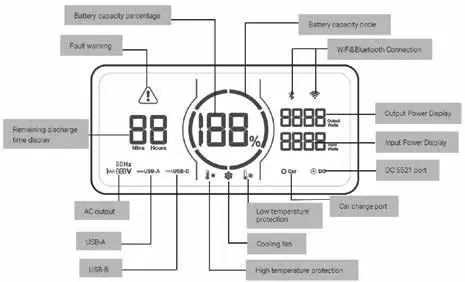
The Powertech 2048Wh Power Station features multiple output ports, including AC, USB-A, USB-C, and 12V DC. It includes a main power switch, an IoT switch for app connectivity, and a circuit breaker for overload protection.
Operation
Powering On/Off: Press and hold the Main Power button (7) until the LCD screen lights up. To power off, press and hold the same button until the screen displays "off".
Activating Outputs: After powering on the unit, you must manually activate the specific output type using its dedicated button (AC Output Button, IoT Button, or USB Output Button). The active status will be shown on the LCD display.
Charging
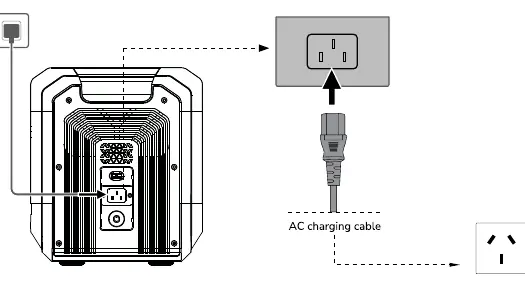
- AC Charging: Connect the mains charging cable to a wall outlet and the AC Charging Input. The blue battery capacity circle will flash clockwise while charging.
- Solar Charging: Connect a 12V solar panel (not included) to the DC & Solar Charging Input using the provided cable.
- Car Charging: Use the included car charging cable to connect to your vehicle's cigarette lighter socket.
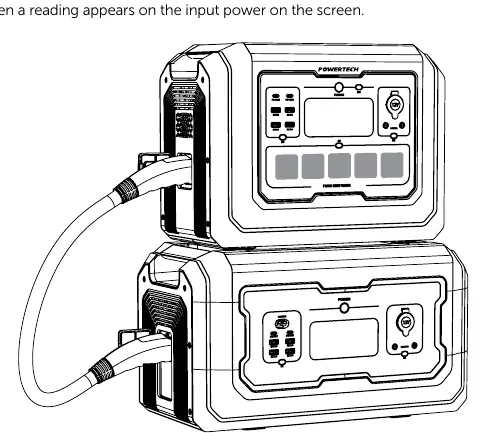
- Extended Battery: You can connect up to one extended battery using the supplied cable. Do not connect or remove the battery while either unit is powered on.
Maintenance and Storage
- Store in a dry, ventilated place at room temperature.
- For long-term storage, charge and discharge the battery every 3 months (discharge to 0%, fully charge, then discharge to 60%).
- Keep away from water, fire sources, and metal objects.
- Recommended storage temperature is 20°C to 30°C.
Troubleshooting
If the unit encounters an issue, an error code will appear on the LCD screen. Common codes include:
- E000: AC output short circuit. Press the AC output power button to recover.
- E001: Output overload. Restore manually.
- E027: System overload. Press the AC power ON/OFF button to recover.
- E030: Abnormal battery pack connection. Replace with a standard battery pack.
Practical help
Common problems
Unit will not charge via solar
Ensure the solar panel open circuit voltage is under 80V and the input is between 12V-80V.
Unit will not charge via car
Ensure the vehicle is running while charging to avoid draining the starter battery.
Circuit breaker tripped
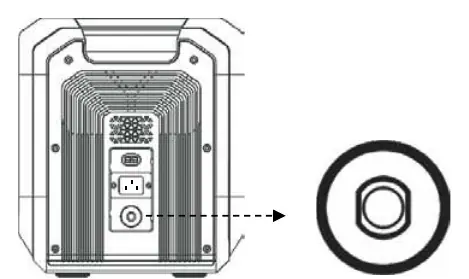
Disconnect all devices and charging inputs, then press the circuit breaker (15) to reset.
App connection failed
Ensure you are using a 2.4GHz Wi-Fi network, as 5GHz is not supported.
Before use
- Fully charge the unit using the mains charging cable.
- Unpack and verify all accessories are present.
- Read all safety and operating instructions.
- Keep original packaging for storage.
Specs in practice
- Rated Capacity
- 2048Wh (Total energy storage)
- Battery Type
- LiFePO4 (Lithium Iron Phosphate)
Images and diagrams
- 1. AC Outputs: Standard power outlets for appliances.
- 7. Main Power: Button to turn the unit on and off.
- 13. Anderson Input: Port for solar or DC charging.
- 15. Circuit Breaker: Safety switch to reset after overload.
Model compatibility
- Supports up to one extended battery.
- Wi-Fi connection requires 2.4GHz frequency.

Manual page author
Michael Turner
Technical manual editor
Reviews PDF manuals for structure, safety notes, and practical product details so readers can find the right information quickly.