Tools / Measuring Tools
User Manual for PCE-CT 100N Coating Thickness Gauge
Quick start guide and user manual for the PCE-CT 100N coating thickness gauge. Learn how to perform measurements, calibrate the device, manage data via USB/Wi-Fi, and maintain the unit.
Table of contents
Manual images
Click an image to enlargeQuick guide from the manual
The PCE-CT 100N is a precision coating thickness gauge designed for non-destructive measurement of non-conductive coatings on magnetic and non-magnetic metal substrates. Before first use, ensure the device is calibrated using the provided coating thickness matrix. Always inspect the device for damage before use and ensure the surface to be tested is clean, smooth, and oil-free.
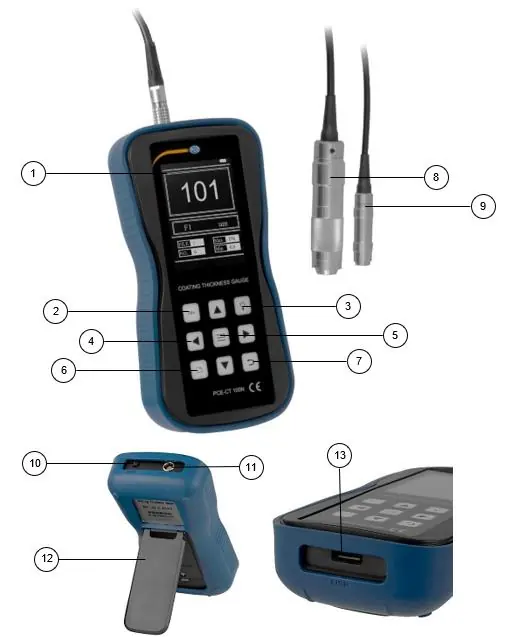
Device layout
The device features a display screen, navigation keys, and a menu button. The probe input is located on the top, and the USB port is on the side. A stand is provided on the back for stable placement.
Measurement principles
The gauge utilizes two methods:
- Magnetic measurement: Used for non-magnetic coatings on magnetic metal substrates (e.g., paint on steel).
- Eddy current measurement: Used for non-conductive coatings on non-ferrous metal substrates (e.g., enamel on aluminum).
Operation instructions
Surface preparation
For accurate results, the sample surface must be smooth and free of oil. If the surface is too rough, it will cause measurement errors. For surfaces with a radius of curvature less than 30 mm, use a small support ring or a profiled support ring.
Measurement procedure
- Insert the probe into the probe input.
- Place the probe on the test sample.
- Ensure the probe, sample, and operator remain stable and the probe is perpendicular to the surface.
- The device will display the measurement result.
Settings
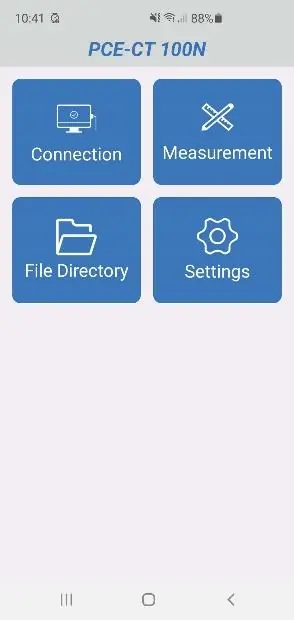
Access the menu by pressing the Menu button. You can configure:
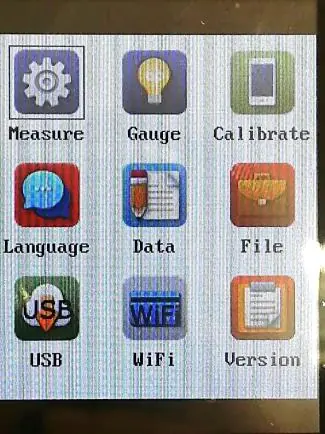
- Unit setup: Select measurement units (e.g., µm).
- Probe setup: Configure probe settings.
- Measurement mode: Choose between single or continuous measurement.
- Gauge settings: Adjust touch tone, backlight, language, and auto-off settings.
Data processing
The device supports on-board storage of up to 500 measurements. Data can be transferred via:
- USB: Connect a USB drive to the device to store data in text format.
- Wi-Fi: Transfer data to an Android device using the dedicated app.
Calibration
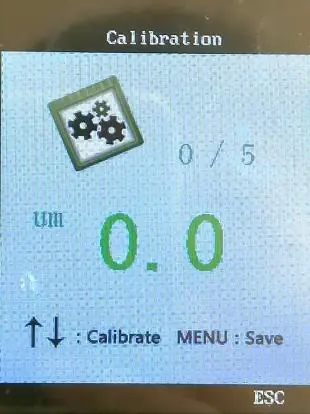
The device must be calibrated before first use or after a long period of inactivity. Perform 6 measurements vertically down into the substrate; the first is a zero calibration without the substrate, followed by 5 measurements with test foils.
Maintenance
Avoid collisions, heavy dust, moisture, and strong magnetic fields. To replace the battery, switch off the device, unscrew the battery cover on the back, replace the batteries, and re-secure the cover.
Practical help
Common problems
Inaccurate measurement values
Ensure the surface is smooth, oil-free, and the probe is held perfectly perpendicular to the test surface.
Measurement errors on curved surfaces
Use a small support ring or a profiled support ring for surfaces with a radius of curvature less than 30mm.
Data transfer failure
Ensure the USB drive is properly inserted or the Wi-Fi connection is active and the app is correctly installed on your Android device.
Before use
- Inspect the device case for visible damage.
- Ensure the probe is securely connected to the probe input.
- Verify the test surface is clean and free of oil.
- Calibrate the device if it has not been used for a long time.
- Ensure the batteries are installed and charged.
Specs in practice
- Measurement range
- 0 to 1250 µm.
- Communication
- Supports Wi-Fi and USB interface for data transfer.
Images and diagrams
- Device Layout: Identifies the display, navigation keys, probe input, and USB port.
- Surface Preparation: Illustrates the correct probe placement on curved surfaces using support rings.
Model compatibility
- Compatible with magnetic metals (Fe) and non-ferrous metals (NFe).
- Wi-Fi data transfer requires an Android device with the official app installed.

Manual page author
Michael Turner
Technical manual editor
Reviews PDF manuals for structure, safety notes, and practical product details so readers can find the right information quickly.