Automotive / Dash Cams
User Manual for Cobra Power Station 200W
Comprehensive user guide for the Cobra Power Station 200W (CPPS244W). Learn how to charge, connect devices, use the inverter, and troubleshoot common issues.
Quick answers from the manual
Quick answer
- The Cobra Power Station 200W is a portable power source with a 200W continuous output. It can be recharged via AC outlet, 12V DC socket, or solar panel. Always charge fully before first use. p. 1, 5
Key actions
- Charge the unit p. 5
- Connect devices p. 6
First start
- Unbox and charge p. 5
Problems and fixes
Beeping noise
Turn off 110V switch, unplug AC cables, verify charge >20%, and restart.
p. 9Maintenance and reset
- Recharge after use p. 5
Technical specifications
| Parameter | Value | Meaning | Pages |
|---|---|---|---|
| AC Output | 200W Continuous / 400W Surge | Power capacity for AC devices | p. 7 |
| Battery | LiFePO4 | Battery chemistry | p. 7 |
Where to find it in the PDF
- Features Diagram p. 4
- Specifications p. 7
Table of contents
Manual images
Click an image to enlargeQuick guide from the manual
Before using your new Cobra Power Station, plug it into a suitable power outlet until it is fully charged. To maintain battery health, recharge the unit after use or before storage. The device features a 200W continuous power output and is designed for both indoor and outdoor use, provided it is kept dry.
Important safety instructions
- Fire and Water Hazard: Keep the unit clear of fire and water. Do not submerge in water, expose to rain, snow, or spray.
- Operating Temperature: Do not expose to temperatures over +113° F (+45° C) or under -14° F (-10° C).
- Internal Battery: The unit contains a non-replaceable Lithium-ion battery pack. Do not open the unit; it contains no user-serviceable parts.
- Installation: Never install in a boat's engine compartment or zero-clearance compartments. Do not obstruct ventilation openings.
Recharging your power station
The unit can be recharged via three methods, all requiring connection to the "INPUT" charging port:
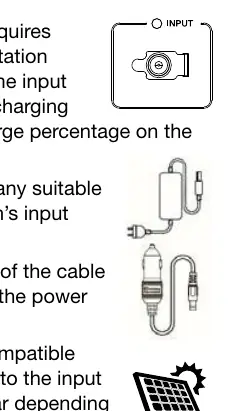
- AC Outlet: Use the included AC charging cable.
- 12V DC: Use the included 12V charging adapter connected to a 12V DC socket.
- Solar Charging: Connect a compatible solar panel to the input charging port.
The LCD display shows the charge percentage. An input charging light provides feedback: blinking green indicates active charging, solid green indicates fully charged, and solid red indicates the battery is below 20%.
Connecting devices
The power station is equipped with an internal 200W pure sine wave inverter. To connect devices:
- Determine the connection type required (AC Outlet, USB-A, USB-C, 12V DC).
- Press the switch associated with the power section to activate it.
- Plug in your devices.
Note: If the output power exceeds 200W for an extended period, the inverter will shut down to protect the unit.
Using the flashlights
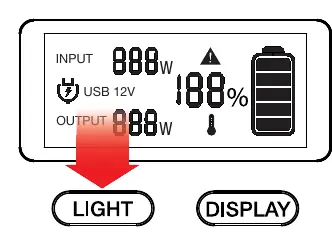
- LED Flashlight: Press and release the LIGHT button to turn on. After two seconds, press and release again to turn off. Pressing the button cycles through solid, strobe, and SOS modes.
- Area Light: Press and hold the LIGHT button until the light turns on. Press and hold again to turn off.
Troubleshooting
- Beeping Noise: Indicates an inverter fault. Press the 110V switch to turn off the inverter, unplug all AC cables, verify battery charge (>20%), and turn the inverter back on.
- USB/12V Not Charging: Ensure the respective "FAST CHARGE" or "12V" switch is turned on and the corresponding icon appears on the LCD.
- No Input Light: Verify the power source and check that cables are securely connected.
- Inverter Shutdown: Occurs if the load exceeds 200W or if the internal temperature is too high.
Manufacturer information
Cobra Electronics
Practical help
Common problems
Beeping noise from the unit
The inverter has faulted. Turn off the 110V switch, unplug AC devices, check that battery is >20%, and restart.
USB or 12V socket not charging
Ensure the specific switch (FAST CHARGE or 12V) is activated and the corresponding icon is visible on the LCD.
No green input light when charging
Verify the power source is active and cables are securely plugged into the INPUT port.
Inverter shuts down during use
The load likely exceeds 200W or the unit is overheating. Reduce the number of connected devices.
Before use
- Charge the unit fully before first use.
- Verify the device power requirements are under 200W.
- Ensure the unit is in a well-ventilated area.
- Check that the unit is dry and away from flammable fumes.
- Confirm the operating temperature is between -14° F and +113° F.
Specs in practice
- 200W Continuous
- The maximum power the inverter can supply to AC devices for an extended period.
- 400W Surge Peak
- The maximum power the inverter can handle for a short duration during startup.
Images and diagrams
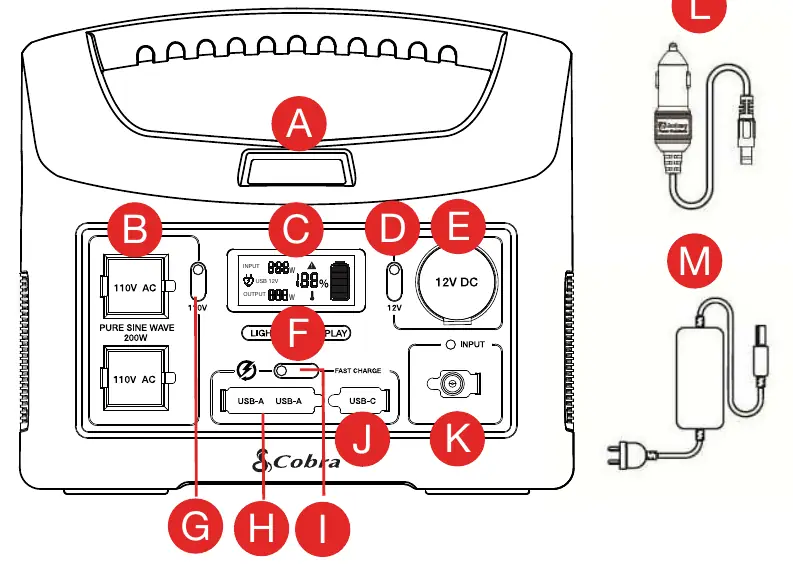
- A: Area Work Light
- B: (2) GFCI AC Outlets
- C: LCD Display
- E: 12V DC Port
- F: LED Light/Display Switches
Model compatibility
- Compatible with devices requiring less than 200W.
- Suitable for sensitive electronics due to pure sine wave inverter.
- Solar panels must be compatible with the input charging port.

Manual page author
Michael Turner
Technical manual editor
Reviews PDF manuals for structure, safety notes, and practical product details so readers can find the right information quickly.