Electronics / PA Systems
User Manual for Redback A 4017 15W Amplifier
Quick guide for the Redback A 4017 15W PA Amplifier. Learn about connections, DIP switch settings, troubleshooting, and technical specifications.
Table of contents
Quick guide from the manual
The Redback A 4017 is a compact 15W PA amplifier designed for smaller installations. It operates on 12V DC, making it suitable for vehicle use. The unit features internal protection against over-voltage, over-temperature, overload, and short circuits. Always ensure the power is switched off before making any connections.
Rear Panel Guide
The rear panel contains the primary connections and configuration switches:
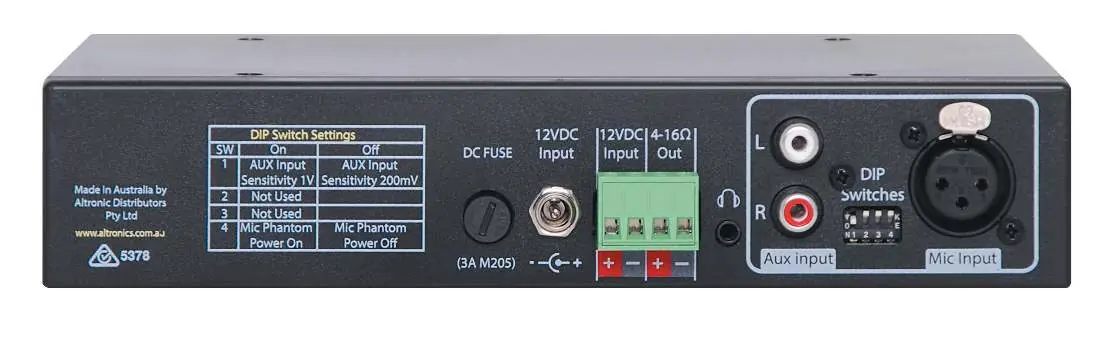
- DC Fuse: Uses a 3A M205 fuse. Replace only with the same rating.
- 12V DC Input: Connects to a 12V DC supply (minimum 2A capacity). Observe correct polarity.
- Speaker Output: Connect speakers with a total impedance of 4-16 Ohm.
- Aux Input: Dual RCA sockets for line-level audio.
- Mic Input: Balanced XLR socket for microphone input.
- DIP Switches: Used to configure settings:
- SW 1: Sets Aux Input sensitivity (1V or 200mV).
- SW 4: Toggles Mic Phantom Power (On/Off).
Front Panel Guide
The front panel provides immediate control over the audio output:
- Mic Input: 6.5mm jack for microphone input.
- Mic Volume: Adjusts the volume for the microphone inputs.
- Aux Volume: Adjusts the volume for the Aux and Music inputs.
- Music Input: 3.5mm jack for connecting portable music players.
- Power Switch: Turns the unit on and off.
Troubleshooting
If the amplifier fails to perform as expected, check the following:
- No Power/Lights: Ensure the power switch is on and check the DC fuse.
- Distorted Output: Verify the speaker type is correct (4-16 Ohm) and check for short circuits on the speaker line.
- Very Low Volume: Ensure the input level is correct and check for shorted connectors.
- Continually Blows Fuses: Check the speaker line for shorts and verify speaker ratings.
- Cutting In & Out: Check speaker types, ratings, and for short circuits on the speaker line.
Specifications
- Power Output: 15W RMS @ 13.8V into 4 Ohm.
- Frequency Response: 50Hz - 12kHz (Mic), 50Hz - 20kHz (Line).
- Sensitivity: 1.5mV (Mic), 200mV/1V (Line).
- Dimensions: 210W x 140D x 44H mm.
- Weight: 0.38kg.
Practical help
Common problems
No Power, No Lights
Ensure the power switch is on and check the DC fuse. Replace with a 3A M205 fuse if necessary.
Distorted Output
Verify speaker impedance is 4-16 Ohm and check for short circuits on the speaker line.
Very Low Output Volume
Check that the input level is correct and inspect for shorted connectors.
Continually Blows Fuses
Check the speaker line for shorts and ensure speaker ratings are correct.
Amplifier Keeps on Cutting In & Out
Check speaker types, ratings, and for any short circuits on the speaker line.
Before use
- Ensure power is switched OFF before connecting power.
- Verify 12V DC power supply has at least 2A capacity.
- Check speaker impedance is between 4-16 Ohm.
- Configure DIP switches on the rear panel for desired sensitivity and phantom power.
- Observe correct polarity for 12V DC input.
Specs in practice
- Power Output
- 15W RMS @ 13.8V into 4 Ohm load.
- Fuse Protection
- 3A DC (M205 type).
Images and diagrams
- Rear Panel: Contains DC input, speaker terminals, Aux RCA inputs, Mic XLR input, and DIP switches.
- Front Panel: Contains Mic input, Mic volume, Aux volume, Music input, and Power switch.
Model compatibility
- Requires 12V DC power supply (min 2A).
- Speaker load must be 4-16 Ohm.

Manual page author
David Miller
Documentation analyst
Organizes user manual content into clear summaries, with attention to model details, product context, and everyday usability.