Electronics / Audio Preamplifiers
Rotel RA-1592MKII Stereo Integrated Amplifier User Manual
Quick guide and user manual for the Rotel RA-1592MKII Stereo Integrated Amplifier. Includes setup, connection diagrams, settings, and troubleshooting.
Table of contents
Manual images
Click an image to enlargeQuick guide from the manual
The Rotel RA-1592MKII is a high-performance stereo integrated amplifier. Before operating, ensure the unit is placed in a well-ventilated area with at least 10 cm (4 inches) of clearance around the chassis. Always turn off all system components before making or changing any connections to prevent damage. The amplifier is configured at the factory for the specific AC voltage of your region; do not attempt to modify this yourself.
Controls and Connections
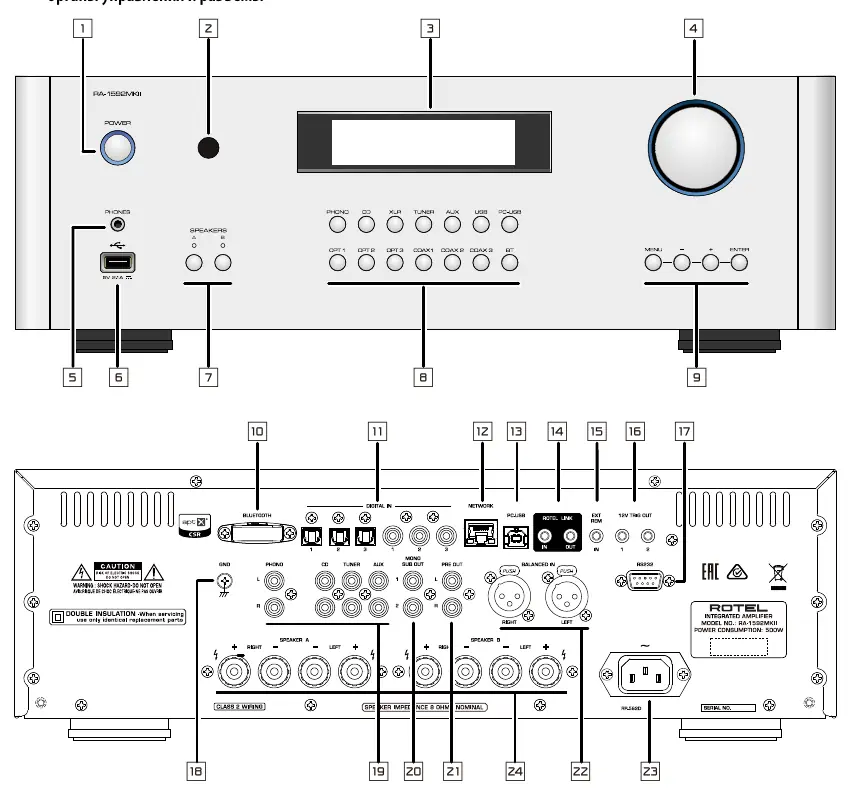
The front panel features the Power switch, headphone output, source input selectors, and volume/menu controls. The rear panel contains various inputs including Phono, Line Level (CD, Tuner, Aux), Balanced (XLR), and Digital (Coaxial, Optical, PC-USB). Speaker outputs A and B are provided, along with Preamp and Mono Subwoofer outputs.
Installation and Setup
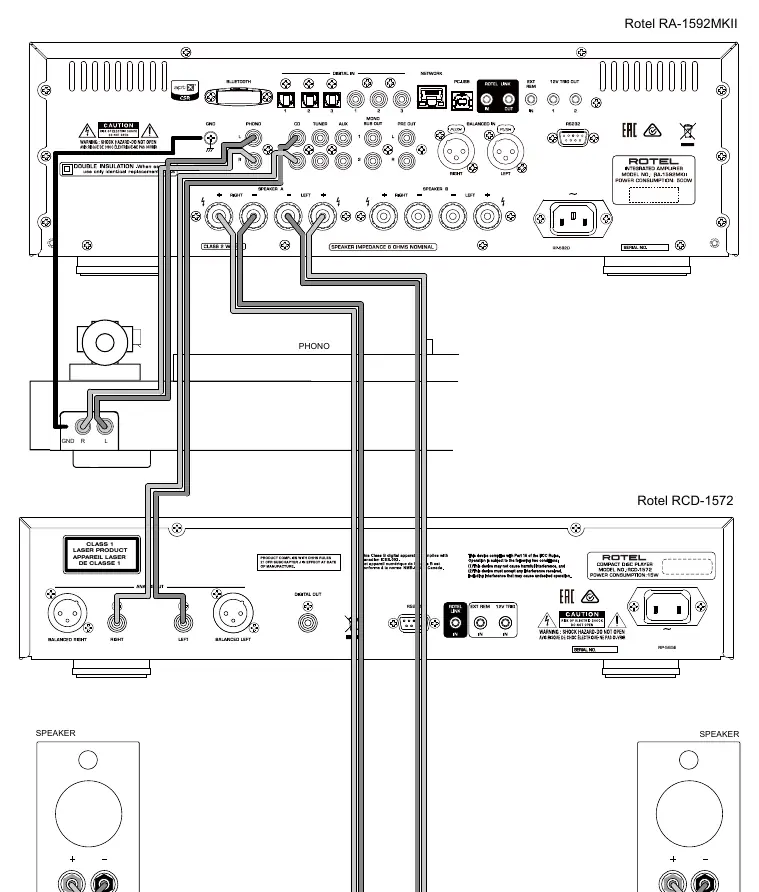
Speaker Connections: Use insulated two-conductor stranded wire. Ensure polarity is consistent for all speakers to maintain proper phasing. If using both Speaker A and B simultaneously, ensure all speakers have an impedance of 8 ohms or more. If using only one set, 4 ohms is acceptable.
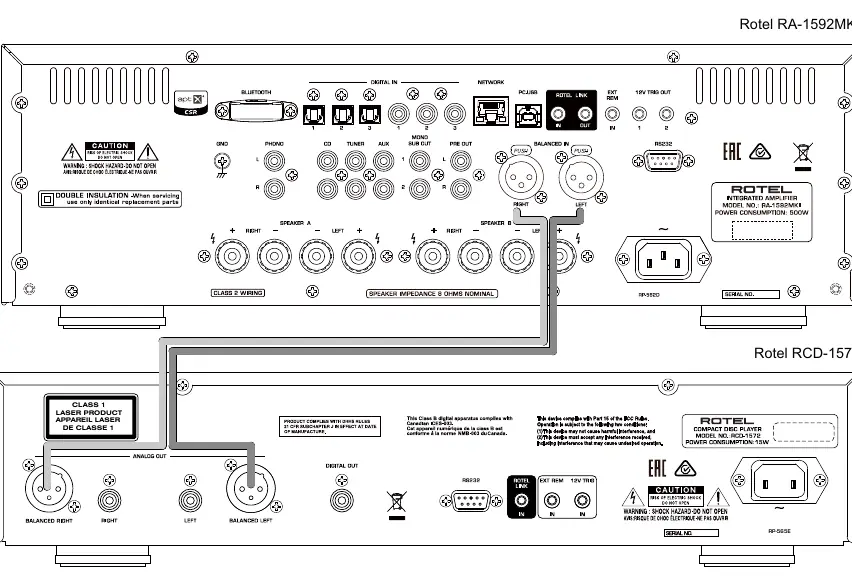
Input Connections: Connect source components to the appropriate inputs. Use only one method of analog connection (RCA or XLR) per source component. For PC-USB, Windows users may need to install the provided driver for USB Audio Class 2.0 support (up to 384kHz/32bit).
Settings Menu
Access the settings menu via the front panel MENU button or the remote control. Key settings include:
- Tone Control: Adjust Bass and Treble levels or enable Tone Bypass for the purest sound.
- Power Option: Configure for Normal or Quick power mode (Quick mode consumes more power in standby).
- Auto Power Off: Set the unit to automatically enter standby after a period of inactivity (default is 20 minutes).
- Fixed Gain: Configure a fixed volume level for specific inputs.
- Factory Default: Reset the unit to original factory settings.
Troubleshooting
If you encounter issues, check the following:
- Power Indicator not illuminated: Ensure the unit is plugged into a live outlet and the power switch is on. Check the internal fuse if necessary.
- No Sound: Verify signal source functionality, check cable connections, and ensure speaker wiring is secure.
- Bluetooth Connection: If pairing fails, delete the previous connection memory on your device ("Forget this Device") and attempt to pair again.
Specifications
The RA-1592MKII delivers 200 watts per channel (continuous, 8 ohms) and 350 watts per channel (4 ohms). It supports a wide range of audio formats via PC-USB, including MQA and MQA Studio. The unit is Roon Tested for compatibility.
Practical help
Common problems
Power indicator not illuminated
Ensure the power cord is connected to a live outlet and the power switch is pressed in. If it still does not light, the internal fuse may have blown; contact your authorized Rotel dealer.
No sound
Check that the signal source is functioning, cables are connected properly, and speaker wiring is secure.
Cannot connect via Bluetooth
Delete the memory of the previous connection on your device (often listed as 'Forget this Device') and try to make the connection again.
Before use
- Ensure 10 cm (4 inches) of clearance around the unit for ventilation.
- Turn off all components in the system before making any connections.
- Install two AA batteries in the remote control.
- Verify the AC voltage matches your region (120V or 230V).
- Ensure speaker impedance is 4-8 ohms.
Specs in practice
- Continuous Power Output
- 200 watts per channel at 8 ohms.
- Damping Factor
- 600 (20 Hz - 20kHz, 8 ohms), indicating control over speaker movement.
- Total Harmonic Distortion
- < 0.008%, indicating high signal purity.
- Frequency Response (Line Level)
- 10 Hz - 100kHz, 0 ± 0.5 dB.
Images and diagrams
- Figure 1: Front and rear panel controls and connections.
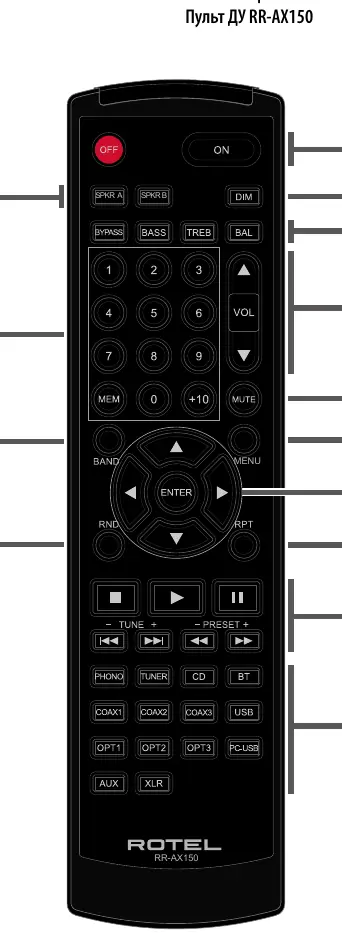
- Figure 2: RR-AX150 Remote control button layout.
- Figure 3: Analog input and speaker output wiring diagram.
- Figure 4: Digital input and 12V trigger connections.
- Figure 5: Balanced (XLR) input connections.
Model compatibility
- Supports USB Audio Class 1.0 and 2.0 (driver required for 2.0 on Windows).
- Compatible with Roon software via PC-USB.
- Supports MQA and MQA Studio via USB Audio Class 2.0.

Manual page author
Michael Turner
Technical manual editor
Reviews PDF manuals for structure, safety notes, and practical product details so readers can find the right information quickly.