Electronics / Amplifiers Receivers
User Manual for Adastra S260-WIFI Internet Streaming Amplifier
Quick start guide and setup instructions for the Adastra S260-WIFI Internet Streaming Amplifier. Learn how to connect speakers, configure WiFi, pair Bluetooth, and use the Legacy Player app.
Table of contents
Manual images
Click an image to enlargeQuick guide from the manual
The Adastra S260-WIFI is an internet streaming amplifier designed for background music systems. It supports WiFi streaming, Bluetooth, USB playback, and external audio inputs. Setup requires the WiiM Legacy Player app for network configuration. Ensure the unit is placed on a stable surface with clear WiFi reception.
Front and rear panel controls
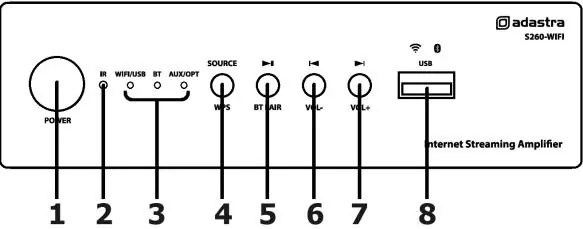
Front Panel: Includes the Power switch, IR sensor, Source indicator LEDs, Source/WPS button, Play/Pause/BT Pair button, Previous/Volume down button, Next/Volume up button, and a USB port.
Rear Panel: Features sockets for WiFi and Bluetooth antennas, RJ45 LAN input, IR extender input, Optical input, L+R RCA AUX input, L+R RCA LINE OUT, L+R Speaker output terminals, and a 24Vdc power inlet.
Connections and setup
Antennas: Connect both supplied antennas to the SMA sockets labeled WIFI ANT and BT ANT on the rear panel to ensure clear signal reception.
Speakers: Connect speakers to the L+R terminals. The amplifier delivers up to 30W per channel at 8Ω. You can connect an 8Ω speaker to each output or two 8Ω speakers in parallel per output (4 speakers total). Warning: The minimum impedance load per channel is 4Ω.
Power: Connect the supplied 24Vdc power adaptor to the rear panel inlet and plug into a mains outlet.
Operation
Source Selection: Press the SOURCE button to cycle through input options (WiFi/USB, BT, AUX/OPT). The unit automatically prioritizes optical input if detected.
Volume: Hold the Previous (l) or Next (l) buttons to adjust the volume.
USB Playback: Insert a USB drive; playback usually starts automatically. Use the media controls to navigate tracks.
Bluetooth: Select BT mode. Hold the Play/Pause/BT Pair button to enter pairing mode. Search for S260-WIFI on your smartphone to connect.
Factory Reset: Press and hold the SOURCE/WPS button for 5 seconds to reset the device to factory settings and disconnect from the WiFi network.
Smart phone and network setup
1. Download the WiiM Legacy Player app from the App Store or Google Play Store.
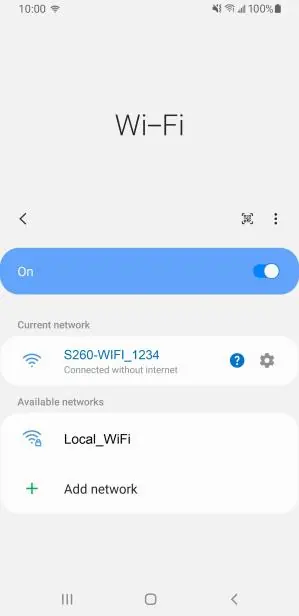
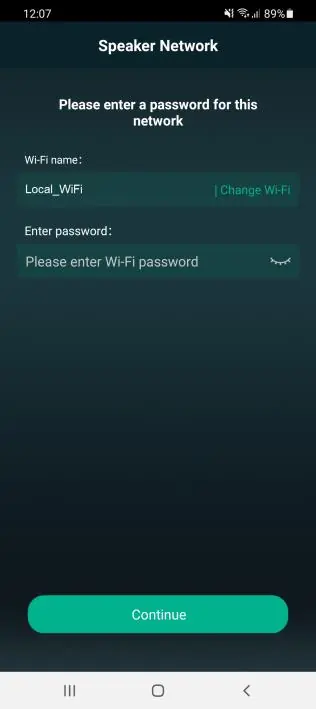
2. If using a wired connection, you can skip WiFi setup. If using WiFi, ensure your router is on the 2.4GHz band.
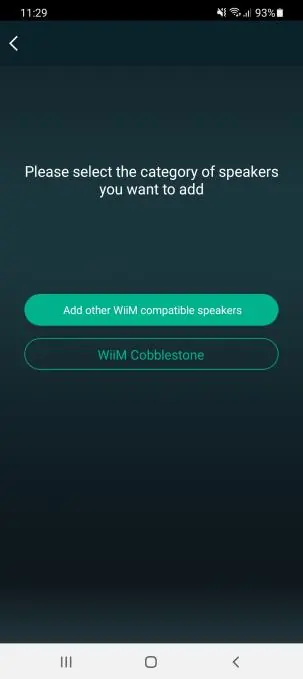
3. Open the app and follow the on-screen instructions. If the device is not detected, select Add Device and choose WiiM Cobblestone.
4. Follow the app prompts to connect to the temporary network created by the amplifier (LinkPlay_XXXX), then return to the app to configure your local WiFi network.
Technical specifications
Power Output: Up to 30W per channel at 8Ω.
Minimum Impedance: 4Ω per channel.
Connectivity: WiFi, Bluetooth, USB, Optical, AUX.
Power Supply: 24Vdc (adaptor supplied).
Practical help
Common problems
Device not detected during setup
Ensure the device is powered on, connected to the same network, or press the WPS button on the front panel to make it discoverable.
No sound from speakers
Check that speaker impedance is not below 4Ω, verify all wire connections, and ensure the correct source is selected.
WiFi connection failure
Ensure your WiFi network operates on the standard 2.4GHz band. Reset the device to factory settings if connection issues persist.
Before use
- Connect both WiFi and Bluetooth antennas to the rear SMA sockets.
- Verify speaker impedance is 8Ω or 4Ω (minimum 4Ω).
- Download the WiiM Legacy Player app.
- Ensure the power supply is 24Vdc.
- Place the unit in a location with clear WiFi reception.
Specs in practice
- Power Output
- 30W per channel at 8Ω load.
- Minimum Impedance
- 4Ω per channel; do not connect speakers with lower impedance.
Images and diagrams
- Front Panel: Controls for Power, Source, Play/Pause, Volume, and USB port.
- Rear Panel: Connections for Antennas, LAN, Optical, AUX, Line Out, Speaker terminals, and Power.
Model compatibility
- iHeart Radio service is U.S. only.
- WiFi must operate on the standard 2.4GHz band.

Manual page author
David Miller
Documentation analyst
Organizes user manual content into clear summaries, with attention to model details, product context, and everyday usability.