Lighting / Stage Lighting
User Manual for Audibax Dayton 120T BT Mixer Amplifier
Quick guide for the Audibax Dayton 120T BT mixer amplifier. Includes setup instructions, connection diagrams, operating modes (Bluetooth, USB, AUX), and safety precautions.
Table of contents
Manual images
Click an image to enlargeQuick Guide
The Audibax Dayton 120T BT is a versatile mixer amplifier designed for audio distribution. Before using the device, ensure the input voltage matches the device requirements and that the system is correctly wired. The device features three working modes: Bluetooth, USB, and AUX. Always ensure proper ventilation to prevent overheating and do not block the air outlet.
Safety Precautions
- Do not connect the device to a power source before the system is correctly wired.
- Ensure the input voltage matches the device requirements to avoid damage.
- The device is not completely disconnected from the power source when switched to OFF; unplug the power cord when not in use for long periods.
- Do not place the device in extremely cold or hot environments.
- Keep the device away from corrosive chemicals and do not place heavy objects on top of it.
- In case of abnormal sound, odor, or smoke, unplug the device immediately and contact professional personnel.
Front Panel Controls
The front panel allows for direct control of audio levels and playback:
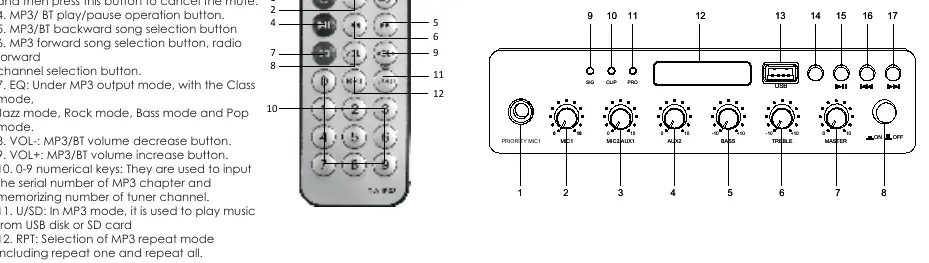
- Volume Knobs: Independent controls for MIC1, MIC2/AUX1, AUX2, BASS, TREBLE, and MASTER volume.
- Indicators: SIG (Signal Level), CLIP (Clipping), and PRO (Protection) indicators.
- Playback Controls: USB port for MP3 playback, Play/Pause button, and Previous/Next track buttons.
- Power Switch: Located on the far right.
Rear Panel Connections
The rear panel provides the necessary inputs and outputs for system integration:
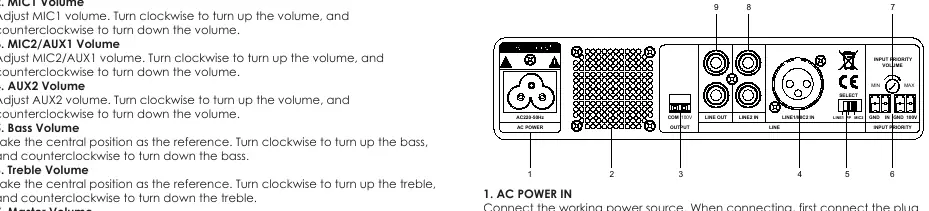
- AC Power In: Connect the power cord here.
- Speaker Out: Terminals for constant-voltage speaker connections.
- Inputs: Includes LINE1/MIC2 input with source selection (LINE1/PP/MIC2).
- Priority Inputs: Dedicated inputs with the highest priority for emergency or announcement signals.
- AUX Out: 1VRMS AUX output.
Operating Instructions
Bluetooth Mode
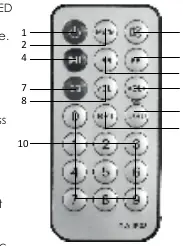
Press the MODE button until the digital screen displays BL. The dot behind the BL will flash. Search for "Dayton 120T BT" on your mobile device and pair. Once paired, the dot will stop flashing.
USB Mode
Insert a USB flash disk into the USB port. The unit will automatically switch to USB mode and begin playing MP3 tracks.
AUX Mode
This is the default mode. If no USB disk is inserted and Bluetooth is not connected, the system defaults to AUX mode upon power-on.
Specifications
- Rated Output Power: 120W
- Rated Output Voltage: 100V
- Frequency Range: 80Hz-15kHz (±3dB)
- Working Voltage: AC180-250V/50-60Hz
- THD: ≤0.5%
- Dimensions: 200x190x44mm
- Net Weight: 1.5kg
Practical help
Common problems
No sound output
Check all cable connections, ensure the correct input mode is selected, and verify that the Master and channel volume knobs are turned up.
Bluetooth pairing failure
Ensure the device is in Bluetooth mode (display shows BL.). Check that your mobile device's Bluetooth is on and searching for 'Dayton 120T BT'.
Device overheating
Ensure the air outlet on the device is not blocked and that there is adequate ventilation in the working environment.
Distortion or clipping
Check the input signal levels. If the CLIP indicator is lit, reduce the volume of the input source or the channel volume.
Before use
- Verify that the input voltage matches the device requirements.
- Ensure the system is correctly wired before connecting to the power source.
- Check that the air outlet is clear for proper ventilation.
- Ensure the power switch is in the OFF position before connecting cables.
- Confirm that the speaker impedance/voltage matches the 100V output requirement.
Specs in practice
- Rated Output Power (120W)
- The maximum power the amplifier can deliver to constant-voltage speakers.
- Working Voltage (AC180-250V)
- The acceptable range of AC power input for the device to operate safely.
- SNR (≥74dB/≥80dB)
- Signal-to-Noise Ratio; higher values indicate clearer audio with less background hiss.
Images and diagrams
- The front panel features volume knobs for MIC1, MIC2/AUX1, AUX2, BASS, TREBLE, and MASTER.
- The rear panel includes AC power input, speaker output terminals, and input source selection switches.
Model compatibility
- Supports Bluetooth, USB flash disk (MP3 format), and AUX inputs.
- Requires constant-voltage speakers for the 100V output terminal.
- Phantom power (PP) is available for microphones on the LINE1/MIC2 input.

Manual page author
Emily Carter
User documentation editor
Prepares concise manual descriptions and highlights the most useful setup, operation, and maintenance information for readers.