Automotive / Car Audio
Installation Guide for RetroSound Kick Panels
A comprehensive installation guide for RetroSound Kick Panels. Includes step-by-step instructions for removing factory panels, routing speaker wires, cutting speaker openings, and mounting the new panels and speakers.
Table of contents
Manual images
Click an image to enlargeQuick guide from the manual
RetroSound Kick Panels are designed to be modified to fit your specific vehicle. Before beginning, ensure you have read all instructions. Always disconnect the negative battery terminal to prevent electrical damage or injury. When routing wires, avoid sharp edges and use rubber grommets to protect the wiring from metal panels. Always check the installation area for fuel lines, brake lines, or electrical wiring before drilling.
Installation steps
- Remove Existing Kick Panels: Remove screws or clips holding the factory panels. You may need to remove the rubber door seal first.
- Route Speaker Wires: Route wires before installing speakers. Never run wires outside the vehicle. Use high-quality connectors to minimize signal loss.
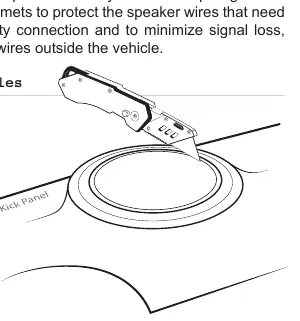
- Cut Speaker Holes: If using larger speakers, use the speaker grill ring as a template to mark the opening. Use a razor knife or Dremel tool to enlarge the opening and a 1/8-inch drill bit for mounting holes.
- Mount Kick Panels: Secure the new panels using factory fasteners. You may need to drill new mounting holes.
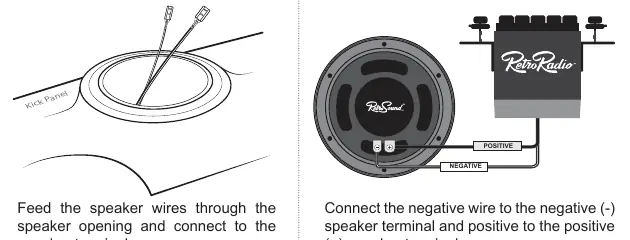
- Connect the Speakers: Feed wires through the opening. Connect the negative wire to the negative (-) terminal and the positive wire to the positive (+) terminal.
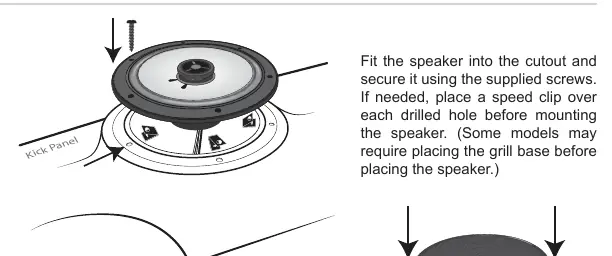
- Mount the Speakers: Fit the speaker into the cutout and secure with supplied screws. Use speed clips over drilled holes if necessary.
- Complete the Installation: Tighten screws until the speaker is snug to prevent rattling. Do not overtighten. Install the grill if included.
Speaker grill removal
To remove speaker grills, identify the type:
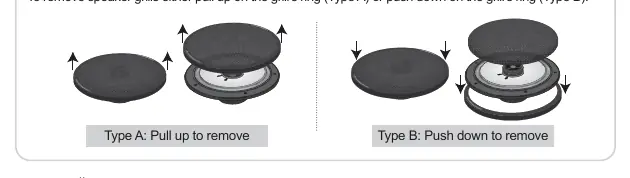
- Type A: Pull up on the grill's ring.
- Type B: Push down on the grill's ring.
Warranty information
RetroSound Kick Panels come with a one-year manufacturer's warranty covering defects in materials and workmanship. Note that once the panels are modified to fit your vehicle, they are no longer covered by this warranty. Verify fitment before modification. For warranty issues, contact [email protected] or 888.325.1555.
Practical help
Common problems
Speaker does not fit the opening
Use the speaker grill ring as a template to mark the size and use a razor knife or Dremel tool to enlarge the opening.
Wires fraying or cutting
Avoid sharp edges and use rubber grommets when routing wires through metal panels.
Speaker rattling after installation
Tighten all screws until the speaker is snug, but be careful not to overtighten.
Before use
- Disconnect the negative (-) battery terminal.
- Check the installation area for gas tanks, fuel lines, brake lines, or electrical wiring before drilling.
- Verify speaker and vehicle fit before modification.
- Ensure high-quality connectors are used for all wiring.
Specs in practice
- Warranty Period
- One (1) year from the original purchase date for defects in materials and workmanship.
Images and diagrams
- Step 3: Cutting speaker holes using a grill ring as a template.
- Step 5: Wiring diagram showing positive and negative terminal connections.
- Tip: Removing speaker grills by pulling up (Type A) or pushing down (Type B).
Model compatibility
- Panels are designed to be modified to fit specific mounting requirements.
- Warranty is void once the panels are modified.

Manual page author
Emily Carter
User documentation editor
Prepares concise manual descriptions and highlights the most useful setup, operation, and maintenance information for readers.